Showing posts with label windows 7. Show all posts

February 18, 2010

Windows Mobile is dead

Remember when I said Nokia's Mameo could potentially be the next killer smartphone OS? Well, screw that. Windows Phone 7 is here to stay.

In the wake of the iPhone, Windows Mobile suddenly seemed to become some of the most unwieldy user experiences ever put to a phone. But today's Mobile World Congress in Barcelona had Microsoft showing off its radically redefined OS. Like Windows 7 for the PC, Windows Phone 7 makes the Windows name attractive for mobile phones again.

(Of course, that's not to say that "Windows Phone 7" is an attractive name though)

I really love the interface, it seems so playful and alive- maybe moreso than the iPhone. The Start page is centered around what you want, and they are composed of tiles (that can have their colors changed) that give you information at a glance. You can instantly access the functions that matter from that home screen, and you can even pin specific people on it. Meaning that if you want to stalk someone's Facebook status or whatever, you can have instant one-tap access.

Using the same "panoramic" sensibilities of the Zune, the Windows Phone 7's native apps are powered by apps that have multi-layered functions that can be accessed with a simple swipe. While you don't have a sort of "page indicator" like in the iPhone, you do get a small arrow encouraging your finger to swipe to a direction. The redefined Contacts app of the phone, called "People", not only contain the most recent contacts you've dialed, you can also swipe to view all of the contacts, and swipe again to view their latest updates. As of now, the updates are only for Windows Live and Facebook, but I suspect Twitter, maybe even Google Buzz, is in the works.

Even in the Photos section, the Windows Phone 7 focuses very much on the people in your life. It will fetch the latest uploads of your contacts from, yes, Facebook and Windows Live again, and you can comment on those photos right from the get-go. Hell, you can upload your own photos as well with a simple tap.

The killer feature of the Windows Phone 7, however, is probably in the form of Xbox Live. You can see your avatar, your gamerscore, your friends list... you can even play some Windows Phone games or something and your Xbox Live profile will probably be used in these games. This actually makes for less user confusion, I mean, the iPhone has a few Xbox Live style apps in games, but Microsoft's offering is much more centralized and unified. Still, you must also remember that Xbox Live is a paid service.

The Music and Videos app of the phone is likely the entire Zune HD, so to speak. The phone will also be powered by universal Bing search, which can be accessed by a specified Bing button.

The phone will also sync your contacts, mail, etc. wirelessly over Wi-Fi, so there's no need for that USB cord, except for when you want to put music and videos as well, which requires the Zune software. Probably the biggest downside of the new OS is Microsoft's stubbornness to the Mac; basically, Microsoft still doesn't want to expand its market of users by supporting its syncing software with the Mac, and that is simply the biggest shame of all. Still, I'm glad that Microsoft's taking a stricter stance on hardware makers, so they won't be able to rape the user experience. Only limited hardware makers have access to the OS, and skinning is not allowed unlike the Google Android.

Seriously, you have to see a video of this OS to believe it.

The iPhone has forced Microsoft to rethink its mobile strategy, and look what the folks at Redmond have conjured up! Now, it's Apple's turn to impress. Will iPhone 4.0, please stand up?


January 16, 2010

Windows 7 Shakes Excess Windows

I have to admit, I wasn't really that up-to-date with the new features of Windows 7, so while I was traversing the Windows site because I was helping Catherine find the function that displays Wi-Fi networks (for I do not have a Windows 7 laptop) I was looking for instructions. Then something in the Videos section caught my eye: Shake.

SHAKE? What does that do?

So I opened the video and to my amazement, I found this rather awesome feature:

Simple, but daaamn impressive.

If you didn't bother watching the FIFTEEN SECOND video (you cheap duck), then it's basically a dude showing people how to use a feature called Shake. Basically, if you have a lot of windows open, and you want to minimize all other windows except for one window in a snap, all you need to do is click the title bar of the window you want to keep maximized, and shake it with your mouse.

Pure genius. I seriously think Apple will duplicate this functionality.


December 18, 2009

12 Days of Random Gift Ideas (Day 6)

If you think your computer needs a refresh or a drastic reformat, then you might want to consider getting Windows 7 to get this job done for you.


It's great, it's pretty, and best of all, it's damn fast, especially on a clean install. Just hope that you get anything but Starter or Home Basic, now that's just playing dirty.

November 3, 2009

Chronicles of a Windows XP Upgrader #5: Yehey.

A trip to Hong Kong helped me clear my mind and take the load off, but now that I'm back in the Philippines and armed with a new hard drive, I can finally go on with my plan.

I opened PCMover and it did its thing... for 5 hours that is. Restarted my computer, opened up Windows 7, formatted my main hard drive, installed for less than 20 minutes, and voila!

I am at peace...
Oh wait a sec, I'll have to move all my files back.

October 29, 2009

Chronicles of a Windows XP Upgrader #4

Contrary to what I said last night, no, rollback is not my favorite Windows Vista feature anymore. Hell, even Vista screwed that up.
In case you were wondering, yes, that is my computer shot from my cellphone. Not bad, eh?

Coincidentally enough, the computer fixed itself after I uploaded this video. Or maybe it was due to other factors, although another run through Startup Repair didn't do crap... or maybe it was the Memory Diagnostic Tool... which didn't run.

But what's this? Windows 7 is suddenly... letting me upgrade directly from XP?!
SAY IT AIN'T SO!


Oh... too good to be true.

October 28, 2009

Chronicles of a Windows XP Upgrader #3

Today I decided to just experience 5 years of Windows history in one night. From XP to Vista, then 7.

Did it go well?

Let's say it stopped at Vista.

Before I finally gave this desperate measure a shot, I also desperately tried to format my external hard drive again, and again, and again. It was successful but transferring files was painful as it would only stop at 100MB. I have 130GB to transfer. FML.

So anyway, back to Vista. Started at 8, purportedly ended at 10. The upgrade seemed to have gone smoothly enough, but when push came to shove, the computer was stuck at the loading screen. Vista didn't even have a chance to rear its ugly head yet again for the second time in my life. I tried finding problems through the CD's Startup Repair to no avail, so I chose to just insert the Windows 7 CD and give it a try. Who knows? It might install and piggyback the failure that was Vista. Alas, it was all for naught. Windows 7 needed to be started from the desktop in order to retain my files so I had no choice but to try Startup Repair again, but the catch is, it's the one that comes with Windows 7.

Lo and behold, Windows 7 instantly found a problem, but it could not fix it anyway so I had no choice but to rollback the Vista installation.

Back to square one.

In consolation though, at least I finally found a feature I really dig in Vista: upgrade rollback.

October 27, 2009

Chronicles of a Windows XP Upgrader #2.1: Good Lord.

Does making an external USB hard drive just work have to be this hard?!
Looks easy to the untrained eye, because you don't know half the crap I had to get through just to make this USB drive of mine appear in My Computer.

First step: Connect the drive. Windows will say it's truly a USB drive, but go to My Computer and there's no trace of it.

Second step: Frantically google "Windows XP not detecting USB external drive".

Third step: Find this ad-ridden site.

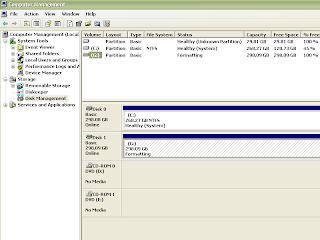
Fourth step: Go to Control Panel, Administrator Tools, Computer Management.

Fifth step: Click Disk Management on the left corner.

Sixth step: Carefully find out which one is the USB drive because both drives have pretty much the same capacity.

Seventh step: Guessed the correct drive. Right clicked to Quick Format it.

Eighth step: Format failed. Unplugged automatically. Replugged it.

Ninth step: Get puzzled as to why my primary hard drive (in the system unit) has a second unused partition that doesn't want to go away. That's 29GB of space down the drain.

Tenth step: Found "Assign Drive Path" through a stroke of luck. Cannot reproduce it anymore for some reason.

Eleventh step: Assigned the hard drive letter, asked me to format it. Didn't click Quick Format. Taking forever.

Twelfth step: Hoping this works. Willing to bet that moving my files will be relegated to, like, tomorrow which sucks.

Chronicles of a Windows XP Upgrader #2: Wrong On All Levels

I just discovered that a semi-direct upgrade to Windows 7 was possible, and it would be like if you were to reinstall the Mac OS: your old files would be put into an old folder called "Old System" or something like that. But unlike Mac upgrades, Windows 7 will not retain all the Applications (or at least put them into the Applications folder automatically) and as such I'll still need to find all that software, which is such a pain.

Oh, and I just ran Windows 7 Upgrade Advisor. It says I can't experience Aero. Seriously? The video card I upgraded from, an ATi, was able to do Aero on Vista (albeit slowly), so what am I missing? The minimum requirements include a 128MB video card that supports DirectX 9.0c. My video card does all that, so what's the problem?

Oh, and don't tell me about the hard drive I'm trying to back up all my data to using Laplink PC Mover. It doesn't read at all in my Windows PC, and it takes soooo long to reformat on my Mac. What the hell, seriously. I need a new one.

October 26, 2009

Chronicles of a Windows XP Upgrader #1

I excitedly opened up my copy of Windows 7 (yes, excitedly) and hastened to boot up my Windows XP rig. After waiting for the system to load and force uninstalling RK Launcher, I popped in the CD and clicked "Install Now".

I clicked "Next" a few times", but there was something that caught my eye: there was no straight-up "Upgrade" option.

I chose "Custom". It said that the my files wouldn't be moved, and Windows 7 can only be installed in a partition. It was like Microsoft was giving me the finger, and I was tempted to give one back.

So I exited the installer and searched the interwebs for a Windows XP to Windows 7 upgrade path-- or a lack of it.

Yeah, it seems a direct non-destructive upgrade from XP to 7 is night impossible, at least through Microsoft's own installer, so the only way for me to be able to simulate something near that would be to... update to Windows Vista.

Or maybe I can just use this.

Then again, I want to move my programs too, not just my files. I googled for another way, and found this.

This way, I can make a virtual copy of my hard drive, and just download the same software over to Windows 7. But I want to make a Clean Install for once, so I'll need an external hard drive... but the one we have is broken. Sigh.

If only Microsoft just put the damn "Upgrade" option in the first place for XP users! I haven't installed 7 yet and it's already making a bad first impression.


October 29, 2008

Windows 7: Looks good so far

Windows Vista was crap when I first installed it in my computer. I mean, I was very excited about Vista at first if you want my honest opinion, but after seeing that my USB Bluetooth was not compatible with it, I didn't mind at first. And then, there went the Handycam and Sony Picture Package software's compatibilities. And it's mind-numbingly slow.

"Ugh, can't this get any worse?," I asked myself. So I downgraded to XP and now I'm happy with a Mac, with Windows as a gaming platform more than a productivity, or all-around for that matter, platform.
Now, Microsoft promises Windows 7- the next Windows to be released in 2010- to be less bloated, and better to use while retaining the appealing interface design. And for the first time in a long time, I'm believing in Microsoft's promise. No really, making the jump to 7 seems like a very reasonable idea in the future in my opinion, and that's because of these few adjustments (using pictures stolen from C|Net and is subject to change since this is pre-alpha):

Universal Ribbon Interface
Love it or hate it, the Ribbon interface is probably the future of Microsoft products, so I guess we better learn now. Perhaps I'll grow to love it too, so yes, I'm gonna resolve my differences with it and embrace it. Below is a picture of the new Paint.
Now with Crop!

Adjustable User Account Control
Instead of being able to either turn the damned feature on or off, you can now adjust how annoying User Account Control has to be. Hey, Mac has this too but less annoying. If Windows 7 can do that, I'm soo jumping ship from XP. Otherwise, sorry, this safety feature was just headbang-inducing back then.

Internet Explorer 8
I know that IE7 opens quick, but its standards compatibility is crap, and sometimes, the performance is just... sluggish. IE8 may (and will) change all that, and since it was 6 months ago when I first tried its beta (and it f**ed up my computer and I had to perform a System Restore), I'll just wait and see what happens in the end.


No more Windows Sidebar
I like the idea of the Windows Sidebar, I liked how it worked in Vista, but I liked it only when I installed Vista through Boot Camp on a MacBook, because it was virtually unusuable in my dedicated Windows computer. Now, you can put gadgets freely anywhere in the Desktop.

And while you can also drag widgets or gadgets onto the Desktop even with the current version of Vista, you'd still have to have the Sidebar on, and I can't have that, so I want to have this.

Bluetooth File Transfer Wizard
Bluetooth File Transfer had to be installed using third-party software based on my experience, so now, like the Macintosh, Windows 7 comes with a built-in File Transfer program for Bluetooth devices. Right now, it's only file transfer, but Microsoft promises to add more Bluetooth services.
Sticky Notes!
Recycle paper! Save the trees! Use digital post-it notes!

And while Macs have been offering for almost a decade, the new Sticky Notes application will be very useful to many. Need to remind yourself of a task? OK, use Sticky Notes.

And for now, these are some of the promising enhancements being made to Windows. Fix it, Microsoft! Fix it now!
 
Elegant de BlogMundi