Showing posts with label browser. Show all posts

February 8, 2010

Free Game: Every Day The Same Dream

The Internet has a lot of Flash-based games, and while this specific game is not an exception (which is actually good since it's basically compatible with Mac, Linux, Windows, and some mobile phones), this game is the type of interactive story that makes you think deeply about life, to the point of actually adding to the argument of "games being art".

But enough about that bullcrap, let's discuss this free game.

Basically, this visually striking game is about the daily life of a man who leads a life purely based on routine. If the player plays it in a linear fashion, he/she only ends up repeating this cycle for hours on end. However, make a turn in the opposite direction and you might just encounter a few surprises along the way.

The game, while short and sweet, is also very thought-provoking and meaningful, as it tests your view in life. It's up to the player to see if this person will live the same dull life over and over again, or become a new person altogether. Every single step that deviates from the normal day is a step to seeing the ending, and it's just surreal.

Playing only involves the directional pad, and the Spacebar. Pressing on the Spacebar lets the character interact with specific objects in the environment.

After finishing the game (which didn't really take too long for me), I suddenly got to thinking about my own life; reflecting upon choices and decisions and the future. There has never been a game that has done this to me before, and this is only a free Flash game.

If you go to this link (http://www.molleindustria.org/everydaythesamedream/everydaythesamedream.html), you'll be able to play the game right now. It won't appeal to everyone, but damn it, it's strikingly thought-provoking.


June 16, 2009

Opera Unite - probably gonna be used in piracy circles

You've probably never heard of a humble browser called Opera, yet for so long it has continued to evolve so much but noticed so little. It's no surprise then, that not all of the major news sites have taken any notice to the browser's new major addition called Opera Unite.
From the looks of it, Opera is proposing a mini-web server that you own so you can share files privately and cut the middlemen out of the process. It's probably so that things will likely be a bit more secure because it's "your" server and nobody else's. This will probably allow for more direct and more secure file transfers, communication, etc..

I myself am not even sure what it's supposed to actually do. But from what I've seen, I think it's like a social networking startup- you get a basic webpage, you can add some apps and even share files. It's proposed that you'll have "complete control" over all the data you upload on your own server so if you distribute illegal stuff over the service, it's probably gonna have to be you that's gonna be sent a cease and desist letter since, well, Opera probably doesn't control it.

More innocent uses, however, include collaboration with other people with Word files and the like, note-posting that your friends will be able to see (or the other way around) or just music sampling with friends through uploading music in your server so that they can listen to the actual song (aka, so your friends can insult your bad taste) but in a more private fashion. You can also share files with other people even if they use other browsers (including mobile ones) but you'll have to send them a special password for it to work.

I don't think it's gonna shape anything for now, but I don't know. Opera needs to provide more information as to how it actually works-- and in plain language.

April 15, 2009

5 Reasons to Get Chrome

If you haven't heard about Google's entry into the browser market, then you might be missing out on a potentially very hard hitter to the industry. While it still doesn't have the extensibility and customizability of the comparably famous Mozilla Firefox, Chrome's simplicity, like Safari before/after it (however you view it), is just one of the things it has going for it, and I wouldn't have any problem recommending that you adopt it as your default browser.

Here are 5 reasons why you should adopt it as your default browser:
1) Security
Security is the primary reason we stay away from browsers like Internet Explorer. While the 8th version of the formidable browser has some unique security features, it's far from being the most secure. In fact, in the recently held Pwn2Own contest, only Chrome was left standing. What's Pwn2Own? Well, it's a competition where people find security flaws in various browsers, and when they do discover those holes, they get to win the computer they exploited the browser upon. 

The other browsers in the competition namely IE8, Safari, and Firefox (Opera was not in the competition), were all exploited in just seconds. Clearly the security alone is enough for a recommendation? (Just uncheck the box that lets you agree to Google spying on your every move in your time with the browser... or go Incognito?)

2) Minimalist design lets you concentrate
The bad thing about Firefox, in my opinion, was the clutter you'd get when you install so many extensions. True, you could simply uninstall them and start fresh, but what if I liked them extensions?
This is where Chrome's "limitation" becomes a real benefit to your browsing. Its minimalist interface forces you to concentrate on the web, and not on the multitudes of toolbars that sit on the browser. Heck, the whole thing could just pass as the Full Screen mode in Internet Explorer- minus the admittedly annoying auto-hide.

3) Don't break down when it crashes
We've all been there before. Firefox would crash and we would simply wish that its auto-recovery feature would be able to save all the other tabs we had open. True, most of the time, the restoration did its thing, but there are times when not all the tabs you open are restored.

Fortunately, we don't even need to contend with such folly with Chrome's unique tab management (and yes, this is the feature Microsoft ripped off from Chrome, but it would be unfair to say that the feature should only be limited to Chrome, because it's valuable) as it treats every tab like an individual program in the Windows taskbar.

For example, Flash would cause a website you're viewing in this one tab to slow down and eventually not respond. You could still switch to another tab and open the browser's own Task Manager by right clicking the top part of the browser. You can kill the pesky unresponsive task and resume reading all those other tabs without a sweat.

4) It Opens FAAST
I'm serious when I say that it very snappily opens itself as soon as you finish double-clicking. True, there might be a few seconds of loading at times, but for the most part, this is one of the biggest draws of Chrome for me: how insanely fast it opens. You could say that it opens as fast (or faster) than Internet Explorer, but it's more secure (and hogs less memory than Firefox).

5) Newbie friendly
It's not that my dad is not computer illiterate because he very much is computer literate, it's just that he has this habit of typing URL's into the search bar- and I might be right to assume that my dad isn't the only one. Well, Google Chrome's Omnibar changes all of that. Not only is it just another Firefox Awesome bar, it's also a search bar as well.
So next time my dad enters in "www.yahoo.com", I'm pretty sure that the result won't be a Google search page, but the real thing. No offense, dad.

These are just my top 5 reasons to download so I might have missed a subtle feature or two that adds a lot to the user experience. Not all people will like Chrome's barebones approach and its lack of extensions (which will be "fixed" in a newer version), but there's a market for Chrome, I'm very sure of that.

March 20, 2009

Internet Explorer 8 is final

The new version of Internet Explorer has just come out of beta and is a seriously huge step for a company like Microsoft. While it still has problems handling JavaScript (and thus, it doesn't pass the Acid3 web standards test), it has several end-user features that people will definitely like.

OK, maybe most of these features have already existed in the form of a Firefox extension (but some IE8 features were inspiration for some extensions as well) or just derived from several browsers outright (but then again, I'm not complaining about that), but it definitely lays some innovations in the table. And yes, those features just might be worth the traditional reboot after installation.

Web Slices
Just as Safari lets you select a part of a webpage to post into Mac OS X's widget environment, Internet Explorer 8 lets you get up to date on the several parts of a specific website. A fine example of what you can do with Web Slices is shown above.

Unfortunately, you'll have to install this add-on as it isn't built-in with the browser.

Accelerators
Although it's present in specialty browsers like Flock, Internet Explorer 8 gives the masses a more comprehensive list of shortcuts or "accelerators" to choose from. Let's say you don't know the meaning of the word "schadenfreude" and you see the word on a webpage. Double-click that word and several options will appear. It's either you blog it, find it on Wikipedia, etc. etc. etc..

Domain Highlighting
It sounds like a subtle cosmetic change, but it's a rather important security feature. Why? Because usually people don't get conscious of the URL when they could be accessing a fake site, I mean, you can know if a website is phishing you and stealing your information by just looking at the URL, but one will not do this always especially when the domain name isn't even noticeable. OK, Chrome users already know this, but since IE8 is a mainstream browser, it's all for the good.

Color-coded tabs
Complementing the domain highlights are the color-coded tabs. Basically, IE8 gives websites of the same domain the same color of tabs, so you can know whether that website you just accessed suddenly brought you to a fake version of it. In theory, that is.

Compatibility mode
Since Microsoft made Internet Explorer 8 a little more standards-compliant, there is bound to be a few issues involving old websites designed for older Internet Explorer versions. You can access this via a button beside the Refresh button. Just hope that you won't mistaken the two of them.

Individual tab management
While IE8 won't be able to let you rip tabs to form another window, you'll be able to have the benefit of a feature similar to Chrome. Let's say a tab froze up because of a plug-in like Adobe Reader or Flash. Usually, you'll have to press Ctrl+Alt+Del and terminate all important data in all the other tabs, well not anymore. You can just exit that tab and continue the work you've been doing in the other tabs.

InPrivate Browsing
Just like Safari's Private Browsing and Chrome's Incognito mode before it, Internet Explorer lets you surf like a rockstar without leaving evidence. Still, the parents have the upper hand if they are tech-savvy, because they can enable Parental Controls and simply disable this feature.

Cross-site scripting filters
Internet Explorer 8 promises to be the most secure browser in the planet, and the efforts show. With cross-site scripting filters ("cross-site scripting" involves one site sending err, messages to another one, hackers may use this system to put malicious code into genuine websites), Internet Explorer 8 finds out whether this is occurring and stops you from going inside the site.

Smart Search
Now when you type a search term, Internet Explorer gives you results as you type- and they're illustrated too!

Admittedly, I won't go back to Internet Explorer unless I'm desperate, but version 8 is very compelling nonetheless. Download it now.

March 1, 2009

REVIEW: Safari 4 Beta

Safari 4 Beta
Developed and Released by Apple

Oh yes, I remember Apple releasing version 3 of this same browser a few years ago.

It sucked.

So this pretty much meant that I had low expectations performance-wise while downloading this new beta, but I was in for a shocker when I completed installation and restarted the system. It just works wonderfully.

Not only is the file size significantly smaller, the performance is snappier, features do as advertised, and Windows users may just have a new viable option for an alternate browser.

While the stable release- Safari 3.1.2- is pretty decent in its own right, this one adapts some killer features, even if they're not as "killer" in comparison to tabs or the awesome bar in Mozilla Firefox, or individual tab management (when one tab hangs, the others don't get affected even if they're in the same window) in Google Chrome.

Let's get to the part that matters first: speed and stability.

While I have yet to try Safari for Windows, Safari pretty much opens slightly faster than the old version. Of course, first open is gonna be slower than usual, but later opens will be purportedly as fast as Chrome.

Then there's the website rendering. At first, my experience was rather slow, but later it somehow accelerated. I'm not sure if I was downloading some torrents at the time, but when I randomly opened my computer and opened the browser one time, sites were loading like fire- as fast as Chrome, or maybe marginally faster- and it has been that way ever since.

Web site render speeds can be attributed to the new Nitro engine built for Apple's WebKit (WebKit is also the same engine running Chrome, since it is open source and standards-compliant), and not only does it pass the new Acid3 test without errors, it also introduces compliance with a new proposed standard called CSS Animation- a Flash substitute that requires no new plug-ins.

And for a beta, it's actually very stable. I have yet to encounter a crash, and it cruises on smoothly.

Now we're getting too technical, but does Safari go too technical on your ass? Let's see how user-friendly it is.

If you've been using Safari for a while, you'll notice quite a change in this beta. While the interface is deemed tentative, it's rather impressive.
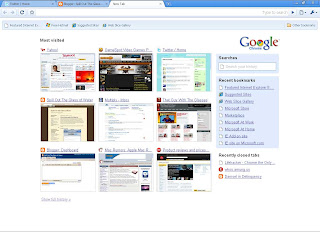
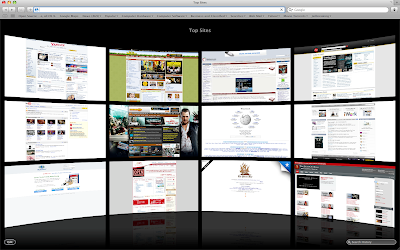
So what's the most noticeable change? The "Top Sites" page, that's what. Yes, you can set Top Sites to be your home page, and while it is just a prettier version of the Speed Dial feature in Opera or the home page of Chrome, it has a twist.

For example, you press the thumbnail of a site you usually visit in Opera or Chrome, but then you find out that there's not even an update available. Whoops! Time wasted. Well, in Top Sites, you can find out whether a site has new content or new feeds. This is marked by a Blue star on the upper right of the website's thumbnail.

Additionally, you can press the small Edit button on the lower-left to adjust the positions of the each site, or pin a site permanently in its place so it won't get replaced, or add and reduce the number of displayed sites.

But there's a catch: Top Sites won't accept specific input from the user- meaning that you can't put your own website for display in the page. It only displays the pages you visit most- which is pretty much the purpose of this new feature. While I love using this feature because it's both beautiful and practical, I'd still like to be able to input my own sites.

But what's the Search bar in the lower-right portion of the Top Sites page? Well, when you click it, the last page you've visited is displayed in Cover Flow mode, and when you type, the search narrows down by letter.
The thumbnails in Cover Flow are thumbnails of the sites as you visited them, and you can also search a portion of a web site. For example, you only remember a shred of text from a website, or maybe I just want to look for pages that have the words 'touch screen phones' in them because I want to look at some phones (pictured above). Well, this comprehensive search can do that.

The search is not only limited to History, Bookmarks can be searched as well when you click the Bookmarks icon on the toolbar.

I think Cover Flow is most practically applied in Safari, because you get a huge thumbnail of a website you visited. It's so big that you don't even have to open it again just to check if it is indeed the correct page you were looking for. Of course, that is if you're not gonna read the whole article located inside the page.

Speaking of Search, it also finally supports search suggestions (that is, if you choose Google to be your search provider) thus making the need for the Inquisitor plug-in unnecessary.

A new feature taken for granted is the improved zoom feature. Typically, when you zoom in on a website, the pictures don't really get zoomed in together with the text. But like the iPhone, Safari can now magnify web pages as well as their pictures. Small screens will benefit from this greatly, you know like a netbook? (Pictured below is the magnified Apple Online Store.)

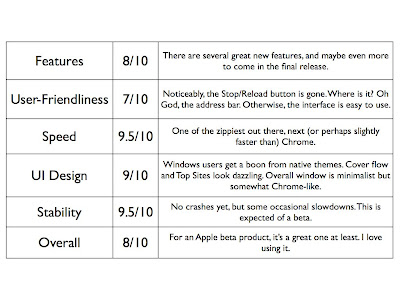
Overall, Safari 4's Beta version is very stable, solid, and most importantly fast. It also features some great features, but some of the interface changes, like the tabs placed on top, the lack of a Chrome-like system for managing tabs and the Refresh and Stop button placed on the address bar, may piss some people off.

Comprehensive Ratings:
February 25, 2009

Safari opens 4 beta

It's the proud granddaddy of the Private Browsing mode... it's Safari!

The public beta for the newest version of Apple's browser Safari is available for download for both Mac and Windows. There are some interesting new features that may somehow resemble other browsers such as:

Top Sites
Taking a cue from Chrome's home page and Opera's Speed Dial, Top Sites gives you an elegant view of the sites you visit the most.
This twist here, however is the fact that you can display up to 24 thumbnails, you can pin a site you like into a position so it will stay and place and you can see whether a site has new content when a star is clipped on the top-right of the website's thumbnail! That sounds really cool for people who usually go to sites like Twitter, Blogger, or any news site.

Cover Flow
While highly unnecessary, it's still pretty nice to be able to browse your history, bookmarks, etc. on this view. This way you are able to actually get a huge thumbnail of the website in question.
Full History Search
This feature lets you search your history as you saw it. If you remember a caption from a photo you viewed, or a shred of text in that site, you can type it and Safari finds it for you. Does it work well? Who knows, especially for Flash sites?

Tabs on top
Safari takes another page from Google Chrome- it puts its tabs on top to save precious screen real estate. Hell, it even adds the effing Plus button!


Spanking New Engine
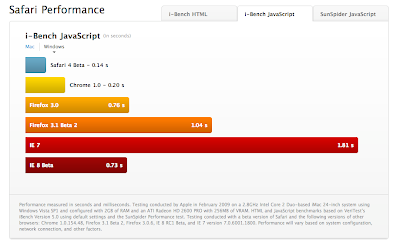
Safari already renders sites pretty fast but the new Nitro Engine renders sites faster (theoretically, at least). Apple has some benchmarks, but why trust the benchmarks released by Apple itself? Let's wait for some third-party to do so.

Still, if you're interested in how much faster Safari is from the competition, it claims to be 30 times faster than Internet Explorer 7, 3 times faster than Firefox, and slightly, very slightly by just the thousandths digit, faster than Chrome. Don't know if this is true for real world conditions, but we'll see.

Native Windows Look and Feel
This is a big, big, big plus for Windows Safari users. Now Safari will adapt to Windows Aero or Windows XP's themes,a s well as their native fonts. Still, if you like the grey anti-aliased look of past Safari versions, you can choose that.
ABOVE: Windows Vista. BELOW: Windows XP.
Developer Tools
HTML coders can test web code on the spot with Safari's developer mode.

The Quintessential Awesome Bar
Firefox first offered the option for people to use the address bar to do almost anything. It can get you sites by name, by address, or by a snippet of the address.


Search Suggestions
Mac Safari offers the Inquisitor plug-in for this feature. Now, you probably wouldn't need it. Powered by Google, Safari automatically suggests search terms and search addresses.
Zoom ala iPhone
Multi-touch gestures on the new MacBooks are able to zoom text like the iPhone's version of Safari. You can also use this feature by clicking the Font increase button.
Better Standards Compliance- made even better
It passes the famous ACID test. A perfect 100.

December 17, 2008

Seriously Stop Using Internet Explorer

If you haven't seen it on Yahoo!, then I'll tell you: STOP USING INTERNET EXPLORER.

A new security vulnerability has been found, and it's effing serious. Tens of thousands of sites are littered with malicious code (and hackers can reproduce this code on other sites as well) and it seems to only affect Internet Explorer, regardless of version. Yes, even beta 8.

Still, malicious code isn't anything new to Internet Explorer users, and Microsoft will come out with a patch, right? Well, it's better to be secure than screwed by the time Microsoft releases a patch, because it seems that the malicious code that exploits Internet Explorer's vulnerability can be used to get your passwords.

I advise you to switch now. For speed, there's Chrome. For standards compliance, there's Safari. For customization, there's Firefox. And for nifty extra features, there's Opera.

August 2, 2008

How to browse without hassle

There are simply some browsing habits some people can't seem to break, and after they get their share of "browsing", they usually have to click several menus, maybe even access the Control Panel to remove all traces of his/her browsing history and whatnot- which is more or less a hassle that most have become accustomed to.

This usually assures your parents (if ever they actually inspect your browsing habits) won't know jacksh*t, or make sure that your younger siblings stay wholesome or something, but haven't you ever wondered why no browser has ever, ever put an option that allows you to browse in confidence, and not record everything you do?

Well, there's actually a one-click solution, you just haven't looked close enough.

Let's look at Safari. What is it? Well, it's the preferred browser of Mac users basically since it's made by Apple, but it also has a Windows version. Both versions are almost identical, with Windows having the bonus feature of modifiable search providers and at times, in my experience, even faster speeds than the one on Mac at times. So yeah, it loads pages faster than any browser I've used to date, and it opens faster than any browser I've used to date. But no, I've covered all that in the past, and no one probably gives a damn about SnapBack, but oh, here's a feature that'll have you shouting, "Why haven't they thought of this before?!". What is it? Well, it's Private Browsing- and it does as advertised.

It's simple: open your browser, select Edit in the menu bar, click Private Browsing, click OK, have fun.

You won't be leaving any tracks, your history will not be updated, the cache will not be used, and exiting the window means a permanent goodbye to visits to the menu bar and the Control Panel. You'll ne'er be caught in your tracks, that is unless the browser hangs*.

*Percentage of chance of hang is high when using Windows Vista, although the blue screen will replace the whole screen anyway.

June 17, 2008

Mozilla goes for the Guiness

Tomorrow marks a milestone on the Firefox browser's life as it ups the ante one notch with its new release: Firefox 3. Right now there are more than 1.5 million pledges for download of the Firefox browser- although I think that the number will increase even further in the next 24 hours, especially in the US.

With faster web page loading, and markedly faster opening than that of Firefox 2- as well as the controversial "Awesome" bar, and safer security- Firefox 3 is probably gonna be make even more of a splash than that of Firefox 2 with 24% global browser user base today thus unseating Internet Explorer from the 90% mark.

If you want to pledge for download of Firefox 3, click here. Whether or not I do, I'll download it anyway.

But there's one thing:

Flock's going in with the same features- and it's a markedly better browser than Firefox (for me, anyway)!

Still, I don't think Flock's coming out with updates at this time, so I'm gonna take a look at Firefox 3 and help stop the Microsoft monopoly because it will be slower compared to Firefox!
 
Elegant de BlogMundi