Showing posts with label new. Show all posts

March 18, 2009

iPhone 3.0: Yes, there's Copy and Paste and then some


No new iPhone revealed today, but existing iPhone (or iPod touch) users can expect a lot from the new firmware to be released by Apple in the Summer months (of course, American summer months) and well, let's cover them chronologically according to the media event that was held.

Developers were the ones in mind when Apple decided to conduct this media event, but that doesn't mean that there are no goodies for end-users as well. Just keep in mind though that the firmware is in beta, and new features might be added. Knowing Apple though, they might even strip one or two in the last minute or otherwise add a buggy feature for that matter.

Anyway, here we go.
Statistics, and more boring stuff
First we have the director of iPod and iPhone Development Team giving out the statistics, iPhone SDK downloads, iPhone sales, motivation for the iPhone developers in the audience, OK, the rudimentary stuff. Additionally, Apple is defending its right for having extremely tight control over App Store submissions by saying that their approval process has become a bit more lax because 96% of App Store submissions have been approved and 98% of submissions have been approved within 7 days, and the man goes on for 5 more minutes afterwards.

Here it really is...
After that, Scott Forstall is called to the stage and we go to the real deal: the iPhone OS 3.0 Software.

Transactions in-App
Developers are pretty much happier because they're able to put purchases in-app, which can actually reduce the number of apps in the App Store, but they're also able to get more revenue and give the consumer more convenience. Catch is that free apps can't do that.
Renew magazine subscriptions inside the app itself.

Local connection to fellow iPhones and iPod touches
Then there's the "Peer to Peer" functionality which enables several iPhones or iPod touches to get inside a local match in a game quickly and through Bluetooth so users need not be in a WiFi zone, nor do any inconvenient pairing. Additionally, other apps can utilize it for other purposes... perhaps file transfer with other brands of phones?

Accessories talk to iPhone (and vice versa)
Plus, accessory makers can now make an app to control an accessory from the iPod touch or iPhone. For example, if your blood pressure thingy is compatible with an iPhone, you can connect it to one and you'll be able to see your blood pressure displayed and you can send that data over to your doctor. Or, maybe you can connect it through Bluetooth if you don't like wires.

Where do I really go to get to Point B?
Next, Google Maps can now be embedded into apps so the full app can be used within a third-party app. Additionally, a framework called CoreLocation can now support turn-by-turn directions for GPS or triangulation, but developers have to make their own maps due to licensing issues. This will make driving to several destinations easier, but unluckily for us, we don't have any Philippine maps that are up-to-date.
Developers can put Google Maps in their apps.

Specific turn-by-turn directions help you cut through traffic.

Broken Promises Made Up For
Now here's one thing people have been a waiting for over a year for: Push notifications. Apple hasn't delivered that with 2.0 last year, so now, well, Forstall acknowledges the error and promises Push notifications for the new firmware. Why not background processes, developers ask? Well, battery life wasn't good that way so push notifications became Apple's workaround for better battery life. Plus, performance will not be affected as much. Let's hope Apple's claims are true though, and that the Apple Push server won't get overloaded. This will be great for IM apps.

Miscellaneous Developer Features
Oh, and I have a good feeling about iPod library access. Rhythm games...... plus voice chat during games! Consumers obviously will say 'Meh', but this is a big deal for developers.
Now Forstall invites several developers from EA, Meebo, Johnsons and Johnsons, ngmoco:) etc. to demo the iPhone 3.0 features.

"Taking care of puppies in the morning, fragging n00bs at night" (Impressions of select demoed apps)
1) The Sims 3 iPhone looks great and it was just programmed in 2 weeks, but oh crap, you're gonna have to pay real money to buy new objects! Rip-off!
The former involves a Sim dancing around to the iPhone's music library, the latter shows off the in-game store.

2) ESPN's app looks great for sports fans who want to see results and the highlights of a game. They demo the iPhone's new video streaming standard.
The quality of the game's highlights are automatically adjusted depending on the bandwidth.

3) And how about that LifeScan glucose meter? It's an app made for diabetics who want to check their glucose and food intake through just the iPhone and an iPhone compatible LifeScan accessory. Pretty nice.

4) Oh, and ngmoco:)'s LiveFire FPS... how will the controls be implemented?
The iPhone OS 3.0 also helps game developers make the iPhone a more credible gaming platform.

5) Leaf Trombone... well, not a big fan of developer smule's Ocarina app but lolz, Phantom of the Opera is the song being demonstrated by the two men from smule, and they look... funny. Two people blowing into an iPhone and just shifting the pitch, it's just... lol.
To your left you'll see the Phantom, and to your right you'll see Christine.

USER FEATURES
1) Cut Copy and Paste - Finally. How to do it? Well, you can double tap some text (or if you want a block of text, just expand the end point/s) and a bubble will appear. Just double tap the part where you want to paste the text and click Paste. Done. More elegant than Clippy, I'm sure. And yes, SMS and Photos can also be copied and pasted. Third-party apps will have support for it as well.

Jailbroken iPhone? Hell no.

2) Undo/Redo - You can shake the device to summon a dialog box that lets you Undo or Redo some erratic typing. This is prolly gonna be a nice feature for those photo editing apps.


3) Landscape typing - Typing E-mails, Notes and SMS (or pretty much anywhere) is a bit less of a pain because people can now type in that format if they so choose.

4) Messages - SMS has been renamed into a more user-friendly "Messages", and they can now be individually deleted and forwarded, thank God. Plus, MMS support has FINALLY been added. Now photos, vCards (contacts), audio, videos and locations can be sent through MMS instead of E-mail. While I don't use MMS much, I'm still happy that Apple whiners and haters can take a break from making fun of the lack of these oh-so basic features.
Can't you help but point and laugh at the two photos above?

5) Voice Memos - An all new app that should've been built-in since the first iPhone, voice memos can now help people create memos using the microphone (or external mic's). The app looks gorgeous, too.

6) Calendar Syncing - Various Calendaring standards are now supported by the Calendar app and iTunes.

7) System-wide Search - Apple finally gives the users a search feature which is pretty much a mobile version of Mac OS X's Spotlight which searches all major apps for specific information by just flicking to the left of the home screen. This will be very much convenient, especially for people who download loads of apps.


8) Shake to shuffle - I knew it. The gimmicky feature first appeared in the iPod nano, and like that device, it'll probably take a vigorous shake before it gets activated- perfect for runners.

9) Stereo Bluetooth - Yup. A2DP right here. Score 1 for Apple's geek rep.

10) Anti-phishing - More mobile security for mobile Safari

11) YouTube accounts - Yes, I can now log-in to my account straight from the dedicated YouTube app!

12) Auto-fill - You can now worry less about dealing with the virtual keyboard as this Safari feature will enable users to fill out forms with the generic information in one click (or in the iPhone's case, touch).
More than a hundred new features, and a thousand new API's can now be downloaded if you're an iPhone developer. Yep, the iPhone 3.0 beta is available on the Apple site today for developers. The final version of iPhone 3.0 will be released in "summer" for free with all the iPhone's (although Stereo Bluetooth and MMS won't be supported due to hardware limitations) and iPhone 3G owners and 10 dollars for iPod touch owners- yes, both generations.

March 14, 2009

Another New Shuffle design leaked?

Despite the fact that a new Shuffle was just released, it seems that Apple already has another one in the works!
While details are vague, it may seem that the earphones to be used are the In-Ear Headphones with Remote and Mic, but now the Remote may just be the iPod itself. Potentially, VoiceOver could be used to help in navigating the songs, and Shuffle or Repeat modes might just be activated through several clicks of the Remote's central button.

The use of in-ear headphones may signal a change to the entire iPod line, or maybe it's just because of the huge backlash due to the default headphones that come with the current generation 4GB shuffle.

The questions remain: how much capacity will it accommodate, and how much battery life it will have? Is it real at all? Will the remote have a 3.5" headphone jack (because it doesn't from the looks of it)?

March 13, 2009

Apple to show off new iPhone March 17

Maybe I could mislead you with the title, but the thing is that the iPhone's operating system is the one that's gonna be shown in a media event to be held on March 17. I'm just gonna put the general term iPhone in here just in case Apple does pull off a "one more thing" even without their cult leader Steve Jobs.

Last year, Apple also held a March event for iPhone developers showing off the capabilities of the then-unreleased iPhone 2.0 software development kit.

What would you like to see in this new work-in-progress? Personally, I'd like the iPhone to gain some actual credibility as a real phone: SMS Forwarding, for one. And how about some copy and paste as well? Make sure you don't charge iPod touch owners again, Apple (or at least the iPod touch owners who have upgraded to version 2.0)!

There'd probably be an even longer laundry list, especially for current owners of the much ballyhooed device.

March 11, 2009

Behold the new iPod shuffle

Apple's most affordable product (arguably ever) is the iPod shuffle, and now it gets a new form factor, a bigger capacity and a voice.
Notice anything different? Well, it's smaller but longer and it actually looks like a really thin USB thumb drive. Yes, it's actually buttonless. The controls are now relegated to the headphones apparently, and it will use the control scheme utilized by Apple's In-Ear Headphones with Mic and Remote. It can now store 4GB worth of songs, and it costs just 79 dollars (4000 pesos).

Unfortunately, there are only two colors: black and white, but it still retains the famous belt clip (which now sports the Apple logo and is really shiny) and it adds a new feature called VoiceOver.

VoiceOver tells you what song will be playing next, and for the first time it will support Playlist syncing as well.

A Guided Tour is now available in the Apple web site if you're interested.

March 1, 2009

REVIEW: Safari 4 Beta

Safari 4 Beta
Developed and Released by Apple

Oh yes, I remember Apple releasing version 3 of this same browser a few years ago.

It sucked.

So this pretty much meant that I had low expectations performance-wise while downloading this new beta, but I was in for a shocker when I completed installation and restarted the system. It just works wonderfully.

Not only is the file size significantly smaller, the performance is snappier, features do as advertised, and Windows users may just have a new viable option for an alternate browser.

While the stable release- Safari 3.1.2- is pretty decent in its own right, this one adapts some killer features, even if they're not as "killer" in comparison to tabs or the awesome bar in Mozilla Firefox, or individual tab management (when one tab hangs, the others don't get affected even if they're in the same window) in Google Chrome.

Let's get to the part that matters first: speed and stability.

While I have yet to try Safari for Windows, Safari pretty much opens slightly faster than the old version. Of course, first open is gonna be slower than usual, but later opens will be purportedly as fast as Chrome.

Then there's the website rendering. At first, my experience was rather slow, but later it somehow accelerated. I'm not sure if I was downloading some torrents at the time, but when I randomly opened my computer and opened the browser one time, sites were loading like fire- as fast as Chrome, or maybe marginally faster- and it has been that way ever since.

Web site render speeds can be attributed to the new Nitro engine built for Apple's WebKit (WebKit is also the same engine running Chrome, since it is open source and standards-compliant), and not only does it pass the new Acid3 test without errors, it also introduces compliance with a new proposed standard called CSS Animation- a Flash substitute that requires no new plug-ins.

And for a beta, it's actually very stable. I have yet to encounter a crash, and it cruises on smoothly.

Now we're getting too technical, but does Safari go too technical on your ass? Let's see how user-friendly it is.

If you've been using Safari for a while, you'll notice quite a change in this beta. While the interface is deemed tentative, it's rather impressive.
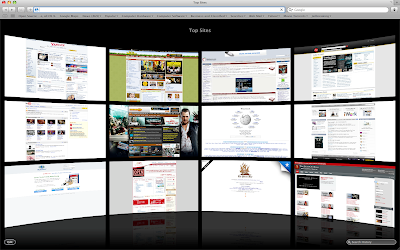
So what's the most noticeable change? The "Top Sites" page, that's what. Yes, you can set Top Sites to be your home page, and while it is just a prettier version of the Speed Dial feature in Opera or the home page of Chrome, it has a twist.

For example, you press the thumbnail of a site you usually visit in Opera or Chrome, but then you find out that there's not even an update available. Whoops! Time wasted. Well, in Top Sites, you can find out whether a site has new content or new feeds. This is marked by a Blue star on the upper right of the website's thumbnail.

Additionally, you can press the small Edit button on the lower-left to adjust the positions of the each site, or pin a site permanently in its place so it won't get replaced, or add and reduce the number of displayed sites.

But there's a catch: Top Sites won't accept specific input from the user- meaning that you can't put your own website for display in the page. It only displays the pages you visit most- which is pretty much the purpose of this new feature. While I love using this feature because it's both beautiful and practical, I'd still like to be able to input my own sites.

But what's the Search bar in the lower-right portion of the Top Sites page? Well, when you click it, the last page you've visited is displayed in Cover Flow mode, and when you type, the search narrows down by letter.
The thumbnails in Cover Flow are thumbnails of the sites as you visited them, and you can also search a portion of a web site. For example, you only remember a shred of text from a website, or maybe I just want to look for pages that have the words 'touch screen phones' in them because I want to look at some phones (pictured above). Well, this comprehensive search can do that.

The search is not only limited to History, Bookmarks can be searched as well when you click the Bookmarks icon on the toolbar.

I think Cover Flow is most practically applied in Safari, because you get a huge thumbnail of a website you visited. It's so big that you don't even have to open it again just to check if it is indeed the correct page you were looking for. Of course, that is if you're not gonna read the whole article located inside the page.

Speaking of Search, it also finally supports search suggestions (that is, if you choose Google to be your search provider) thus making the need for the Inquisitor plug-in unnecessary.

A new feature taken for granted is the improved zoom feature. Typically, when you zoom in on a website, the pictures don't really get zoomed in together with the text. But like the iPhone, Safari can now magnify web pages as well as their pictures. Small screens will benefit from this greatly, you know like a netbook? (Pictured below is the magnified Apple Online Store.)

Overall, Safari 4's Beta version is very stable, solid, and most importantly fast. It also features some great features, but some of the interface changes, like the tabs placed on top, the lack of a Chrome-like system for managing tabs and the Refresh and Stop button placed on the address bar, may piss some people off.

Comprehensive Ratings:

February 13, 2009

Is this the new iPhone?

First it was an aluminum casing, then it was curved black plastic, and now... it's metal, maybe.

MacRumors.com has reported that the website iPodObserver has posted "leaked photos" of the upcoming iPhone. Obviously it won't be dubbed iPhone 3G so the picture gets a teeny bit of credibility, but aside from that, what seems to be a mock-up is pretty darn believable. Last year, the same website- iPodObserver- posted correct photo leaks of the iPhone 3G's backside, so there's quite a bit of reason to believe this rumor to be true.

Now, features-wise, what happens next, Apple? I mean, the phone's getting multi-core mobile processors or something, ain't it?

October 13, 2008

iPod nano hands-on: This is more like it

So today we went to Bonifacio High Street- always a pleasure to go to- and we went into iStudio where smack dab right in front of the doorway iPods both old and new were placed for mass fondling. Naturally, I went to the newer nano and tried it out, unfortunately I had to make do with my cellphone's video camera as its still camera is next to broken (it rarely works) but at least it's video!

You seriously have to hold it to see how amazingly thin this thing is. Still, I did not realize how sharp its base edges are. Sit down in a certain angle with that thing in your pocket and bam, potentially bruised leg! But I guess that's beauty for ya- like that pair of awesomely contoured but painful to wear shoes, you just have to make sacrifices for the sake of coolness.

That quirk aside, this iPod is unbelievably nearly as slim as a credit card which is no joke, yet like a shuffle is ultimately easy to lose because it can easily drop and the grip you have on this is thing is not exactly anything to write home about especially if you have sweaty hands like mine.

Features-wise, the new nano works excellently on most if not all accounts. Yeah Genius, although not turned on in that specific unit will depend on the kinds of varieties of music you have in your library. The accelerometer is surprisingly snappier and more responsive so you get to Cover Flow mode in your music or landscape mode in your photos faster if you rotate the position of the iPod... or maybe I got used to the angle you have to rotate the iPod in to do those things? Whatever the case, the nano does these things beautifully. Unfortunately, the controls don't rotate accordingly, thus even when you flip the nano 90 degrees, the Menu button does not become either the Next or Previous buttons in the click wheel, the function of the Menu button merely remains the same.

But another thing that's more responsive is the aforementioned Cover Flow. When it was first introduced in the fat nano and the then new classic, operation was rather slow unlike in the iPod touch where it was invaluable as a navigation tool. Now, well, the new nano doesn't exactly change everything, but it feels less slower and more responsive.

And when you fire it up, you'll notice some more practical aesthetic changes in the interface. You know that little preview screen that divided the real list into half and made navigation slower? It's been relegated to the lower part of the screen instead seeing that the screen's dimensions don't exactly fit a setup like last time's.

Another beautiful aesthetic change comes when you actually play something because it now looks like the iPod touch's Now Playing screen wherein the album art covers up most of the screen. And if you hold on to the center button long enough, you'll see a new context menu with options for browsing songs of the same artist or album, for adding a song to the On-The-Go playlist and for starting Genius which makes a playlist of songs that it thinks sounds great with the current song, which is a nice touch.

But if you don't seem to like a specific song, you can always give the nano a vigorous shake as if you're blaming the nano for making yourself know that you have a horrible taste in music, so it will switch tracks and activate Shuffle. If you're wondering whether this gimmick will ruin your mood because it'll repeatedly switch tracks while you're running or jogging, don't fret, because Apple worked hard to make sure that that will rarely happen, if not at all. Besides, if the thing is on Hold, shake-to-Shuffle is disabled anyway. If you're still paranoid about it, you could always disable it entirely.

As I mentioned in an earlier post, video and picture quality are superb, and the screen has become more tolerable for longer video viewing sessions, but I encountered plenty of glare. The video or picture you're viewing will rotate accordingly to the angle you're viewing unless it's portrait though.

I didn't get to try out the acceleremeter driven game Maze, nor was I able to gauge how clear the Voice Recording feature was, but it's still safe to say that the new nano is a more than welcome enhancement- and a must-buy especially with its competitive price in the 8000-10000 peso range for 8 and 16GB models.

On an unrelated side note, the Fully Booked Bonifacio High Street branch is just pure heaven for booklovers. So obviously today was also my first time going in there. I mean, what more can you ask for with a whole building devoted to books of all genres? Starbucks? It's got that too.

September 17, 2008

iTunes 8: Is it really Genius?

Way back even before the September special event held by Apple to announce iTunes 8 and the new iPods, several rumors and leaks have already popped up about a sort of "Genius" feature included in the iTunes 8 upgrade. Like the popular websites Pandora and Last.fm, the feature tries to create a playlist that it thinks sound great together with this one song you yourself pick. Does it work? What about the other features in iTunes 8? Well let's see then...

Genius
This is the most advertised feature but does it work?

Well, it actually depends on how many songs (or rather, song genres) you actually have in your library.

But it's not exactly activated at first launch, though. First, you'll have to send your entire library to Apple, so they can process it and determine which songs sound great with each other. Of course, you don't need to fill in some private information, but if hackers found a way to access your computer via this feature, (because Apple sends information back to you) I'll be damned.
Anyway, once you activate Genius, you can plug in any upgraded iPhone 3G, upgraded first generation iPod touch, 2nd generation iPod touch, 4th generation Nano and 6th generation Classic to activate the feature in those machines. Besides that, you can now use that new atom button thingy below.


You first play a song- any song- and click that button so you can let iTunes generate a "Genius playlist". I based my first ever Genius playlist on Jason Mraz's "I'm Yours", and the results are snappy but some of the choices made are pretty questionable.
Panic! At The Disco? Daughtry? Fall Out Boy? Wait, I never knew they'd potentially sound good alongside something like "I'm Yours"!

Still, I have to give effort points to the system, and really, I don't blame it for the choices since I'm more of a rock/alt fan than pop. Still, if you're unsatisfied with the results, you can always Refresh it. And when iTunes gives you that perfect combination, you can Save that playlist (although you can still Refresh it anyway) and sync it to your iPod.

So I tried putting more varieties of songs into the library, then updating Genius, and what do you know? It became smarter. The questionable choices were less, and the playlist was a lot better.
If you hate Genius though, I won't blame you. It's very much new, so if you give it enough time, and if a lot more people use it, the system will become smarter. It's still off to a great start regardless.

New Browsing mode
Back then, it was just that "spreadsheet" style of music browsing. It was pretty boring, even with Cover Flow. Now, Apple gives the browsing style an overhaul. The spreadsheet style is still there for those who opt for it, but for those who want a new way to browse their music, they can use the revamped Grid view.
If you're a Mac user, you'll notice that the design is reminiscent to that of iPhoto. And if an artist has, say, 2 or 3 albums, you can look at them by pulling the mouse cursor up or down, left or right. To play the whole album or artist, you can just click the "Play Album" button that appears when you hover your mouse over it. You can resize the size of each album cover (and the captions underneath them) if you're blind, and you can sort them by Artist, Genres, Composers and Albums.

(AT TOP: You can view albums by Genre or; BELOW: ...get this view in the Podcasts, TV Shows and Movies menus. Noticeable in the Podcast menu are blue numbered circles marking the number of unwatched/unheard podcasts.)

New Visualizer
I don't know if you still use a visualizer in this day and age (I sure don't), except for Windows Media Player fans (they have no choice), but if you like them, you will like the new Visualizer Apple put in the new version. It's actually very pretty if you ask me.
But as I said: I don't think anyone would be using this very often. Especially since it's a...

Memory Hog
iTunes has a reputation of being a big memory hog. Unless you're running a Mac, not all processes run silky smooth in iTunes 8. It's slow, it's unresponsive, and damn, it just brings CPU usage up the roof. Heck, it causes the Blue Screen of Death in Vista! That can't be good. Of course, Apple has re-uploaded a fixed version of the Windows iTunes, but this just makes me ask whether Apple even tests its software before releasing it to the public? Surely, you should like any normal company? Or maybe your Windows developers just got lazy or something?

A hassle to download
It's like really HUGE! It's ginormous! It's a music and video player for God's sakes! Even VLC is only like 4-5MB's or something! I'd accept 20MB, but 60MB is like... a real hassle to download even on a broadband network. Apple needs to reduce the file size for this thing, damn it.

Overall
Genius needs a bit of time to mature, but it's off to a good start. The new view is welcome, and the visualizer is really beautiful, but kind of pointless. I'm not sure why Apple still hasn't fixed the memory leaks and all, and they sure haven't reduced the file size of this beast, but other than that, this upgrade is pretty nice- especially if you want to buy a new iPod (or upgrade your iPod touch or iPhones), but for other people who still don't plan to buy a new iPod or upgrade their existing iPod touch or iPhones can stick to iTunes 7 if they so choose to. Genius isn't really that much of a reason to download in the first place, but it's still a really fun feature to toy with.

Of course, you have the standard music and (limited) video playing options, and they work as they should. Aforementioned hogging may cause a broken listening and viewing experience at times, though.

Rating: 7.5/10

May 22, 2008

Guitar Hero 4: Getting bloated?

Before I start with this, I'd first like to say that I love the Guitar Hero franchise, and that I find it too expensive to buy Rock Band although I'm very interested in it.

And now, for a little teaser for the new game:


Although it has yet to be released, Activision has given us a glimpse of what the new, "reinvented" installation of the multi-million franchise would have, and that includes a new instrument: Drums. Sound familiar?

I know that a sequel should always try to put in something new or quirky or both just to keep fans interested, but I don't see myself buying this new installment for the fact that if you put another kind of instrument in a package that clearly says "Guitar", then it shouldn't be called Guitar Hero. I mean, they could take the name Battle of the Bands and then would I understand. But no, sadly, Activision is getting a little too much competition from EA and more specifically, Harmonix. Guitar Hero won't get tired, don't worry! As long as Rock Band stays expensive, you'll still have your millions of dollars.

But yeah, I guess that song creation and sharing mode will be a treat that'll give it a bit of an edge over Rock Band though. I just think that it'll be the franchise's blessing and curse though because, well, you'll probably see some wannabe dude fretting some terrible notes of his own- and he'll think it'll be cool.

Although I'm not expecting that this mode will make the music industry shut up and take notice of these "compositions" like MySpace is doing, a mode like this alone will keep the people locked to the franchise.

So Activision should let Guitar Hero be Guitar Hero, and Rock Band be Rock Band... although I like the design of those drums!

March 20, 2007

New things to see in the future...

1. I'm gonna start ravaging YouTube and start embedding my fave YouTube vids every week. It will be the My YouTube Vid of the Week.
2. Expect more pics to see in my blog...
3. Game, TV show, movie reviews...
4. New skin... it'll take long though...

That's all I can think of for now...
 
Elegant de BlogMundi