


 If you haven't heard about Google's entry into the browser market, then you might be missing out on a potentially very hard hitter to the industry. While it still doesn't have the extensibility and customizability of the comparably famous Mozilla Firefox, Chrome's simplicity, like Safari before/after it (however you view it), is just one of the things it has going for it, and I wouldn't have any problem recommending that you adopt it as your default browser.
Here are 5 reasons why you should adopt it as your default browser:
1) Security
Security is the primary reason we stay away from browsers like Internet Explorer. While the 8th version of the formidable browser has some unique security features, it's far from being the most secure. In fact, in the recently held Pwn2Own contest, only Chrome was left standing. What's Pwn2Own? Well, it's a competition where people find security flaws in various browsers, and when they do discover those holes, they get to win the computer they exploited the browser upon.
The other browsers in the competition namely IE8, Safari, and Firefox (Opera was not in the competition), were all exploited in just seconds. Clearly the security alone is enough for a recommendation? (Just uncheck the box that lets you agree to Google spying on your every move in your time with the browser... or go Incognito?)
2) Minimalist design lets you concentrate
The bad thing about Firefox, in my opinion, was the clutter you'd get when you install so many extensions. True, you could simply uninstall them and start fresh, but what if I liked them extensions?
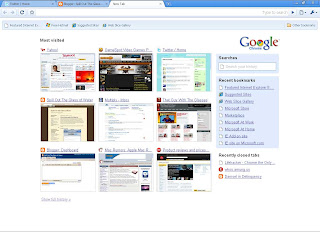
This is where Chrome's "limitation" becomes a real benefit to your browsing. Its minimalist interface forces you to concentrate on the web, and not on the multitudes of toolbars that sit on the browser. Heck, the whole thing could just pass as the Full Screen mode in Internet Explorer- minus the admittedly annoying auto-hide.
3) Don't break down when it crashes
We've all been there before. Firefox would crash and we would simply wish that its auto-recovery feature would be able to save all the other tabs we had open. True, most of the time, the restoration did its thing, but there are times when not all the tabs you open are restored.
Fortunately, we don't even need to contend with such folly with Chrome's unique tab management (and yes, this is the feature Microsoft ripped off from Chrome, but it would be unfair to say that the feature should only be limited to Chrome, because it's valuable) as it treats every tab like an individual program in the Windows taskbar.

For example, Flash would cause a website you're viewing in this one tab to slow down and eventually not respond. You could still switch to another tab and open the browser's own Task Manager by right clicking the top part of the browser. You can kill the pesky unresponsive task and resume reading all those other tabs without a sweat.
4) It Opens FAAST
I'm serious when I say that it very snappily opens itself as soon as you finish double-clicking. True, there might be a few seconds of loading at times, but for the most part, this is one of the biggest draws of Chrome for me: how insanely fast it opens. You could say that it opens as fast (or faster) than Internet Explorer, but it's more secure (and hogs less memory than Firefox).
5) Newbie friendly
It's not that my dad is not computer illiterate because he very much is computer literate, it's just that he has this habit of typing URL's into the search bar- and I might be right to assume that my dad isn't the only one. Well, Google Chrome's Omnibar changes all of that. Not only is it just another Firefox Awesome bar, it's also a search bar as well.

So next time my dad enters in "www.yahoo.com", I'm pretty sure that the result won't be a Google search page, but the real thing. No offense, dad.
These are just my top 5 reasons to download so I might have missed a subtle feature or two that adds a lot to the user experience. Not all people will like Chrome's barebones approach and its lack of extensions (which will be "fixed" in a newer version), but there's a market for Chrome, I'm very sure of that.


 Posts
Posts


