Showing posts with label features. Show all posts

March 20, 2009

Internet Explorer 8 is final

The new version of Internet Explorer has just come out of beta and is a seriously huge step for a company like Microsoft. While it still has problems handling JavaScript (and thus, it doesn't pass the Acid3 web standards test), it has several end-user features that people will definitely like.

OK, maybe most of these features have already existed in the form of a Firefox extension (but some IE8 features were inspiration for some extensions as well) or just derived from several browsers outright (but then again, I'm not complaining about that), but it definitely lays some innovations in the table. And yes, those features just might be worth the traditional reboot after installation.

Web Slices
Just as Safari lets you select a part of a webpage to post into Mac OS X's widget environment, Internet Explorer 8 lets you get up to date on the several parts of a specific website. A fine example of what you can do with Web Slices is shown above.

Unfortunately, you'll have to install this add-on as it isn't built-in with the browser.

Accelerators
Although it's present in specialty browsers like Flock, Internet Explorer 8 gives the masses a more comprehensive list of shortcuts or "accelerators" to choose from. Let's say you don't know the meaning of the word "schadenfreude" and you see the word on a webpage. Double-click that word and several options will appear. It's either you blog it, find it on Wikipedia, etc. etc. etc..

Domain Highlighting
It sounds like a subtle cosmetic change, but it's a rather important security feature. Why? Because usually people don't get conscious of the URL when they could be accessing a fake site, I mean, you can know if a website is phishing you and stealing your information by just looking at the URL, but one will not do this always especially when the domain name isn't even noticeable. OK, Chrome users already know this, but since IE8 is a mainstream browser, it's all for the good.

Color-coded tabs
Complementing the domain highlights are the color-coded tabs. Basically, IE8 gives websites of the same domain the same color of tabs, so you can know whether that website you just accessed suddenly brought you to a fake version of it. In theory, that is.

Compatibility mode
Since Microsoft made Internet Explorer 8 a little more standards-compliant, there is bound to be a few issues involving old websites designed for older Internet Explorer versions. You can access this via a button beside the Refresh button. Just hope that you won't mistaken the two of them.

Individual tab management
While IE8 won't be able to let you rip tabs to form another window, you'll be able to have the benefit of a feature similar to Chrome. Let's say a tab froze up because of a plug-in like Adobe Reader or Flash. Usually, you'll have to press Ctrl+Alt+Del and terminate all important data in all the other tabs, well not anymore. You can just exit that tab and continue the work you've been doing in the other tabs.

InPrivate Browsing
Just like Safari's Private Browsing and Chrome's Incognito mode before it, Internet Explorer lets you surf like a rockstar without leaving evidence. Still, the parents have the upper hand if they are tech-savvy, because they can enable Parental Controls and simply disable this feature.

Cross-site scripting filters
Internet Explorer 8 promises to be the most secure browser in the planet, and the efforts show. With cross-site scripting filters ("cross-site scripting" involves one site sending err, messages to another one, hackers may use this system to put malicious code into genuine websites), Internet Explorer 8 finds out whether this is occurring and stops you from going inside the site.

Smart Search
Now when you type a search term, Internet Explorer gives you results as you type- and they're illustrated too!

Admittedly, I won't go back to Internet Explorer unless I'm desperate, but version 8 is very compelling nonetheless. Download it now.

March 18, 2009

iPhone 3.0: Yes, there's Copy and Paste and then some


No new iPhone revealed today, but existing iPhone (or iPod touch) users can expect a lot from the new firmware to be released by Apple in the Summer months (of course, American summer months) and well, let's cover them chronologically according to the media event that was held.

Developers were the ones in mind when Apple decided to conduct this media event, but that doesn't mean that there are no goodies for end-users as well. Just keep in mind though that the firmware is in beta, and new features might be added. Knowing Apple though, they might even strip one or two in the last minute or otherwise add a buggy feature for that matter.

Anyway, here we go.
Statistics, and more boring stuff
First we have the director of iPod and iPhone Development Team giving out the statistics, iPhone SDK downloads, iPhone sales, motivation for the iPhone developers in the audience, OK, the rudimentary stuff. Additionally, Apple is defending its right for having extremely tight control over App Store submissions by saying that their approval process has become a bit more lax because 96% of App Store submissions have been approved and 98% of submissions have been approved within 7 days, and the man goes on for 5 more minutes afterwards.

Here it really is...
After that, Scott Forstall is called to the stage and we go to the real deal: the iPhone OS 3.0 Software.

Transactions in-App
Developers are pretty much happier because they're able to put purchases in-app, which can actually reduce the number of apps in the App Store, but they're also able to get more revenue and give the consumer more convenience. Catch is that free apps can't do that.
Renew magazine subscriptions inside the app itself.

Local connection to fellow iPhones and iPod touches
Then there's the "Peer to Peer" functionality which enables several iPhones or iPod touches to get inside a local match in a game quickly and through Bluetooth so users need not be in a WiFi zone, nor do any inconvenient pairing. Additionally, other apps can utilize it for other purposes... perhaps file transfer with other brands of phones?

Accessories talk to iPhone (and vice versa)
Plus, accessory makers can now make an app to control an accessory from the iPod touch or iPhone. For example, if your blood pressure thingy is compatible with an iPhone, you can connect it to one and you'll be able to see your blood pressure displayed and you can send that data over to your doctor. Or, maybe you can connect it through Bluetooth if you don't like wires.

Where do I really go to get to Point B?
Next, Google Maps can now be embedded into apps so the full app can be used within a third-party app. Additionally, a framework called CoreLocation can now support turn-by-turn directions for GPS or triangulation, but developers have to make their own maps due to licensing issues. This will make driving to several destinations easier, but unluckily for us, we don't have any Philippine maps that are up-to-date.
Developers can put Google Maps in their apps.

Specific turn-by-turn directions help you cut through traffic.

Broken Promises Made Up For
Now here's one thing people have been a waiting for over a year for: Push notifications. Apple hasn't delivered that with 2.0 last year, so now, well, Forstall acknowledges the error and promises Push notifications for the new firmware. Why not background processes, developers ask? Well, battery life wasn't good that way so push notifications became Apple's workaround for better battery life. Plus, performance will not be affected as much. Let's hope Apple's claims are true though, and that the Apple Push server won't get overloaded. This will be great for IM apps.

Miscellaneous Developer Features
Oh, and I have a good feeling about iPod library access. Rhythm games...... plus voice chat during games! Consumers obviously will say 'Meh', but this is a big deal for developers.
Now Forstall invites several developers from EA, Meebo, Johnsons and Johnsons, ngmoco:) etc. to demo the iPhone 3.0 features.

"Taking care of puppies in the morning, fragging n00bs at night" (Impressions of select demoed apps)
1) The Sims 3 iPhone looks great and it was just programmed in 2 weeks, but oh crap, you're gonna have to pay real money to buy new objects! Rip-off!
The former involves a Sim dancing around to the iPhone's music library, the latter shows off the in-game store.

2) ESPN's app looks great for sports fans who want to see results and the highlights of a game. They demo the iPhone's new video streaming standard.
The quality of the game's highlights are automatically adjusted depending on the bandwidth.

3) And how about that LifeScan glucose meter? It's an app made for diabetics who want to check their glucose and food intake through just the iPhone and an iPhone compatible LifeScan accessory. Pretty nice.

4) Oh, and ngmoco:)'s LiveFire FPS... how will the controls be implemented?
The iPhone OS 3.0 also helps game developers make the iPhone a more credible gaming platform.

5) Leaf Trombone... well, not a big fan of developer smule's Ocarina app but lolz, Phantom of the Opera is the song being demonstrated by the two men from smule, and they look... funny. Two people blowing into an iPhone and just shifting the pitch, it's just... lol.
To your left you'll see the Phantom, and to your right you'll see Christine.

USER FEATURES
1) Cut Copy and Paste - Finally. How to do it? Well, you can double tap some text (or if you want a block of text, just expand the end point/s) and a bubble will appear. Just double tap the part where you want to paste the text and click Paste. Done. More elegant than Clippy, I'm sure. And yes, SMS and Photos can also be copied and pasted. Third-party apps will have support for it as well.

Jailbroken iPhone? Hell no.

2) Undo/Redo - You can shake the device to summon a dialog box that lets you Undo or Redo some erratic typing. This is prolly gonna be a nice feature for those photo editing apps.


3) Landscape typing - Typing E-mails, Notes and SMS (or pretty much anywhere) is a bit less of a pain because people can now type in that format if they so choose.

4) Messages - SMS has been renamed into a more user-friendly "Messages", and they can now be individually deleted and forwarded, thank God. Plus, MMS support has FINALLY been added. Now photos, vCards (contacts), audio, videos and locations can be sent through MMS instead of E-mail. While I don't use MMS much, I'm still happy that Apple whiners and haters can take a break from making fun of the lack of these oh-so basic features.
Can't you help but point and laugh at the two photos above?

5) Voice Memos - An all new app that should've been built-in since the first iPhone, voice memos can now help people create memos using the microphone (or external mic's). The app looks gorgeous, too.

6) Calendar Syncing - Various Calendaring standards are now supported by the Calendar app and iTunes.

7) System-wide Search - Apple finally gives the users a search feature which is pretty much a mobile version of Mac OS X's Spotlight which searches all major apps for specific information by just flicking to the left of the home screen. This will be very much convenient, especially for people who download loads of apps.


8) Shake to shuffle - I knew it. The gimmicky feature first appeared in the iPod nano, and like that device, it'll probably take a vigorous shake before it gets activated- perfect for runners.

9) Stereo Bluetooth - Yup. A2DP right here. Score 1 for Apple's geek rep.

10) Anti-phishing - More mobile security for mobile Safari

11) YouTube accounts - Yes, I can now log-in to my account straight from the dedicated YouTube app!

12) Auto-fill - You can now worry less about dealing with the virtual keyboard as this Safari feature will enable users to fill out forms with the generic information in one click (or in the iPhone's case, touch).
More than a hundred new features, and a thousand new API's can now be downloaded if you're an iPhone developer. Yep, the iPhone 3.0 beta is available on the Apple site today for developers. The final version of iPhone 3.0 will be released in "summer" for free with all the iPhone's (although Stereo Bluetooth and MMS won't be supported due to hardware limitations) and iPhone 3G owners and 10 dollars for iPod touch owners- yes, both generations.

March 1, 2009

REVIEW: Safari 4 Beta

Safari 4 Beta
Developed and Released by Apple

Oh yes, I remember Apple releasing version 3 of this same browser a few years ago.

It sucked.

So this pretty much meant that I had low expectations performance-wise while downloading this new beta, but I was in for a shocker when I completed installation and restarted the system. It just works wonderfully.

Not only is the file size significantly smaller, the performance is snappier, features do as advertised, and Windows users may just have a new viable option for an alternate browser.

While the stable release- Safari 3.1.2- is pretty decent in its own right, this one adapts some killer features, even if they're not as "killer" in comparison to tabs or the awesome bar in Mozilla Firefox, or individual tab management (when one tab hangs, the others don't get affected even if they're in the same window) in Google Chrome.

Let's get to the part that matters first: speed and stability.

While I have yet to try Safari for Windows, Safari pretty much opens slightly faster than the old version. Of course, first open is gonna be slower than usual, but later opens will be purportedly as fast as Chrome.

Then there's the website rendering. At first, my experience was rather slow, but later it somehow accelerated. I'm not sure if I was downloading some torrents at the time, but when I randomly opened my computer and opened the browser one time, sites were loading like fire- as fast as Chrome, or maybe marginally faster- and it has been that way ever since.

Web site render speeds can be attributed to the new Nitro engine built for Apple's WebKit (WebKit is also the same engine running Chrome, since it is open source and standards-compliant), and not only does it pass the new Acid3 test without errors, it also introduces compliance with a new proposed standard called CSS Animation- a Flash substitute that requires no new plug-ins.

And for a beta, it's actually very stable. I have yet to encounter a crash, and it cruises on smoothly.

Now we're getting too technical, but does Safari go too technical on your ass? Let's see how user-friendly it is.

If you've been using Safari for a while, you'll notice quite a change in this beta. While the interface is deemed tentative, it's rather impressive.
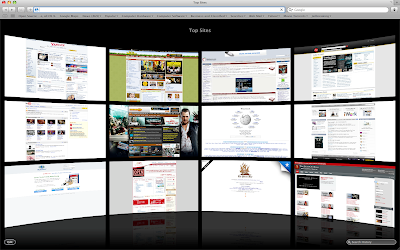
So what's the most noticeable change? The "Top Sites" page, that's what. Yes, you can set Top Sites to be your home page, and while it is just a prettier version of the Speed Dial feature in Opera or the home page of Chrome, it has a twist.

For example, you press the thumbnail of a site you usually visit in Opera or Chrome, but then you find out that there's not even an update available. Whoops! Time wasted. Well, in Top Sites, you can find out whether a site has new content or new feeds. This is marked by a Blue star on the upper right of the website's thumbnail.

Additionally, you can press the small Edit button on the lower-left to adjust the positions of the each site, or pin a site permanently in its place so it won't get replaced, or add and reduce the number of displayed sites.

But there's a catch: Top Sites won't accept specific input from the user- meaning that you can't put your own website for display in the page. It only displays the pages you visit most- which is pretty much the purpose of this new feature. While I love using this feature because it's both beautiful and practical, I'd still like to be able to input my own sites.

But what's the Search bar in the lower-right portion of the Top Sites page? Well, when you click it, the last page you've visited is displayed in Cover Flow mode, and when you type, the search narrows down by letter.
The thumbnails in Cover Flow are thumbnails of the sites as you visited them, and you can also search a portion of a web site. For example, you only remember a shred of text from a website, or maybe I just want to look for pages that have the words 'touch screen phones' in them because I want to look at some phones (pictured above). Well, this comprehensive search can do that.

The search is not only limited to History, Bookmarks can be searched as well when you click the Bookmarks icon on the toolbar.

I think Cover Flow is most practically applied in Safari, because you get a huge thumbnail of a website you visited. It's so big that you don't even have to open it again just to check if it is indeed the correct page you were looking for. Of course, that is if you're not gonna read the whole article located inside the page.

Speaking of Search, it also finally supports search suggestions (that is, if you choose Google to be your search provider) thus making the need for the Inquisitor plug-in unnecessary.

A new feature taken for granted is the improved zoom feature. Typically, when you zoom in on a website, the pictures don't really get zoomed in together with the text. But like the iPhone, Safari can now magnify web pages as well as their pictures. Small screens will benefit from this greatly, you know like a netbook? (Pictured below is the magnified Apple Online Store.)

Overall, Safari 4's Beta version is very stable, solid, and most importantly fast. It also features some great features, but some of the interface changes, like the tabs placed on top, the lack of a Chrome-like system for managing tabs and the Refresh and Stop button placed on the address bar, may piss some people off.

Comprehensive Ratings:

September 21, 2008

Stuff I Missed in my iPhone 3G Review

I forgot to mention the iPhone 3G's Bluetooth features, which are extremely limited. How, you say? Well, typically you are able to transfer files from cellphone to cellphone via Bluetooth. Here? Definitely not. The only use for Bluetooth is for the hands-free Bluetooth headsets. Yes, it can still pair with another phone/computer with Bluetooth, but what can you do while a mobile phone or computer is paired? Nothing except being able to unpair. It can't at least be the receiving end of the file you want to send, so, yes, if I want to send my dad's iPhone some kind of music file, it's a lost cause.

However, I've updated the firmware of my dad's iPhone 3G (to the latest 2.1), and you know what? Many performance and call quirks we experienced are virtually non-existent now. Back-up times in iTunes are dramatically speedier, and so is application installation. Now we don't have to wait 20 minutes for back-up to finish!

Plus, the iPhone is responsive after hanging up from a call. The screen is actually supposed to detect your face so it will black out when calling. You know, avoid accidental button pushing via your cheeks, and it now works excellently. When your face gets out of the screen after calling (or when you want to hang up), everything will appear as it should. It's actually a nice touch now that I know why the screen wouldn't show up unless it wanted to before updating.
Speaking of calling, the signal we get around here has significantly improved. Back then, 3G was next to impossible to get. Now, reception is very strong.
Apps are generally more stable, and so is Safari. The screen, while already snappy and responsive, is impossibly even more zippy! 2.1 is the update to get, even though yes, there's still no video recording, no copy and paste, no MMS and no SMS forwarding, but if you already love your iPhone 3G or iPod touch even before this update, you'll love it even more after updating.

Now if only it wasn't such a beast. (230+ MB download?!)

My rating for the iPhone 3G still won't change, so I stand by my 7.5 rating. I actually wanted to decrease the score by 0.5 because of the limited Bluetooth functionality, but the update straightened other things out, so you can say that they, like protons and neutrons, cancel each other.

August 24, 2008

iPhone 3G Hands-on

Basically both expected and unexpected in terms of features. For one thing, typing is at least made less of a pain because of the extremely intelligent auto-correct system, the camera is pretty good for 2 megapixel (my dad is actually wanting to downgrade from 3 megapixel to 2) but surprisingly, there's no zoom! Still, I'm actually glad to see that there are sane buttons for volume and sleeping (also the equivalent for Lock). The unit overall is actually really sexy up close and personal, and to be honest, I liked the wobbly curved black back. At least there's a phone  
that's not anorexic nor boxy!

Multi-touch gestures are greatly implemented here and although it isn't always responsive, the fact that the unit can tell whether you're holding it sidewards or normally is pretty cool, and it makes browsing music or the web via 3G extremely easy.

Of course, I didn't exactly test everything. And that's because it's merely a demo model from Globe Telecom. However, based from the video that was being shown outside makes it apparent that SMS will be G-Mail like, and again, there's no MMS, but getting extremely user-friendly E-mail options that contains Yahoo! Mail which is surprisingly free even for those not using Yahoo! Mail Plus verily much makes up for it.

The music side of the iTunes store is still not available here, so advertising it will not do any good, but the App Store works... And as I said in the past few posts, there are bad ones and good ones.

It's not as feature stripped as I thought, but it's still not worth the money.

July 27, 2008

Ninja Gaiden Dragon Sword (DS) Review

(First posted on my GameSpot blog.)

What do you get when you get a crappy overused plot, and some pretty good gameplay? Well, not Mario, but Ninja Gaiden. But this time, Ryu Hayabusa goes for a spin on the Nintendo DS.

So how does this start again?

You first play as Momiji, who I think is Ryu's sister. After training, she picks flowers for Sakura, but after picking flowers, she sees some freaky monsters trying to get you at every corner. She is not entirely defenseless, however, and that's because she has her shurikens and her sword. So you as the player will at least try to defend Momiji against the evils of the Black Spider Clan by controlling her, but that's just for a short period of time and serves as introduction to the new controls because she gets abducted anyway.


                   Ryu! Hurry up before the old lady rapes Momiji!

Stylus-slashing!

This will draw comparisons to Zelda, which I haven't played, and that's because Ninja Gaiden is almost fully controlled by the stylus. You hack and slash by slashing your screen and releasing projectiles by tapping at your target lightly. This also makes for some control issues and conflicts that arise from the fact that walking is also initiated by tapping at a part of the screen!

Then again, it's more of the hardware's problem if you think about it.

You can defend yourself from attacks as well by pushing any button. I'd advise pressing the R button since your one of your hands is gonna be resting there, and that's because you play Ninja Gaiden like you're playing Brain Age- you flip the DS sideways.

Graphics

At first glance, you'll see that Ninja Gaiden Dragon Sword is a heavy-hitter in the graphics department because they're pretty good to look at. My gripe is that they're pretty much wasted by the monotonous look of most dungeons because most of the rooms look pretty much the same save for a few rooms, thus making it really easy to know which room is important, and which one is not.
     These graphics still shine regardless, and what Team Ninja has exhibited is nothing short of a  benchmark that other third-party developers should follow.

And again, stylus control, and the use of the microphone are some of the game's most advertised features. They're implemented quite well, save for the aforementioned projectile-walking issue.

This leads me to the microphone.

There are times when you have to use the microphone to advance the story, but you don't know exactly when you'll use it.

Like many others, I was stuck at Chapter 3 with the sleeping Muramasa thing which was so self-explanatory that you had to open your PC, connect to the Internet, wait for GameSpot to load, type in the search term, pick the correct title, click Cheats, select one of the many walkthroughs for the game, wait for the thing to load, press Control or Command-F, type Chapter 3, and read it from there.

I mean, yeah, the NPC's note that you should call a person when he's sleeping, but doesn't that mean that if you tap a person that's awake, you don't call them? Instead, they talk randomly? Because common sense usually states that when you want to talk to a person, you call them first. But no, in this game, the NPCs that are actually awake are probably released from the mental institution because they just talk to you without you even calling them. I mean, if you wanted to apply the logic of having to use the microphone to call someone, why don't you just use it to talk to someone awake as well?

Well?

And then...

And then there are those times when the game seriously wants you to waste your Ki and use your special Ninja arts to get rid of an obstacle. Now there's nothing wrong with using powers to clear obstacles, it's just that some of them don't even make sense!

Here's an example that makes me grind my teeth:
                           Gamespot rotated it again! Argh... I just wanted to put my own picture!

Now if Ryu can penetrate steel armor with his sword, why the hell would you have to use fire to get rid of a SPIDER WEB? I don't know about you, but that just doesn't make sense to me. What, is Ryu scared of cleaning his sword because the itty-bitty spidow web will make itty-bitty Wiyu's sword cwy? What about the blood that goes into your damn sword?

Speaking of blood...

There's none of that here, and that makes the game family-friendly, which I don't have much of a problem with.

However, the game's really, really easy, and really, really, really short. As in, each chapter amounts to like 30 minutes of gameplay, but the chapters are far too few to be deemed long.

Mind-numbing strategy...

So there are bosses, of course, and though they're pretty big, they only have like 2 to 3 attacks: 1) the throw and; 2-3) plain, semi-powerful attack.
                I rarely get caught by the bosses since they're so mind-numbingly easy.

So what strategy is there to be had with boss fights? Well, they're so strategic and epic, that you can just roll and use projectiles, roll, projectile, roll, projectile until they fall (except for the last boss who knows how to evade). In fact, the only times I succumb to a boss' throw attack is when I hit the invisible barrier which is annoying as heck because you're simply given an illusion of free 3D movement in every boss battle but not given just that! But at least the camera can catch up.

And if you want to accelerate these boss battles, you can always do this:
                                            Oh yeah, you're gonna die.

In fact, to be perfectly honest, I die more deaths from losing life to the "grunts" or the normal enemies in the game, who are far more irritating to kill, than the bosses. Yeah, I die from them. And when I do die from the bosses, it's because fighting these grunts have made me tired from slashing and Izuna-dropping and such. Yeah, there's not button mashing which affects the fingers, but your right (or left) hand will hurt instead. If there was a term used for describing the many slashes you do on the DS, I'd use it.

Oh yeah, it's called carpal tunnel syndrome.

Still...

There is still variation in the attacks nonetheless. You can slash down and then up twice to perform a pretty cool dive, or rub the screen so hard it could break to execute the Ultimate Technique. Frankly, I'm underwhelmed at the minimum of varied combos and attacks the game offers, but they're actually pretty cool to watch, and exciting to implement.

Overall

Granted, there's still a lot of fun to be had with Ninja Gaiden DS, and maybe you can pick it up unless you're expecting a challenge.

Rating: 8.0/10

                                  Oh look, lesbians! The score just went up a notch!

March 7, 2008

DVD Update: Mo Features, Mo Content, Mo Days to Wait

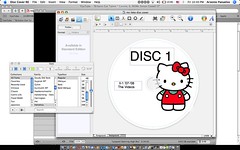
OK, maybe you've already known about the delayed release date of the DVD (for II-1, not teachers) but here it is again: April 1, 2008 which is the card receiving day. For the teachers, it's still Wednesday and I'm getting ready to burn disc 1 tomorrow (disc 2 after I get Nuevo's footage on Monday).

Teachers' Copies Exclusives
So what's gonna be special about the teachers' copies, you say? Well...

They get a cover for their DVDs. For the students? Well, they can print their own because I'm not gonna print anything for them for economic reasons obviously.

Next, they get a sort of pamphlet, you know, like the ones in original DVDs? (I hope.)

Plus, the DVD case will also have something printed there as well. So no, us II-1 students, even me, won't be getting those as well. (Still, it gives you a chance to personalize and do it yourself. :D)

Actually, economic reasons lang talaga hehehe. Otherwise, the price would be higher.

Final Content
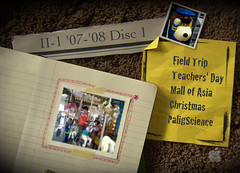
And then, here's the content you'll be getting in Disc 1. (And no, it's no longer widescreen.)


The menus will also be a mix of moving chapter menus and immobile and plain menus. Diba may variation?

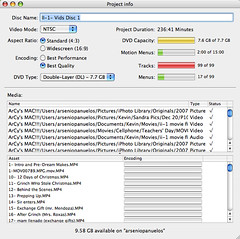
And how much content does the disc have?
Well...


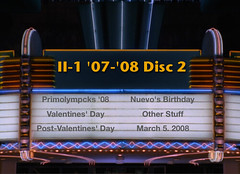
And as for Disc 2...
It still looks the same as last time, only with "Last Day" exchanged with "March 5, 2008". Because I feel that the date was not the last day, but a new beginning as cliche as it sounds.


But as for the "Other Stuff" menu... You'll have to wait and see. (Tinatamad lang ako. Hahahaha)
But so far, I haven't put the March 5 videos inside, only the photos because the collection isn't complete yet.

New feature
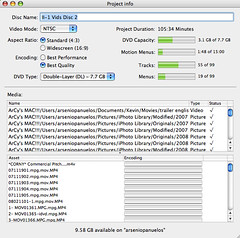
I mentioned "mo features", right? Well, this dialog box shows that 3.1GB is filled out of the 7.7GB you can put. And this shows that I can actually put more content rather than reduce them, which is the ability to actually access files in your computer. Of course, the pictures only. And note that this only available on Disc 2 especially since Disc 1 is already so jam-packed. OK, wait, don't get it? Here's an explanation.

Though I haven't actually tried it, the application I'm using has the ability to let you put so-called "DVD-ROM Content" which you can access when you put the disc in your computer. In my view, though, the DVD-ROM feature will enable you to directly access the source pictures I used in the slideshows found inside through Windows Explorer without hacking or third-party solutions. (I will update on this when I burn the second disc.)

Hmm... I guess this is the end for this update.
 
Elegant de BlogMundi