iPod touch and iPhone owners now have a one-click solution for jailbreaking. It's currently only available for Windows but a Mac and Linux version will surely come out eventually. However, there are several conditions that keep "blackra1n" from being a killer app:
1) If you rely on an iPhone unlock (meaning that you bought an iPhone under a carrier like Globe but got it "unlocked" so that you can use other carriers like Sun or Smart), do not download this app. If you have a Mac, you can use PwnageTool to create custom firmware that will preserve the prospect of an unlock.
2) The iPod touch 3G (the one released a month ago) is supported, but if you restart it, you'll need to do the jailbreak all over again.
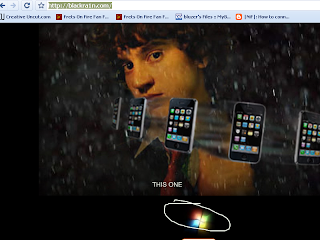
So with that in mind, how to do it? Well, go to this website and click on the Windows logo. Yes, the Windows logo, trust me. It'll download the app "blackra1n.exe".
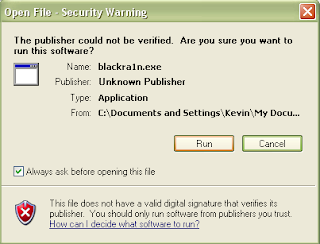
After the 600-some kilobyte download, you can open it. This is what you'll see.
Oh sorry, I forgot this was Windows. This is what you'll see.
Make sure your iPod touch or iPhone is connected before you get tempted to click that big grey button. If you do have it connected, just click it and let the app do its magic.
In my experience, it only took around a minute to get things up and running. The app will say that it's putting your iPhone in recovery mode and stuff, which means that your iPhone's screen will do a lot of crap. Don't mind that, that's normal. Once you see the picture of a man with rain as his background, that means success. You've jailbroken 3.1.2, be proud!
The iPhone/iPod touch will have a new icon (probably in the next page) that says "blackra1n". This will allow you to install such lovely sources as Cydia, Icy, and Rock. I advise you to go with Cydia since that's the source I've used ever since I first jailbroke my iPod. After you install Cydia, you can uninstall "blackra1n" if you feel like you won't ever use it again.
And if you've jailbroken (or pwned) your iPod touch or iPhone before, you can just do all that other crap again. Winterboard, NES emulators, what say you. If you don't trust my tutorial, then the two iDevices I have installing Cydia right now after the jailbreak might be from a non-existent dream.
We now focus our eyes on some low-profile releases by Filipino developers or some Asian-centric apps. Just a teeny collection. Hell, maybe I could get this going on a regular basis?
Supermarket Manila
#1 on the Philippine App Store charts for paid apps, this game has a polish to it. The premise here is that you own a supermarket, and that you have to manage it. I know, it's a bit of a rip-off to games like Diner Dash, but hey! It looks like a decent rip-off with a Filipino flavor, I'm guessing. It costs $1.99.
Philippine Travel Guide
The Philippines has its own wonders and sights. So why not get yourself a mobile travel guide while you get out during summer?
You don't need an Internet connection, either. $0.99 on the App Store.
CX Mobile
Bring a football spin to your average travel guide with Cathay Pacific's CX Mobile.
It gives you everything you'd want to know when traveling to Hong Kong- probably a location you'll be going to when talking about going abroad- and it has Google Maps support. Ooh, it looks like a great companion to the free Lonely Planet Mandarin Phrasebook! It costs zilch.
TVU Player
iPhone gets live TV! And many Philippine channels work best. You can't watch on landscape though.
The thing is that you can only run this under Wi-Fi, but with my tests, I never got anything to really run. Just a loading screen. Still, several reviews state that it works, and many of the working channels are Asian. For me, at least.
Classical Philippines Radio
This free app gives you all the folk songs you want. Although they're not my cup of tea, I know that some people will want this.
Wonder how old and classic this throwback iPhone radio station gets? Does it still have Pilita Corrales in there somewhere? Or is it purely songs of the Paruparong Bukid variety?
Filipino Phrases: How to Argue, Use Slang, and More!
It's an almost 1200 word list of Filipino phrases fit for daily use.
Unfortunately, the page says, the "argument" part only reaches to "bwisit". Will it cause an uproar if they included other... "phrases"? Maybe in a tiny scale, but otherwise, no. This app is more aimed to people who want to LEARN the language. It costs $3.99.
DianHua
Ever encountered a Chinese word that you found foreign and that you want to get a translation without having to resort to the Internet nor a bulky dictionary? Well, look no further than the free DianHua Chinese-English, English-Chinese dictionary! It has saved my ass a couple times.
Wan Nian Li Chinese Calendar
Want to specifically know when the Mooncake Festival comes? Well, a Lunar calendar does that job for you. There are many, I know, but I randomly picked this one. :p
That's about it, I guess. Tune in next time, if there is a next time.
Last night, Philippine time, Phil Shiller made his MacWorld appearance to unveil several things that matched the rumors.
Unfortunately, the stream of the keynote isn't going as smoothly as keynotes past, but I'm just gonna outline every major announcement over here.
1) iLife '09
So the iLife suite is pretty much a big selling point since it comes built-in to every Mac. And since this is a suite, there are singular applications that run in an integrated, seamless environment, and they are:
a) iPhoto
The photo management tool gets new features- face detection, geotagging, online sharing, better editing tools and themed slideshows.
With Faces (or face detection), you can get a photo, select the face you want to track and type the name of the person with the face. After that, iPhoto automatically detects whether the person is in a picture the next time you import photos from your camera.
With Places (geotagging), you can "tag" the location of the picture you took using a GPS-enabled cameraphone (ahem, iPhone) or a GPS-enabled camera. iPhoto will group your pictures according to the place you went to. If you live in America, you can also use this feature to print out books that also track the location of your vacation (called Travel Places).
Then there's online sharing which lets you directly upload your pictures to Facebook or Flickr in one click.
Additionally, themed slideshows are (finally) there, and all you have to do is view your pics as a slideshow and show them off on-screen with an accompanying theme.
Bottom line, amateur photographers who don't want to shell out more cash to buy Adobe Lightroom or Apple Aperture can get by with iPhoto even better, especially with better editing tools.
b) iMovie
I've criticized iMovie '08 for being hard to use, and preferred iMovie HD. Now, even though it kind of keeps the same interface, it adds in new features that will most likely satiate the fickle ones- like me.
Precision editing, advanced drag-and-drop, more themes, video stabilization, green-screen effects, new effects, and a full screen browser make up for the lackluster '08 edition.
I can't wait to get my hands on it, because I'm still quite skeptical.
c) GarageBand
Ever wanted to learn all those crazy riffs for all those crazy songs from the crazy ones who made them popular? Well, you can now get Sting to teach you Roxanne, or Patrick Stump with I Don't Care when you purchase Artist Lessons. This is a pretty good gimmick that'll get guitarists, pianists and girls (mostly girls) screaming, and an interesting experiment. There's a huge chance of it sinking under, you see, but who knows.
Colbie's teaching me how to play "Bubbly"!
Additionally if your guitar supports it, you can wire it onto your computer and make it sound like those legendary guitars your dad keeps talking to you about. Let's get that oomph into the music.
d) iWeb
The only update that's probably meant for everyone to care about is iWeb's Facebook features which let your Facebook friends know whether an iWeb website has been updated.
Unfortunately, one would require MobileMe for that one.
e) iDVD
Actually nothing much new here, just more themes since iDVD is excellent already in its own right.
2) iWork '09
Because of versatile export tools, excellent themes and speed, I prefer iWork '08 to the Mac version of Microsoft Office. While Microsoft Office on Windows is still better (except for PowerPoint, Keynote pwns it regardless of version), there are some welcome changes to this suite of applications.
a) Pages
This is Apple's answer to Microsoft Word. While I loved the previous version, this version adds even more options to the fray like a full-screen view, better outlining, mail merge (with Numbers), more gorgeous templates and a better way to type mathematical equations (using MathType or EndNote).
b) Numbers
Microsoft Excel's extremely young brother. While Numbers was a decent alternative to Excel, it didn't really compare. This new version, fortunately, adds some more functions that make it more user-friendly, even if it still doesn't compare to Excel.
Your charts can now be categorized and hidden so that you can work better with a more compact view of looking at things, for example.
c) Keynote
Now this is a program I enjoy tinkering with. Significantly more beautiful and better than PowerPoint, Keynote once again blazes ahead of the pack with even more stunning effects and actions.
Magic Move, for example, operates quite a bit like Flash's keyframes. In one slide, you can place an object in one side, and in the other slide, you can place the same object in another side. Once Magic Move is activated, the object will automatically animate. This is a great way to save time (and for animating a set of scattered cards).
Then there's the ability to use your iPhone or iPod touch as a remote control. I've always wanted that, and now it's available through a separate app in the App Store!
d) iWork.com
Now in public beta, iWork.com promises to be a glorified Google Docs and Spreadsheets, meaning that you can work on a presentation, document or spreadsheet on your computer, transfer that file online and work on that thing on your PC through a browser. You can invite other people so they can collaborate on comment on your work.
Additionally, iWork.com also promises to be able to send copies of the same document to friends regardless of operating system because it can convert and send the files in Microsoft Office or iWork formats.
No need for exporting and sending and waiting for the other person to respond.
I'm not sure whether you'll need MobileMe for this, though, but it would be cool if you didn't. And let's hope there aren't any severe bugs this time, OK, Apple?
3) It's all in the box.
iWork '09 and iLife '09 will strictly need Mac OS X 10.5 (Leopard). Fortunately, Apple is selling a box set that is of extremely high value for money (how surprising!) which includes Leopard, iWork and iLife. For 169 dollars, it's a fricking bargain.
4) iTunes without condoms.
What is DRM? It's a stupid way of stripping the rights of consumers while protecting the rights of copyright owners. iTunes has had that for years and now, it suddenly doesn't.
With 4 major labels and thousands of independents agreeing, iTunes is finally making the shift to being DRM-free, meaning that you can buy that track and burn it not 3, not 4, but infinite times. You can also put that song into your Zune, or your Creative Zen without having to actually re-encode it.
This will really grant Apple the status of biggest music retailer ever.
Still, how about existing purchased songs? Well, for 30 cents per track, you can get a DRM-free version of the same track with a 256kbps bit rate.
iPhone and iPod touch owners in America can also get on the act, now even without Wi-Fi.
5) A 17-inch MacBook Pro that sips, sips, sips juice
Not just a bigger screen.
There was a product that was noticeably ignored last year in the Notebook event. While its younger brothers were re-designed, the 17" MacBook Pro was left in the dust. Apple makes amends this time and introduces a little twist: an 8-hour unremovable battery that's environmentally-friendly, lasts 1000 charge cycles and jives with the Pro's demands. Holy sh*t.
And if your eyes are good enough, the color gamut of the screen has been increased greatly (60%) as well. Most likely for the pro video editors and graphic designers.
Other than that, the redesign introduces the 17-incher to the MiniDisplayPort, the unibody, the dual video cards and the gorgeous LED backlit screen (and yes, an optional matte finish for 50 more). And yes, it costs the same as the last-generation 17" MacBook Pro.
Here's the commercial:
And here's how the unbelievable 8-hour battery came to be:
(thanks goes to the user applejuicevideos for being such a fast uploader)
6) Tony Bennett
Ending the whole keynote was world-renowned singer Tony Bennett. But I didn't see that performance either.
I can't really muse about 'how the keynote was so underwhelming' because I couldn't really watch it properly for some reason, but I gotta say, just the promise of a more precise iMovie sells for me.
There are a lot of apps available for the iPhone, but you know the Americans- they have bad taste, as the saying goes.
These fickle folk are the same people responsible for driving up sales of a useless 99 cent app called iFart Mobile. So what is iFart Mobile? Oh come on, don't tell me you don't know what it does. The name alone will give you an idea.
If you still can't use your imagination, here's an idea: You select a sound, touch the screen, and activate the fart.
Great, now the developers who don't deserve getting the coveted top spot in the App Store are the ones making literally almost 10000 US dollars- in ONE DAY EVERYDAY.
Will this model inspire other developers to screw ambition and inspiration for a quick buck? Well, perhaps we'll know when the Caucasians don't stop with their strange affinity for gas passing.
Remember that naughty teaser Konami put on its website?
People all thought it was finally a port of the in/famous game Metal Gear Solid 4 for the X-Box 360, which was of course long-rumored. Unfortunately, it kinda isn't.
In fact, it has nothing to do with full-fledged consoles at all, just a pretender. And it's the iPod touch and iPhone. Yep, Metal Gear Solid is coming to the iPod touch and iPhone. The official name of the game? It's lame. Metal Gear Solid Touch. Yep. Metal Gear Soli- OHHH WHO AM I KIDDING.
I AM EXCITED.
Now as a consolation for the disappointed 360 owners out there, you deserve some concept art for Metal Gear Solid on the 360 at least.
Even though Globe doesn't exactly suck, Smart and Sun users left out in the cold can finally give an overrated phone a cheaper whirl by New Year's Day.
CAPTION: And you paid 40000 pesos to put in a Smart SIM.
Just go to Globe, get an iPhone 3G, wait for January 1 (or 2, in the Philippines), go to Greenhills (or, for a shameless plug, me if you want it done cheaper, although I have to do this with my dad's iPhone 3G so I can know how this works, if he'll let me), and cancel your Globe contract.
CAPTION: I got my custom firmware for iPhone 3G pwnage ready.
Anyway, the ever-infamous iPhone Dev Team have announced that the iPhone 3G's SIM unlock is imminent, aka on January 1, 2009. They advise interested iPhone 3G owners NOT to update if iTunes wants them to if they want to unlock the SIM, because of, well, let's say it's something technical.
Additionally, Mac users who updated to yesterday's update (Leopard 10.5.6) will also not be able to jailbreak the thing themselves.
CAPTION: Mac jailbreakers, don't update! Wait until further instruction from the iPhone dev team.
So if you've been wanting an iPhone 3G, but you don't want to be confined to Globe's plan, wait 2 more weeks (as of this writing).
On a semi-related note: While iPod touch owners don't have to worry about SIMs and stuff, there's still no chance in hell for an iPod Touch (2nd Generation) jailbreak to be found, at least this year (that is not fake, of course). So if you were asking, no, there's no update on that. The 1st iPod touch remains the safest multi-touch device for hacking (pretty much).
On paper you'd see that the features you get on the iPhone 3G are sparse compared to even the most basic of cellphones. Come on, who doesn't think that omitting MMS and video recording are embarrassing for a company well-known to be the cutting-edge? Why does the iPhone lack so many features yet receive so much acclaim and praise?
Well, think about this: how often do you use your cellphone's E-Mail features? Did you know your cellphone probably had one (if it was made after 2003 or so)? How about your music player? Compare how much you used to listen to it when you first got it to the frequency of your music listening now. Do you even bother to surf the internet with your phone despite having 3G? Statistically, only 10% of users are able to actually use all of their cellphone's features to their advantages (especially multimedia ones) while the rest ignore them altogether or use them rarely and just stick to texting and calling. However, the iPhone changed all this.
Let a newbie take an iPhone for a spin, and chances are that most of the features it has actually get put to use. That's because most of these features aren't secluded into some stupid folder; they're just staring at the user. You want E-Mail? Press E-Mail and set up your Yahoo! mail account credentials! Music? Ha! It's right there unmistakably in the iPod! It's all driven by one-click (or in this case, one-touch) access, because people become tired of having to slog through various menus and stuff like that just to access this one little feature (-cough- Nokia! -cough-). It's convenient and an extremely quick way to access features, and it's surprising that no other touch-screen phones before it have done stuff this way. This kind of reminds me of the old Nokia phones of lore, or even current Sony Ericsson models. You only had to push Menu and there the features were. Now, you have to go through hell to find where the Address Book is (-cough- Nokia! -cough-).
That's primarily the driving force behind my dad's batchmate (the same batchmate I mentioned in my CEL '08 post) preference of the iPhone to the significantly more feature-packed E61i- the menus weren't convoluted and the features were staring at you in the face.
Oh, and here's another game-changer that Apple put: an accelerometer. Some phones have already been using the accelerometer for other gimmicks even before the original iPhone came out, but the accelerometer in the iPhone wasn't a gimmick- it was a legitimate function. Gone were the days when you had to click a button and search a menu to make a video adopt a landscape orientation in the screen. All you had to do was flip the phone sidewards, and voila! Same goes for the music navigation. If you find having to flick your finger tiresome just to find a specific song, why don't you flip the iPhone sidewards to access Cover Flow? And how about surfing the web? If you feel that the web is more justified with a widescreen view of things, why not flip the iPhone sidewards as well? See? Legitimate feature and less gimmicks.
Speaking of which, multimedia also plays a big part in the iPhone. Once you've loaded up your iPhone's music library, you can immediately plug any ordinary headphones (in the 3G iPhone, that is) to replace those crappy Apple ones and enjoy. Or if you're on a plane, get your iPhone on Airplane mode and watch your favorite movie. This thing could replace a dedicated music player if not for the lackluster battery (my dad's iPhone 3G's battery has even become defective!) and for the refusal of Apple to let users put music manually in it.
And how about a mention of Visual Voicemail? Voicemail may not be popular in the Philippines, but this killer feature has been tremendously helpful to the Caucasians out there. Normally, voicemail could be heard only through the order of which the mail was received. In the iPhone, you could access the voice message you want in a menu. It doesn't matter in the Philippines, but it still matters that the iPhone is actually the mobile that pioneered such a feature.
Lastly, the App Store. Yes, the Palm has apps, Windows Mobile has apps, Google Android has apps and your phone probably has apps too, but the rapidity of popularity the stuff in Apple's App Store has is astounding, thus the quantity of apps that get hosted there are also rapidly increasing moreso than the competition if claims are to be believed. Whatever the case, getting an app is easy after you make an iTunes Store account- and most of them extend what the capabilities of the iPhone and make up for most of the lacking features.
All of these elements combined with a stylish and extremely nice presentation make for an unmatched user experience, and they are what make the iPhone the innovator despite having some of the thinnest feature sets in any smartphone.
Now it has sparked competition between other companies, and they're trying to match the experience on other platforms. And this competition attests to the power of Apple's innovation. But has the competition been beneficial? Well, it has also caused some brands to drop features they normally would have, and the physical keyboard is sometimes non-existent as well. Whether you like the touch keyboard is up to you, but I think the competition for touch-screen phones is beneficial to those looking for alternatives like the Omnia or the Xperia X1. But for those looking for beefy featured phones should look elsewhere. That is, unless the right one comes along.
So how much more proof can you get to see if the iPhone is truly a fad or something revolutionary? Bugs don't mean anything when you're actually talking about something like this, mind you, and security issues are significantly different affairs. So even if, on paper, the iPhone 3G is lackluster in features, it more than makes up for the experience.
DISCLAIMER: I won't review the MobileMe service, the specific 3G speeds, nor the iTunes store.
It's hard to hate the iPhone 3G if you overlook some of Apple's glaring feature omissions. I mean, for one thing, everything it offers, EVERYTHING, is on display even in the first time you open the thing after activation and syncing and whatnot, and they're all presented in the now trademark futuristic 'desktop' or 'springboard'. So if you want to access something in particular, you can just click the dominant Home button below the screen and press.
OUT OF THE BOX Practically anyone with nearly zero technological know-how can use this thing. Everything the phone offers is at their disposal unlike other phones which need menus to sort out the clutter. Intuitive menus make sure they become an instant expert in using and maximizing the device, and the clean interface will make sure their eyes are not going to be ripped out anytime soon.
DESIGN The iPhone 3G's design differs slightly from the original if you look at the comparison photos of various sites. For one thing, it has a black, smudge-prone and curved back, and the earphone jack is now ideal for normal earbuds. Plus, its heft feels better than holding the relatively anorexic iPod touch, so typing stuff wouldn't be as much of a pain.
TYPING AND TEXTING Speaking of typing, it feels better overall than the iPod touch, which attributes more to it's thickness than its relative newness. Of course, extremely smart spelling suggestions ensure that you won't have to worry as much but if you're typing in Filipino, welcome to correction hell.
Once my dad sent me a message stating that he was at the office ("Nasa opis pa ako"), but it instead became corrected into "Nasa opus la ako". You can reject suggestions, but what if you're in a hurry?
Still, Apple brings a whole new perspective to texting as it presents them like an Internet chat. The con to this though is that forwarding would have to be omitted. If only copy and paste was existent, the omission wouldn't seem so bad. But the idea us still really nice as it's kind of practical. For example, you want to reply for a text but you forgot what the text's message was. Normally, you would have to go back to the main list of text messages, THEN read the previous text. Here, text messages of the same sender are compiled G-Mail style, so you only have to flick upward to see what the text has to say. This is also especially useful for long text conversations.
INTERNET and MAIL I only browse through 2.5G, but compared to my own cellphone, the speed pages load are still pretty fast. This is possible with Safari, which practically let's you view any page save for Flash ones. Excellence is the word here, as Safari is a more than capable mobile browser- the best of its kind. Now if only a little more stability could be obtained...
And as for E-Mail, you can be ready to go no matter what service you use. It's all easy to set, and if you have the 'Push' feature on, the phone will regulary look for mail, but expenses will rack up if you do.
You can now view and download Word or Office files like any normal smartphone would, and it also works dandy.
CONNECT TO WI-FI If the phone gets a Wi-Fi signal that doesn't have a password, it will automatically disconnect from the 3G network and connect to Wi-Fi automatically and nearly seamlessly. From what I've experienced, it works relatively well.
MAPS and GPS GPS seemed like a good idea at the time, but the implementation here was nothing like I expected. You'd still need to wait for Google Maps to download the map of your area before the area you are in becomes clear, and the GPS location is not as specific as I would've wanted it to pinpoint to. Basically, it did not give me my address, just the main street. But maybe that's more likely due to the fact that there aren't specific Philippine maps?
APP STORE The App Store is nice as it offers a collection of great apps that push the technologies running the phone. You'll need an account to download though, and some apps are not offered in the Philippines.
POWER ISSUES When calling or hanging up from a call, usually from a number of a different carrier, the screen doesn't reappear and anything you do doesn't matter, as it will only reallear when it feels like it. That's stupid, but a firmware upgrade may resolve this.
ITUNES SYNCING For the most part, I have no qualms with iTunes syncing except for Music. When in regular iPods you can selectively choose your music and directly drag and drop, you have to put music into a specfic playlist, go to the iPhone properties menu, select the playlist you want to sync, then press the Sync button to selectively get music in the iPhone. When something goes against the nature of other products made by the same company, it immensely gets me bothered. Why not be able to selectively directly drag and drop music to the iPhone?! The iPod touch can do it, but you can't?
Still, the multimedia features work fine in the iPhone, and video is the best.
OVERALL The iPhone is a phone that's hard to resist but it's not exactly as feature packed as a typical Sony Ericsson phone would. Multi-touch is still the best kind of touch interface hands-down, Internet services are excellent, business features are pretty swell, it has a huge collection of applications both free and paid (I'm making this review on an iPhone app right now!), SMS is unique, but when you get to the calling, the phone becomes crap. Basically, it's not the 3Gesus phone T3 was talking about, but it's still one HELL of a phone. Now if only the prices were lower (although if you still want to buy now, the Plan 800 is most cost-effective and lets you save more than 10K of the set price for prepaid kits)...
Basically both expected and unexpected in terms of features. For one thing, typing is at least made less of a pain because of the extremely intelligent auto-correct system, the camera is pretty good for 2 megapixel (my dad is actually wanting to downgrade from 3 megapixel to 2) but surprisingly, there's no zoom! Still, I'm actually glad to see that there are sane buttons for volume and sleeping (also the equivalent for Lock). The unit overall is actually really sexy up close and personal, and to be honest, I liked the wobbly curved black back. At least there's a phone that's not anorexic nor boxy!
Multi-touch gestures are greatly implemented here and although it isn't always responsive, the fact that the unit can tell whether you're holding it sidewards or normally is pretty cool, and it makes browsing music or the web via 3G extremely easy.
Of course, I didn't exactly test everything. And that's because it's merely a demo model from Globe Telecom. However, based from the video that was being shown outside makes it apparent that SMS will be G-Mail like, and again, there's no MMS, but getting extremely user-friendly E-mail options that contains Yahoo! Mail which is surprisingly free even for those not using Yahoo! Mail Plus verily much makes up for it.
The music side of the iTunes store is still not available here, so advertising it will not do any good, but the App Store works... And as I said in the past few posts, there are bad ones and good ones.
It's not as feature stripped as I thought, but it's still not worth the money.
I wonder how Apple got my E-Mail address, but there it was in my Inbox: the iPhone 3G is coming tomorrow. And despite my efforts of dissuading my father from buying that overpriced feature-stripped phone, he reserved the 8GB model. But anyway, I'm sure you too got suckered into the hype, so why not go along for the ride?
What is the point of this post, you say? Well, I'm actually gonna help you set up and personalize your new iPhone 3G once it gets out tomorrow by at least giving you tips on what is the best of the best of its much praised, much awaited new service: the App Store.
Of course, it's all judged by real experience, so yes, I myself have played these games and productivity apps. And I can safely say that most of the apps here are a new treat, but I'm not going to divulge on how I actually got to test them- not yet anyway- so now I bring you some of the best iPhone App Store Apps and Games. And if you were asking, yes, you can now make a real iTunes Store account using your parent's credit card for the Philippines.
Best of the Apps: These apps are worth your money.
1) Lumen- Damn, this game is hard! You have to let the laser pass through using your brain, and even the "Easy" puzzles will make you already scratch your head! ($1.99; Lite version is Free)
2) Lumina- It's simple: Follow the pattern. Get it right, get up a level. There's nothing really special about its presentation, and the simplicity is the beauty of it. You're simply given 4 glowing boxes and you have to follow and memorize the pattern it gives you. That's already addicting in itself! And it's not scripted either, it's random! ($1.99)
3) Labyrinth- Yes, you're given just a few demo puzzles, but you can download even more for free! What's more, this is one of the best motion-controlled games for the iPhone/iPod touch! It's responsive, and you don't have to set the sensitivity at all. Just get the ball to the checkered block, and proceed. It's harder than you'd think, and that's what's addicting about it. ($6.99; Lite version is Free)
4) Imangi- It's a simple word game. Just touch 2-whatever number of letters to form a word, and double tap the words that are glowing green to finish. No other twists, no time limit, just spotting as many words as you want. ($3.99)
5) Muddled- Oh my God, this is hooking! If you like Text Twist, this is its portable counterpart. It's almost a duplicate that I smell a lawsuit from GameHouse! If you don't know Text Twist, then here's a little background info: You are presented a few letters, and you should arrange them to form real words. If you form the longest word, you already get an instant ticket to the next round. If not, then get half the words. ($1.99)
6) Numba- Form consecutive numbers, odd consecutive numbers, even consecutive numbers, pattered numbers, etc. just by tapping a number and dragging your finger. For example, the blocks you see are 1, 2 and 3 together. You put your finger on the number 1 block and drag your finger to the number 3 block. Simple, but most addicting. ($6.99)
7) Tic Tac Touch- Bored out of your wits? Then play Tic Tac Toe with your iPod's Artificial Intelligence. Heck, you can even challenge a friend! ($1.99)
8) de Blob- The INKT Corp. has wiped all the color in the world, and it's your job as the titular character to bring it back. You can control it using the motion-controls or the touch-screen, and they both work very well! The controls are simple as well, and if you want to beat an enemy, you just touch a crosshair. Simple, but addicting. ($6.99)
9) Cro-Mag Rally- Although I'm not a fan of motion-control steering, and I was skeptical when Pangea Software introduced this, you can actually set how sensitive the phone is for better steering, and since then I've been having a ball. Get this! It's actually kind of funny. ($5.99)
10) Air Hockey! Fingertip Sports- Engage in 2 player matches, and tilt the iPhone to gain control of the puck, as well as control settings through the home screen's Settings button before you play. It does as advertised, although there is a bit of a problem with collision detection personally. ($2.99)
11) Remote- Apple's iPhone app enables you to literally get a remote control for iTunes (aside from the Apple Remotes that come with the Macs). Select your tune from afar, and your computer's speakers will follow. Just type a passcode and you're in! It's actually worth it even if it costed something! Get it if you have a Wi-Fi connection. (No Wi-Fi connection=no effect) (Free)
Just remember, you have to make an iTunes Store account before you download, and set it to the appropriate country!
So I accidentally pushed enter when Mozilla Firefox's Awesome Bar led me to Globe instead of GameSpot, and when the page loaded while I was typing the correct address, I saw in the headlines of a portion of the site that they have officially dated the authorized release of the iPhone 3G in the Philippines. Fellow Filipino geeks, mark your calendars for 22 is the magic number- August 22.
Globe announces in their article that they will have a specialized plan just for the iPhone 3G, ranging from offering free Wi-Fi and mobile internet browsing hours to the offers that exist today. The details are really, really shocking, but you can reserve your unit now.
But I assume you didn't click on the link found in "really, really shocking", so I'll let you see what's so shocking about it.
I assumed back then that you can get the phone for free at plan 800 when you convert 199 USD to peso, but I was DEAD wrong. I mean, of course, a high-end phone without MMS and video recording should be free (but only the 8GB model, not the 16GB) at Plan 5000 although it comes bundled with unlimited WiZ (Globe's Wi-Fi service) hours and many free texts, voice minutes, and mobile internet.
And if you're on prepaid, your luck has run out. You know why? It is pricey. It's like you can buy something more feature-packed like, I don't know, a video camera? Oh wait, how about a MacBook or almost any laptop for that matter? A phone isn't worth this much, not even Sony Ericsson can match the price of this (I heretofore regard as) pile of $hit. Why? It almost costs an iPod shuffle covered in real gold; it costs 41,889 pesos for 8GB and 48,899 pesos for 16GB. But I think it's open to any network.
You'd get a LOT MORE value with an illegal/jailbroken iPhone 3G that's been hanging around since its release. Better yet, you can go to America and take a chance on unlocking it in Greenhills.
We've got the round-up of this week's news and today's headlines as well.
Rudy "Daboy" Fernandez; 56: God bless his soul Masa action hero Rudy Fernandez- also known as Daboy- has been battling periampullary cancer for the past two years. Now the struggle has ended as he passed away a week ago aged 56.
Days ago, you may have also heard about his public wake, and burial which were obviously jam-packed. But that was simply the respected actor's last wish- to have a last "box office hurrah".
Enrile shuns foreign investors; but GMA welcomes them The Joint Foreign Chambers received an embarrassing tongue-lashing courtesy of Sen. Juan Ponce Enrile and Sen. Miriam Quiambao for trying to erase the EPIRA (Electric Power Industry Reform Act) a week ago. June 12 was different, and that's because it was GMA who invited them so that she could praise and suck-up to them and stuff.
3G iPhone announced Apple's WWDC didn't disappoint as it was home to the unveiling of several iPhone applications, and of course, the 3G iPhone. Globe Telecom also subsequently made a news page/announcement that vaguely stated that the Philippines will have its share of iPhone fever "later this year".
Maybe in between August and October?
Tornado kills boy scouts in central US June 12 not only saw the release of much-awaited game Metal Gear Solid 4 in America, but also the release of a devastating tornado in central America. It destroyed the Little Sloux Scout Ranch and killed 4 teenagers from Omaha who were also boy scouts.
2 more lives were claimed in Dickinson County and Jackson County.
Greenpeace and the coal plant Coal power plants are obviously contributing to global warming, and that's what environmental activist group Greenpeace is trying to avoid in the barangay of Ingore in Iloilo. Barangay officials are rallying back however because they claim that Greenpeace, though their protest is understandable, is trespassing in private property.
Celtics win against Lakers 'Twas the Finals yet again, and the Boston Celtics won 3-1 against the Lakers. The final score was 97-91.
"We asked for Ces, got Angelo instead" This was the frontpage headline in today's Inquirer, and that's because yesterday saw the release of Angelo Valderama: one of the cameramen who was kidnapped along with TV news anchor Ces Drilon who was kidnapped by an unknown group of gunmen while in Mindanao. Families of the kidnapped party were relieved to see Valderama released, but they, of course, wanted the others back.
Kidnapped Marines released The MILF released 2 kidnapped Marines from Basilan. The 2 released Marines' names are Jessie Duatin and Bernie Alcabasa which were "unharmed after a successful negotiation Thursday night," said MILF civil military affairs chief Eid Kabalu.
2 killed, 8 injured in Japan earthquake Today saw an earthquake that happened in northern Japan which measured 7.0 in the Richter scale. The powerful earthquake claimed the lives of a fisherman in the Fukishima prefecture, and a person who was run over by a truck when the person evacuated from the house (which was in the Iwate prefecture: the epicenter).
There were 8 injured, one of them in critical condition.
In WWDC, there is bound to be a big product launch or two- and this year is no exception. This year, it's about the iPhone- what will become of it, and if there is even a new one.
Will everyone be happy, or will everyone be sad about the long awaited iPhone 2. What about current owners? What'll happen to their obsoletely expensive hacked iPhones? How much will this new iPhone cost? And what'll Globe bring out? All these answers and more coming to you!
NOTE: If you are only interested in the 3G iPhone because you don't own an old iPhone, scroll down until you see a sign. Don't worry, you'll see that sign. iPhone 2.0 Not to be confused with the 3G iPhone, the iPhone 2.0 is an iPhone software update that's been widely awaited by owners. So yes, longevity of your old iPhone can be rest assured but... what will it have?
Software Development Kit (Games, Productivity, Education) Apple introduced the new iPhone upgrade features and software and I guess it's pretty cool. What they introduced with regards to the enterprise users are the Microsoft Exchange server and secure Wi-Fi connection. Although that's not really major for us ordinary people, big corporations have hailed it as a great help to their productivity and at least it's pretty good to see that the iPhone is finally a real smartphone.
Next, Apple introduced once again the SDK program and showed off how people "enjoyed" developing programs for the iPhone. The first program they introduced was a Sega game- Super Monkey Ball- and it is able to be controlled via tilting the thing. Pretty good, but pretty expensive at 10 dollars, although it does have 110 levels- ridiculously many for a phone.
And then, there was the eBay program which was surprising since eBay didn't advise Safari for browsing a long time ago. Loopt, TypePad mobile blogging, the Associated Press mobile news program in which you yourself can submit and read news, etc.- all of which are free for purchase from the App Store.
If you've already watched the iBand video, the program behind it is also exhibited.
Other games like Promac Rally however, seems like it's gonna be really bad because based from my experience with Mario Kart Wii motion-steering, it's gonna be too imprecise.
One of the more promising apps however, is the medical education program that will probably benefit a lot of nursing students called Modality. I don't know if it will cost you anything, but I think it's really looking good. Even better is the body mapping application from MIMVista which lets doctors view x-rays and CAT scans intuitively. And wow.
There is another game in particular that amazed me because of the amazing graphics and animation, but I forgot the name.
Wow, I guess the delay of the iPhone for worldwide release was probably for the best since they want to mature the phone software and features for more practical use- and money obviously.
Office and iWork iPhone 2.0 software has finally put support for Office and Apple iWork documents- and that's definitely what people have been waiting for. Another obvious thing they should've put in the iPhone was the Calculator in which when you put your phone on landscape, it becomes a scientific calculator; contact searching, and the moving and multiple deletion of messages.
Gearing up for Asia Asia is finally getting native languages for the iPhone, and like some Nokia phones and TCL phones before it, you can write the Chinese and Japanese characters.
Free The upgrade is free for existing iPhone users, but if you want it for the iPod touch, you should still have to pay 10 dollars because, obviously, the iPod touch is for music and videos- not the features above.
MobileMe And I thought the update was just for enterprise users.
MobileMe essentially has the same features as the Microsoft Exchange support- only without the need for Microsoft Exchange. That means you can get Blackberry-like features such as Push e-mail and calendar without having to work for a huge company or set up a so-called "Exchange server".
So for example, if you get an e-mail on Outlook or Mail, it gets pushed to your phone like the famous BlackBerry. Or if your mom has changed the schedule in your iCal or Outlook calendar, it gets sent to your iPhone anytime, anywhere. The same goes for stored contacts: update them in the Address Book, update in the iPhone.
Me.com Me.com is now the replacement for Apple's .Mac service and will features Mail, Contacts, Calendar, Photo Gallery, and Online Hard Disk. It's a new web application both compatible for iPhone and the computer and will feature drag-and-drop features, and a fancy-pants interface.
*STOP SCROLLING!!!*
And now... "It's almost the iPhone's 1st birthday. Let's take it to the new level." Jobs says. And here it is:
New features Most of the new features of this new iPhone will be the same as the features on the upcoming firmware upgrade. But if you didn't read the above details, here they are in a nutshell:
3G - This feature is obviously not available in the first iPhone, neither is it available in the upcoming update. You probably already what this actually is. If not, then let's just say that 3G is a mobile Internet connection that is significantly faster than 2G's GPRS. And if the phone has a camera on front, you can make video calls to another 3G phone. The iPhone doesn't have a front camera, however, so there is no video calling.
What Apple didn't mention however, is also the inclusion of 3.5G (or HSDPA), which is faster than both 3G and at some cases, DSL.
Calculator - The iPhone finally gets a Calculator- and if you put it in landscape mode by tilting the phone horizontally, it becomes a scientific calculator! Pretty neat way to switch, to be honest.
Asian language support - With support for more than 20 Asian languages, with a lot of emphasis on Chinese and Japanese as well, you can now jot down characters on the screen or use the keyboard.
Third-party Applications - You've probably already heard about the several Java applications made for other kinds of phones, or maybe you've downloaded some apps for your Palm as well. This phone is of course, no different. Deployment of the third-party apps however, will be in the form of Apple's on App Store- so you don't need to go to that Globe website to download some pretty cool games.
Better battery life - Apple managed to get more juice out of the system clocking it at 24 hours on Audio, 7 hours video, 5 hours 3G talk time, 300 hours standby time, 7 hours browsing time and 10 hours 2G talk time.
GPS - Track your location, or let the iPhone help you go to a desired destination with its built-in GPS. Now the iPhone can really compete with the Nokia N95!
Better audio - Apple has finally pledged to put in better audio output, so you can enjoy your music even more.
Enterprise features - Push e-mail, calendar and contacts enable the Crackberries to not miss their BlackBerrys as much. It uses the Microsoft Exchange server as well.
MobileMe - MobileMe is a 99 dollar service that replaces Apple's .Mac hard drive/media/web publishing service. It lets the iPhone update the same database of contacts, e-mail and calendar events wirelessly and quickly.
Office support - Businessmen can view their Office and iWork files right from the get-go!
Thinner What's surprising is that the 3G iPhone is very much thinner than its predecessor.
The last time I checked as to why 3G wasn't supported by the last iPhone, it was because "it would make the phone really bulky". That's why I'm surprised. But whatever.
What happened to the backside??? Personally, I like its plastic black back (although there is another color choice for the 16 GB model). But critics say that the plastic back is a sure magnet for smudges- like the iPods before it.
Back to normality Critics also hated its unconventional 2" headphones jack. This time, Apple amended this to the normal 3.5" headphone jack, so yay!
Still no video recording? WTF?! For some reason Apple doesn't want to put video recording in the iPhone. This was a gripe among the masses the last time, and it still is.
I wish... I hope Apple will immediately phase out the 8GB model, lower the price of the 16GB model by a hundred dollars, and put in a newer 32GB model! The screen would be put to waste if the memory can't hold 8 full-length movies!
Cost "And even though 90% of our customers love their iPhone, 56% of the people who didn't have iPhones said it was simply too expensive. So one of the things we should tackle- besides common requests like 3G, Enterprise, Third-party apps and International support- is cost."
And what a price cut Apple did.
If you didn't already buy a hacked iPhone, it would probably be more sulit if you bought the 3G iPhone. Why? Well, the price has been cut from 399 USD to 199 USD- which is about 8000 pesos without the tax. Wow, you can say that it can even rival the famous Nokia music phones because of the bang-for-your-buck!
Globe Telecom Only Globe has the authorized access to sell the iPhones locally. Yes, locally as it will be sold here finally. Of course, it's the 3G iPhone! Otherwise, everyone will hate Apple!
Release date Apple plans to get things going on July 11th- which is the release date for 22 countries. After a later time, it will be released in all of the other 48 countries- including the Philippines. Officially, the price worldwide will also be 199 dollars for the 8GB version and 299 dollars for the 16GB version, and Apple will not allow the price to be higher than that exact amount- or so Steve Jobs says.
Finally... The iPhone is finally a competent contender in the smartphone arena, as it boasts a lot of very welcome features and viable adjustments, as well as some pricing perks, to finally make it worth buying! No really, I want it myself because I personally think that it's a worthy upgrade to my Sony Ericsson W800i, although knowing me, it's a bit hard to be letting go of the video recording.
But then again, that's what my Cybershot is for!
EDIT: Commercial And oh, I forgot. Here's a mildly funny commercial that Steve Jobs played twice in a row during the keynote. :D






 Posts
Posts


