Showing posts with label ilife. Show all posts

January 7, 2009

MacWorld '09: Fall Out Boy shows you how to play guitar

So the rumors were true.

Last night, Philippine time, Phil Shiller made his MacWorld appearance to unveil several things that matched the rumors.

Unfortunately, the stream of the keynote isn't going as smoothly as keynotes past, but I'm just gonna outline every major announcement over here.

1) iLife '09
So the iLife suite is pretty much a big selling point since it comes built-in to every Mac. And since this is a suite, there are singular applications that run in an integrated, seamless environment, and they are:

a) iPhoto
The photo management tool gets new features- face detection, geotagging, online sharing, better editing tools and themed slideshows. 

With Faces (or face detection), you can get a photo, select the face you want to track and type the name of the person with the face. After that, iPhoto automatically detects whether the person is in a picture the next time you import photos from your camera.

With Places (geotagging), you can "tag" the location of the picture you took using a GPS-enabled cameraphone (ahem, iPhone) or a GPS-enabled camera. iPhoto will group your pictures according to the place you went to. If you live in America, you can also use this feature to print out books that also track the location of your vacation (called Travel Places).

Then there's online sharing which lets you directly upload your pictures to Facebook or Flickr in one click.

Additionally, themed slideshows are (finally) there, and all you have to do is view your pics as a slideshow and show them off on-screen with an accompanying theme.

Bottom line, amateur photographers who don't want to shell out more cash to buy Adobe Lightroom or Apple Aperture can get by with iPhoto even better, especially with better editing tools.

b) iMovie 
I've criticized iMovie '08 for being hard to use, and preferred iMovie HD. Now, even though it kind of keeps the same interface, it adds in new features that will most likely satiate the fickle ones- like me.

Precision editing, advanced drag-and-drop, more themes, video stabilization, green-screen effects, new effects, and a full screen browser make up for the lackluster '08 edition.

I can't wait to get my hands on it, because I'm still quite skeptical.

c) GarageBand
Ever wanted to learn all those crazy riffs for all those crazy songs from the crazy ones who made them popular? Well, you can now get Sting to teach you Roxanne, or Patrick Stump with I Don't Care when you purchase Artist Lessons. This is a pretty good gimmick that'll get guitarists, pianists and girls (mostly girls) screaming, and an interesting experiment. There's a huge chance of it sinking under, you see, but who knows.
Colbie's teaching me how to play "Bubbly"!

Additionally if your guitar supports it, you can wire it onto your computer and make it sound like those legendary guitars your dad keeps talking to you about. Let's get that oomph into the music.

d) iWeb
The only update that's probably meant for everyone to care about is iWeb's Facebook features which let your Facebook friends know whether an iWeb website has been updated.

 Unfortunately, one would require MobileMe for that one.


e) iDVD
Actually nothing much new here, just more themes since iDVD is excellent already in its own right.

2) iWork '09
Because of versatile export tools, excellent themes and speed, I prefer iWork '08 to the Mac version of Microsoft Office. While Microsoft Office on Windows is still better (except for PowerPoint, Keynote pwns it regardless of version), there are some welcome changes to this suite of applications.

a) Pages
This is Apple's answer to Microsoft Word. While I loved the previous version, this version adds even more options to the fray like a full-screen view, better outlining, mail merge (with Numbers), more gorgeous templates and a better way to type mathematical equations (using MathType or EndNote).

b) Numbers
Microsoft Excel's extremely young brother. While Numbers was a decent alternative to Excel, it didn't really compare. This new version, fortunately, adds some more functions that make it more user-friendly, even if it still doesn't compare to Excel.

Your charts can now be categorized and hidden so that you can work better with a more compact view of looking at things, for example.

c) Keynote
Now this is a program I enjoy tinkering with. Significantly more beautiful and better than PowerPoint, Keynote once again blazes ahead of the pack with even more stunning effects and actions.

Magic Move, for example, operates quite a bit like Flash's keyframes. In one slide, you can place an object in one side, and in the other slide, you can place the same object in another side. Once Magic Move is activated, the object will automatically animate. This is a great way to save time (and for animating a set of scattered cards).

Then there's the ability to use your iPhone or iPod touch as a remote control. I've always wanted that, and now it's available through a separate app in the App Store!

d) iWork.com
Now in public beta, iWork.com promises to be a glorified Google Docs and Spreadsheets, meaning that you can work on a presentation, document or spreadsheet on your computer, transfer that file online and work on that thing on your PC through a browser. You can invite other people so they can collaborate on comment on your work.

Additionally, iWork.com also promises to be able to send copies of the same document to friends regardless of operating system because it can convert and send the files in Microsoft Office or iWork formats.
No need for exporting and sending and waiting for the other person to respond.

I'm not sure whether you'll need MobileMe for this, though, but it would be cool if you didn't. And let's hope there aren't any severe bugs this time, OK, Apple?

3) It's all in the box.
iWork '09 and iLife '09 will strictly need Mac OS X 10.5 (Leopard). Fortunately, Apple is selling a box set that is of extremely high value for money (how surprising!) which includes Leopard, iWork and iLife. For 169 dollars, it's a fricking bargain.

4) iTunes without condoms.
What is DRM? It's a stupid way of stripping the rights of consumers while protecting the rights of copyright owners. iTunes has had that for years and now, it suddenly doesn't.

With 4 major labels and thousands of independents agreeing, iTunes is finally making the shift to being DRM-free, meaning that you can buy that track and burn it not 3, not 4, but infinite times. You can also put that song into your Zune, or your Creative Zen without having to actually re-encode it.

This will really grant Apple the status of biggest music retailer ever.

Still, how about existing purchased songs? Well, for 30 cents per track, you can get a DRM-free version of the same track with a 256kbps bit rate.

iPhone and iPod touch owners in America can also get on the act, now even without Wi-Fi.

5) A 17-inch MacBook Pro that sips, sips, sips juice
Not just a bigger screen.

There was a product that was noticeably ignored last year in the Notebook event. While its younger brothers were re-designed, the 17" MacBook Pro was left in the dust. Apple makes amends this time and introduces a little twist: an 8-hour unremovable battery that's environmentally-friendly, lasts 1000 charge cycles and jives with the Pro's demands. Holy sh*t.

And if your eyes are good enough, the color gamut of the screen has been increased greatly (60%) as well. Most likely for the pro video editors and graphic designers.

Other than that, the redesign introduces the 17-incher to the MiniDisplayPort, the unibody, the dual video cards and the gorgeous LED backlit screen (and yes, an optional matte finish for 50 more). And yes, it costs the same as the last-generation 17" MacBook Pro.

Here's the commercial:

And here's how the unbelievable 8-hour battery came to be:


(thanks goes to the user applejuicevideos for being such a fast uploader)

6) Tony Bennett
Ending the whole keynote was world-renowned singer Tony Bennett. But I didn't see that performance either.

I can't really muse about 'how the keynote was so underwhelming' because I couldn't really watch it properly for some reason, but I gotta say, just the promise of a more precise iMovie sells for me.

September 20, 2007

Apples for Christmas

Forgive the metonymy but Macs have just been unveiled to the masses of CKSC recently. Well, you've heard me rave madly about all those cool products from Apple and I'm doing it again, just for the sake of being relevant! But if Apple doesn't lower its price point (in ALL Mac products), there's nay a chance that we students can persuadeour dear parents to make a wise investment on a Mac!

Mac Buying Guide
Macs aren't very commonplace in the Philippines and it's time it is. It's even great timing that the holidays are coming so you better save up some dough. Otherwise... well, it'll just gather dust in those store shelves.

IN A NUTSHELL:
Mac Mini: power for less; for people on a budget with an external monitor; keyboard sold separately; below P30,000

MacBook
: all for less; for people with tight budget looking for a laptop that's bang-for-your-buck; lightweight; all work no play; below P50,000

MacBook Pro
: tippety-top of the laptop crop; got money-to-burn; wants a bigger screen; wants to play games on-the-go; budget above and below P100,000

iMac
: all-in-one, compact desktop; you get your money's worth; avid gamer (Boot Camp software needed); likes/wants High Definition; don't want to look at a tunnel; got money-to-shell-out (for better configurations)

Mac Pro
: professional graphics/game/3D designer, movie editor (you have Final Cut Pro?!), in short, Professional Graphics and Film Guy; super-hardcore gamer; money-to-burn (P114,000 to be approximate)

BELOW P30,000
Though it sounds impossible, there is a Mac that costs below 30,000 pesos. Believe me, this is the cheapest they can offer. But the ONLY product under that price range is the Mac mini which costs approximately 28,500 pesos. It's totally NOT cheap but it has a VERY powerful configuration. With a very fast 2.4GhZ Intel Core Duo, up to 2GB RAM and 160GB hard drive (custom-made Mac mini's), this very little system unit will connect to your monitor, keyboard and mouse.
Plus, it's preloaded with the useful iLife and iWork '08 suites which enable you to create spreadsheets, documents, presentations, podcasts, videos and the Front Row software which is Apple's answer to Windows Media Center (includes a free remote, too!) to add value to the system. Oh, I forgot. You'll only be able to buy a system unit and not the whole package with the cash.

BELOW P50,000
Get a Mac mini, add a 13" screen, a keyboard, a trackpad, a camera and a microphone. Put them all together and what do you get? A MacBook.An evolution to its former PowerBook and iMac lines, the MacBook has become a big hit with people with dough. Heck, even my family thinks that it's a worthy investment (nagbabayad pa rin kami ng downpayment). It's fast (Intel Core 2 Duo and 1GB-2GB RAM) and has a huge hard drive (80GB-200GB) plus Wi-Fi, Ethernet (LAN), and entertaining software like Photo Booth (this was the selling point when we tested and canvassed it), iLife '08 and Front Row (with Remote). To keep it even smaller, the keyboard has been flattened (yet it doesn't feel UN-tactile) and it has a magnetic cover (no more moving parts) as well as a magnetic charger (MagSafe charger as they call it) so when someone trips over the charger, it pops right out and leaves your MacBook unharmed. For dial-up people, this laptop will NOT support it directly but via a very small external modem that you'll have to buy for more money!
Its specifications are very, very close to the MacBook Pro. Heck, the only difference between them is mainly the video card wherein even PS2-era games cannot run on a MacBook but can on a MacBook Pro. Plus, there is also the FireWire thingy which I don't really use though.

BELOW P100,000
Add 40,000 pesos to a MacBook. What you get is a better, bigger display, more USB ports, a FireWire 800 port, 802.11N Wi-Fi, and the ability to play games!
Go MacBook Pro for a great eye remedy as well as the luxury of being able to watch movies and play games better with its upgraded nVIDIA powered graphics card. It also features what its little brother has, Intel Core 2 Duo, upgradeable RAM (up to 4GB) and hard drive (up to 250GB), iLife suite, widescreen display, Bluetooth, MagSafe adaptor, magnetic cover, flat keyboard, camera and of course, the OS X Tiger.
(Price varies in the two different screen sizes- 15" and 17". 15" being the one with the pricetag below a hundred thousand pesos.)
Though it's not the tippety-top, cream-of-the-crop Macintosh, the iMac might as well be because of the fact that the more powerful edition of this computer is more aimed at professionals and businessmen of the graphic industry than the wider consumer market. Anyway, it also features the stuff you find on the MacBook Pro albeit more juiced-up than ever. With hard drive space you can upgrade for storage up to a whopping one terabyte, RAM up to 4GB, 64-bit Intel Core 2 Duo processor (Leopard ready!) and a cinematic 20-24" High Definition display, what else can you possibly want in a computer?

It can also play high-end games with 30% more oomph and it's beautiful aesthetically. I mean, you can hardly tell that it's an all-in-one computer (without the printer) until you try it. Plus, the credit-card thin, flat-keyed and optionally wireless keyboard is surprisingly a dream to type on, thus showcasing Apple's attention to detail and flair. In just P50,000 for the 20-inch model, it's definitely something that offers bang-for-your-buck despite the price tag. (The iMac is available in the form of 20 and 24 inch models. Only the 2.8GhZ Intel Core 2 Extreme iMac with 500GB hard drive space, 2GB RAM and ATi HD 2600 PRO with 256MB memory costs above a hundred thousand. Yes, it's hard to believe that this desktop is cheaper than a MacBook Pro.)

All the power in your fingertips. Harness it by paying P114,000.
The Mac Pro is, as Apple claims, its most customizable and powerful Mac ever. You get 3.0GhZ 4 or 8-core Intel 64-bit Xeon architecture, 4 hard drive slots up to 1 terabyte each and eight DIMM slots for 16GB of RAM! In layman's terms, it's simply all the power the world can have at present. Of course, this unit is merely for the use of low and big-
budget production companies simply because of its relatively cheap price (for companies, that is). What use would you have with this, right?

CAPTION: It's all enclosed in an elegant, industrial design that is eye-catching.

WORD OF CAUTION:
Unless you want to pay approx. 6,000 pesos for a new version of Apple's operating system Leopard, you better nab a Macintosh with that operating system in November this year instead of now.
If this warning doesn't even stop you, take a look at this VERY COOL demonstration by Steve Jobs in his Leopard conference.
CAPTION: (Application of Live Preview and Core Animation) How the heck do you get 800 videos to play together and search for them without any hiccup on a last generation iMac?!

You've seen the hardware. Now see the software.
Mac OS X Tiger was revolutionary upon its release. It still is.
If the hardware can't sway your stance on Windows and sucky Vista, you better see what Apple did as the base for Vista's existence.
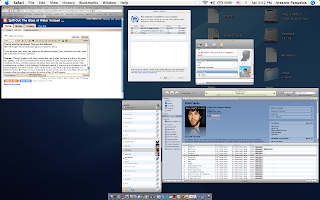
Exposé - Though Windows will never imitate this, this is Mac's answer for the lack of a taskbar. And it's not as cumbersome as you may even think. In just a press of F9, all the windows you have will show and you can select them and with ease because no matter what configuration you have, it will definitely be fast and smooth. If you have lots of windows of the same program, let's say a browser, F10'll do the trick.
If you want to go to the desktop in a flash, F11 is key. But if you are more dependent on your mouse, you can even define the corners wherein when you place your mouse, the action of say, F9 will happen.
CAPTION: Expose all your running programs with Exposé

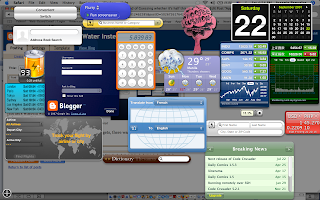
Dashboard - Before the Windows Sidebar and Gadgets, there was Dashboard and Widgets. Apple currently has a range of widgets from useful stock quotes to stupid whoopee cushions.
In Leopard, you'll be able to create
your own widget by just cutting a portion of any web page and putting it th ere in just 3 steps using Safari's WebClip. They will be refreshed constantly to give you the latest information.

CAPTION: My own dashboard. Yes, it has the Whoopee Cushion.

Spotlight - Per-word searching and Boolean (AND, OR) logic make the search function for the
Mac specific and human. For example, if you search 'Garage and band', not only will the GarageBand application appear, other stuff that involve the word Garage and Band will come to you in literally a second. It's placed on every Finder window (Windows counterpart: Explorer) and was definitely imitated by Vista. Too bad Vista's search is practically brain-dead while Mac's search is dead simple. Plus, it has direct desktop search which Windows Vista doesn't have (you have to bring the Start menu
out which is slooow).

CAPTION: I'm looking for GarageBand yet typing 'ga' gives me that result in just a fraction of a second!


GarageBand and free iLife in every Mac - Though mine are outdated, I'm pretty much very contented with what I have. There's iTunes (it's free, of course), iMovie, iDVD, iWeb, iPhoto, Quicktime Player and GarageBand. Hell, GarageBand already makes up most of the experience. You can make your own movie scores, songs and even podcasts! Plus, it has more than a thousand preloaded sound effects that are cinematic which can be expanded further by Jam Packs.
CAPTION: The iLife suite exposéd. Clockwise from upper-left, Mozilla Firefox (which is not part of iLife), iMovie, iLife, GarageBand (center, highlighted), iPhoto (below GarageBand), iWeb

Hope this guide helped... Hehehe.

August 9, 2007

TECHNOLUST!: iLife suite


I've posted about this before (as formal news) but now, I'm posting about this piece of software as the one I'm currently lusting for among others. It brings all of Apple's popular software to a new level with its new organizing tool called events, as well as DVD Handycam (that's the Handycam we own) support for iMovie. Plus, there are radical new presets for iDVD that look breathtaking at first glance as well as a new Magic GarageBand feature for GarageBand which can let you create a band that can play your own creation. Of course, it also has the low price tag it's known and loved for. Hopefully, it'll be shipped to the Philippines after a few weeks... Too bad all these powerful utilities are exclusive on a Mac. I'd love to see that day come out... which would be pretty far yet pretty near at the same time. But I guess that will be all for now. Tata!

August 8, 2007

The Storm...


Today was a great day for having no long test but tomorrow? NOOOO! It would've made great timing if the long test continued tomorrow. Damn, storm!

Dep-ed... Nagsisi
han na!
Remember a while ago? Everyone's going to school and it was raining, no, pouring. And suddenly, you're blocked by the security guard, who says in shock, "What are you doing??? Walang pasok ngayon, a! Go home."
Many incidents similar to this have happened across the country and Dep-Ed people are going the way of the blame game. What unscrupulous, immature behavior! Don't you agree?

Beijing 2008 Olympics
Anyway, to get my mind off this, I've decided to talk about the Beijing Olympics. Chinese are currently learning simple English... or rather a crash course. Though it's admittedly not as effective, China just wants to give a great welcome to people from literally all walks of life and all roads of the world. Just want to wish luck to them and hopefully, the Olympics are going to be great and huge... judging solely from the pictures and the efforts they are exerting, it sure is gonna be one heck of a summer!

Local TV: A Joke
Hmm... I never really watched anything Pinoy in the boob tube except Bubble Gang. But when I channel-surfed a while ago, I just can't help but notice all those sexy dancers in those noontime shows... I mean, what the heck is the purpose of putting sleazy sexy dancers in a noon time show when everybody's watching? Isn't this supposed to be controlled by the MTRCB???
The source of all this is probably the granddaddy of all noontime shows which is Eat Bulaga!. People say it was very wonderful and refreshing when they tapped Tito and Vic Sotto and Joey de Leon as hosts and yet, they (co-hosts) expanded to a nauseating number which can make viewing, well, nauseating. It's not just that, the quality itself of all primetime and daytime shows are just deteriorating in terms of quality. Good thing Tony Gloria is offering color grading services... Hopefully everyone will be able to see a higher quality in our local boob tube as well as the local movie scene!

Digital Films on the Rise
Speaking about the local movie scene, mainstream's getting tired and digital's taking it's place. It's dying for God's sakes and yet the Metro Manila Film Festival has a sick basis of judging "Best" pictures. 50% on Commercial Viability and 10% on Cultural Value? What the hell?
Good thing there's indiesine @ the Robinson's Galleria, though. It'll probably be the new hub for real (local) movies.
I wonder when indiesine will show Kubrador- one of the most acclaimed next to Maximo Oliveros...-->
Entertainment News (on the tube) are sick...
Every time I see shows like ET or The Insider, it ne'er fails to deliver a story about Britney or Lindsay or the DUI peepz as I like to call them. They aren't celebrity news at all. Heck, they shouldn't even be considered celebrities because they've only resulted into goddesses of the low and cheap and yet they influence the li'l ones (and sometimes... the teenagers). Shame.
<-- Lindsay Lohan in a beach house... If you don't mind, I'd just like to say that her chest looks extremely fake. XD
TECH NEWS
New iMacs unveiled along with bundled iWork and iLife software
Good thing we never bought the iMacs (the Macs with "cinema display"). Apple has carved it to a bigger, thinner, and not to mention, more powerful and I just drool at the thought of it (though nothing beats the 8-core Intel-powered Mac Pro).
<-- The thinner iMacs...
Apple also introduces the new versions of iWork and iLife. They've overhauled everything and even added jaw-breaking, mouth-opening effects, templates and features inside. Heck, I'm even impressed by the versatile file format saving (which means you can save files in .doc, .docx, .pdf, AppleWorks, etc. etc.) already!
Cool text effects for PowerPoint's Apple counterpart Keynote -->
Hotmail... finally decent
If you've been a Hotmail user before (like me), you'll find the interface very slow and clunky. But because of the successful Yahoo! Mail Beta, Microsoft finally followed suit. They re-labeled it as Windows Live Hotmail and gave it a better interface. At least Microsoft can finally attract more people now. (But not me!) LOL.
<-- Hotmail is apparently better now...

Surface Computing... wait a sec, doesn't Apple have the patent for that?!

Though this is relatively old news, Microsoft unveiled it's so-called "Surface Computing" technology which utilizes multi-touch (same type of touch-screen which powers the iPhone... it's basically a touch screen that you can touch with several fingers and apply pressure, etc.) and can also use your credit card to buy online by just literally placing the card on top of the surface and just letting the computer go through the motions. You can also even use place a glass on top and make whirly effects! It sounds kinda cool but doesn't Apple hold the patent for multi-touch?
<-- This is "The Surface"... the target for all those lawsuits...
 
Elegant de BlogMundi