So the rumors were true.
Last night, Philippine time, Phil Shiller made his MacWorld appearance to unveil several things that matched the rumors.
Unfortunately, the stream of the keynote isn't going as smoothly as keynotes past, but I'm just gonna outline every major announcement over here.
1) iLife '09

So the iLife suite is pretty much a big selling point since it comes built-in to every Mac. And since this is a suite, there are singular applications that run in an integrated, seamless environment, and they are:
a) iPhoto
The photo management tool gets new features- face detection, geotagging, online sharing, better editing tools and themed slideshows.

With Faces (or face detection), you can get a photo, select the face you want to track and type the name of the person with the face. After that, iPhoto automatically detects whether the person is in a picture the next time you import photos from your camera.
With Places (geotagging), you can "tag" the location of the picture you took using a GPS-enabled cameraphone (ahem, iPhone) or a GPS-enabled camera. iPhoto will group your pictures according to the place you went to. If you live in America, you can also use this feature to print out books that also track the location of your vacation (called Travel Places).
Then there's online sharing which lets you directly upload your pictures to Facebook or Flickr in one click.
Additionally, themed slideshows are (finally) there, and all you have to do is view your pics as a slideshow and show them off on-screen with an accompanying theme.
Bottom line, amateur photographers who don't want to shell out more cash to buy Adobe Lightroom or Apple Aperture can get by with iPhoto even better, especially with better editing tools.

b) iMovie
I've criticized iMovie '08 for being hard to use, and preferred iMovie HD. Now, even though it kind of keeps the same interface, it adds in new features that will most likely satiate the fickle ones- like me.
Precision editing, advanced drag-and-drop, more themes, video stabilization, green-screen effects, new effects, and a full screen browser make up for the lackluster '08 edition.
I can't wait to get my hands on it, because I'm still quite skeptical.
c) GarageBand
Ever wanted to learn all those crazy riffs for all those crazy songs from the crazy ones who made them popular? Well, you can now get Sting to teach you Roxanne, or Patrick Stump with I Don't Care when you purchase Artist Lessons. This is a pretty good gimmick that'll get guitarists, pianists and girls (mostly girls) screaming, and an interesting experiment. There's a huge chance of it sinking under, you see, but who knows.

Colbie's teaching me how to play "Bubbly"!
Additionally if your guitar supports it, you can wire it onto your computer and make it sound like those legendary guitars your dad keeps talking to you about. Let's get that oomph into the music.

d) iWeb
The only update that's probably meant for everyone to care about is iWeb's Facebook features which let your Facebook friends know whether an iWeb website has been updated.
Unfortunately, one would require MobileMe for that one.
e) iDVD
Actually nothing much new here, just more themes since iDVD is excellent already in its own right.
2) iWork '09

Because of versatile export tools, excellent themes and speed, I prefer iWork '08 to the Mac version of Microsoft Office. While Microsoft Office on Windows is still better (except for PowerPoint, Keynote pwns it regardless of version), there are some welcome changes to this suite of applications.
a) Pages
This is Apple's answer to Microsoft Word. While I loved the previous version, this version adds even more options to the fray like a full-screen view, better outlining, mail merge (with Numbers), more gorgeous templates and a better way to type mathematical equations (using MathType or EndNote).
b) Numbers
Microsoft Excel's extremely young brother. While Numbers was a decent alternative to Excel, it didn't really compare. This new version, fortunately, adds some more functions that make it more user-friendly, even if it still doesn't compare to Excel.
Your charts can now be categorized and hidden so that you can work better with a more compact view of looking at things, for example.
c) Keynote
Now this is a program I enjoy tinkering with. Significantly more beautiful and better than PowerPoint, Keynote once again blazes ahead of the pack with even more stunning effects and actions.
Magic Move, for example, operates quite a bit like Flash's keyframes. In one slide, you can place an object in one side, and in the other slide, you can place the same object in another side. Once Magic Move is activated, the object will automatically animate. This is a great way to save time (
and for animating a set of scattered cards).
Then there's the ability to use your iPhone or iPod touch as a remote control. I've always wanted that, and now it's available through a separate app in the App Store!
d) iWork.com
Now in public beta, iWork.com promises to be a glorified Google Docs and Spreadsheets, meaning that you can work on a presentation, document or spreadsheet on your computer, transfer that file online and work on that thing on your PC through a browser. You can invite other people so they can collaborate on comment on your work.
Additionally, iWork.com also promises to be able to send copies of the same document to friends regardless of operating system because it can convert and send the files in Microsoft Office or iWork formats.

No need for exporting and sending and waiting for the other person to respond.
I'm not sure whether you'll need MobileMe for this, though, but it would be cool if you didn't. And let's hope there aren't any severe bugs this time, OK, Apple?
3) It's all in the box.
iWork '09 and iLife '09 will strictly need Mac OS X 10.5 (Leopard). Fortunately, Apple is selling a box set that is of extremely high value for money (how surprising!) which includes Leopard, iWork and iLife. For 169 dollars, it's a fricking bargain.
4) iTunes without condoms.
What is DRM? It's a stupid way of stripping the rights of consumers while protecting the rights of copyright owners. iTunes has had that for years and now, it suddenly doesn't.
With 4 major labels and thousands of independents agreeing, iTunes is finally making the shift to being DRM-free, meaning that you can buy that track and burn it not 3, not 4, but infinite times. You can also put that song into your Zune, or your Creative Zen without having to actually re-encode it.
This will really grant Apple the status of biggest music retailer ever.
Still, how about existing purchased songs? Well, for 30 cents per track, you can get a DRM-free version of the same track with a 256kbps bit rate.
iPhone and iPod touch owners in America can also get on the act, now even without Wi-Fi.
5) A 17-inch MacBook Pro that sips, sips, sips juice
Not just a bigger screen.
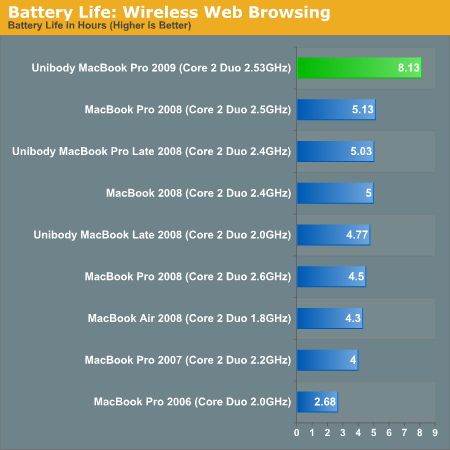
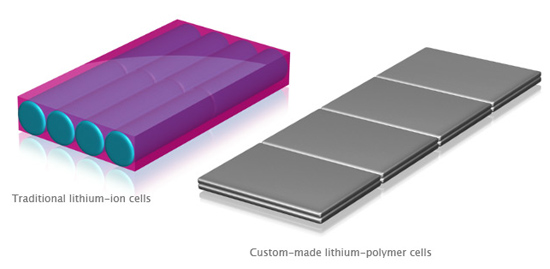
There was a product that was noticeably ignored last year in the Notebook event. While its younger brothers were re-designed, the 17" MacBook Pro was left in the dust. Apple makes amends this time and introduces a little twist: an 8-hour unremovable battery that's environmentally-friendly, lasts 1000 charge cycles and jives with the Pro's demands. Holy sh*t.
And if your eyes are good enough, the color gamut of the screen has been increased greatly (60%) as well. Most likely for the pro video editors and graphic designers.
Other than that, the redesign introduces the 17-incher to the MiniDisplayPort, the unibody, the dual video cards and the gorgeous LED backlit screen (and yes, an optional matte finish for 50 more). And yes, it costs the same as the last-generation 17" MacBook Pro.
Here's the commercial:
And here's how the unbelievable 8-hour battery came to be:
(thanks goes to the user applejuicevideos for being such a fast uploader)
6) Tony Bennett
Ending the whole keynote was world-renowned singer Tony Bennett. But I didn't see that performance either.
I can't really muse about 'how the keynote was so underwhelming' because I couldn't really watch it properly for some reason, but I gotta say, just the promise of a more precise iMovie sells for me.


 MacBookPro 6,1 is an unreleased revision of the MacBook Pro, and has been referenced for some time now. It runs a special build of Snow Leopard and the benchmarks presented compare favorably to Apple's most powerful offering, the Mac Pro.
 It is said to be running at 2.66GHz, and the performance is looking swell.




 Plus, the new trackpads are buttonless and made of GLASS. This entire pad is now the button (just push the entire thing anywhere your hand is) and it's powered by multi-touch (the same tech for iPhone). And yep, there are new gestures using 4 fingers. Expose can be used by 4 fingers sliding down or up, and well as app switching by swiping 4 fingers left or right.
 WOW, full glass, black bezel, super-thin LED display, and... is it me or does it look a bit like the MacBook Air?
 Well anyway, it's gonna have a graphics card that's 82% the power of the Mac Pro's (GEForce 9400M and GEForce 9400M GT both inside), aforementioned glass trackpads, it'll have connections on one side, and a nice sturdy body (which Steve Jobs let the audience feel and touch and pass around for quite a long time...).


 ow, the MacBook Air has faster graphics, 120GB hard drive or 128GB solid-state drive, a Mini-display port and still at

 Cost is

 Posts
Posts


