Maybe I could mislead you with the title, but the thing is that the iPhone's operating system is the one that's gonna be shown in a media event to be held on March 17. I'm just gonna put the general term iPhone in here just in case Apple does pull off a "one more thing" even without their cult leader Steve Jobs.
Last year, Apple also held a March event for iPhone developers showing off the capabilities of the then-unreleased iPhone 2.0 software development kit.
What would you like to see in this new work-in-progress? Personally, I'd like the iPhone to gain some actual credibility as a real phone: SMS Forwarding, for one. And how about some copy and paste as well? Make sure you don't charge iPod touch owners again, Apple (or at least the iPod touch owners who have upgraded to version 2.0)!
There'd probably be an even longer laundry list, especially for current owners of the much ballyhooed device.
Way back even before the September special event held by Apple to announce iTunes 8 and the new iPods, several rumors and leaks have already popped up about a sort of "Genius" feature included in the iTunes 8 upgrade. Like the popular websites Pandora and Last.fm, the feature tries to create a playlist that it thinks sound great together with this one song you yourself pick. Does it work? What about the other features in iTunes 8? Well let's see then...
Genius This is the most advertised feature but does it work?
Well, it actually depends on how many songs (or rather, song genres) you actually have in your library.
But it's not exactly activated at first launch, though. First, you'll have to send your entire library to Apple, so they can process it and determine which songs sound great with each other. Of course, you don't need to fill in some private information, but if hackers found a way to access your computer via this feature, (because Apple sends information back to you) I'll be damned. Anyway, once you activate Genius, you can plug in any upgraded iPhone 3G, upgraded first generation iPod touch, 2nd generation iPod touch, 4th generation Nano and 6th generation Classic to activate the feature in those machines. Besides that, you can now use that new atom button thingy below. You first play a song- any song- and click that button so you can let iTunes generate a "Genius playlist". I based my first ever Genius playlist on Jason Mraz's "I'm Yours", and the results are snappy but some of the choices made are pretty questionable. Panic! At The Disco? Daughtry? Fall Out Boy? Wait, I never knew they'd potentially sound good alongside something like "I'm Yours"!
Still, I have to give effort points to the system, and really, I don't blame it for the choices since I'm more of a rock/alt fan than pop. Still, if you're unsatisfied with the results, you can always Refresh it. And when iTunes gives you that perfect combination, you can Save that playlist (although you can still Refresh it anyway) and sync it to your iPod.
So I tried putting more varieties of songs into the library, then updating Genius, and what do you know? It became smarter. The questionable choices were less, and the playlist was a lot better. If you hate Genius though, I won't blame you. It's very much new, so if you give it enough time, and if a lot more people use it, the system will become smarter. It's still off to a great start regardless.
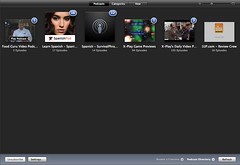
New Browsing mode Back then, it was just that "spreadsheet" style of music browsing. It was pretty boring, even with Cover Flow. Now, Apple gives the browsing style an overhaul. The spreadsheet style is still there for those who opt for it, but for those who want a new way to browse their music, they can use the revamped Grid view. If you're a Mac user, you'll notice that the design is reminiscent to that of iPhoto. And if an artist has, say, 2 or 3 albums, you can look at them by pulling the mouse cursor up or down, left or right. To play the whole album or artist, you can just click the "Play Album" button that appears when you hover your mouse over it. You can resize the size of each album cover (and the captions underneath them) if you're blind, and you can sort them by Artist, Genres, Composers and Albums. (AT TOP: You can view albums by Genre or; BELOW: ...get this view in the Podcasts, TV Shows and Movies menus. Noticeable in the Podcast menu are blue numbered circles marking the number of unwatched/unheard podcasts.)
New Visualizer I don't know if you still use a visualizer in this day and age (I sure don't), except for Windows Media Player fans (they have no choice), but if you like them, you will like the new Visualizer Apple put in the new version. It's actually very pretty if you ask me. But as I said: I don't think anyone would be using this very often. Especially since it's a...
Memory Hog iTunes has a reputation of being a big memory hog. Unless you're running a Mac, not all processes run silky smooth in iTunes 8. It's slow, it's unresponsive, and damn, it just brings CPU usage up the roof. Heck, it causes the Blue Screen of Death in Vista! That can't be good. Of course, Apple has re-uploaded a fixed version of the Windows iTunes, but this just makes me ask whether Apple even tests its software before releasing it to the public? Surely, you should like any normal company? Or maybe your Windows developers just got lazy or something?
A hassle to download It's like really HUGE! It's ginormous! It's a music and video player for God's sakes! Even VLC is only like 4-5MB's or something! I'd accept 20MB, but 60MB is like... a real hassle to download even on a broadband network. Apple needs to reduce the file size for this thing, damn it.
Overall Genius needs a bit of time to mature, but it's off to a good start. The new view is welcome, and the visualizer is really beautiful, but kind of pointless. I'm not sure why Apple still hasn't fixed the memory leaks and all, and they sure haven't reduced the file size of this beast, but other than that, this upgrade is pretty nice- especially if you want to buy a new iPod (or upgrade your iPod touch or iPhones), but for other people who still don't plan to buy a new iPod or upgrade their existing iPod touch or iPhones can stick to iTunes 7 if they so choose to. Genius isn't really that much of a reason to download in the first place, but it's still a really fun feature to toy with.
Of course, you have the standard music and (limited) video playing options, and they work as they should. Aforementioned hogging may cause a broken listening and viewing experience at times, though.
That is the first thing Steve Jobs covered in his awesome keynote today. That, and that iTunes has quite the customer base, and so they're pleased to announce the addition of HD television episodes which start at 2.99 dollars, and they can now be watched directly on your computer. Speaking of which, NBC is announcing a return, so yes, you can purchase Heroes on hi-def legally again.
iTunes 8 "We have been receiving a lot of requests for HD TV shows, Accessibility, New Browsing and Genius. Let's look at the last two."
A new space-efficient way to browse is to now be able to scroll through album covers solely. It's not Cover Flow, but it's more of a tool that let's you see little tiles of an album of a particular artist. This also applies for movies, TV shows, etc.
And, if you want to look at your music by genre or composers, you can sift through a genre by putting your mouse over the genre's name and scroll up or down to see artists. Like in iPhoto.
And then there's Genius which helps pair various tunes together that it thinks sound nice together. You can do that in only one click. Plus, you can even summon a sidebar that gives suggestions that link to the iTunes Store that it thinks will go great together with your existing tunes. You can repeatedly refresh it as well. So if you like Pandora, you may want to give Genius a shot.
Plus, Genius benefits from better results if even more people use it. So, it's basically something other humans upgrade by just clicking, and I have a feeling that I will definitely be using this. It will even update once a week!
It's now available for free.
iPod Sales figures bla, bla, bla... 160 million units sold, fine... and finally!
iPod Classic Now the 80GB is off, gone forever, and 120GB remains at the price of the 80GB ($249 or 11500 pesos), and it's as thin. Nothing else.
iPod Nano (OMFG) Gasp, puberty has done something to everyone's favorite Nano!
"We have a new iPod nano for this holiday season and it's really really beautiful."
INDEED. -drool-
It's the thinnest iPod ever made, and the wide 3G design is scrapped for the original tall design, only with a huge screen. It comes with more colors than ever, and it's sure to be a big hit. When Steve Jobs put it out of his pocket, it was just gorgeous and so small! New features? A new curved aluminum design, it has curved glass for durability, it now even has a new interface design, Genius playlist selection so you can access the iTunes feature in the iPod itself, and an accelerometer! Wow, what would you do with the accelerometer? I wonder...
Like the iPod touch, you can just flip the iPod nano sidewards to activate cover flow or look at a photo on landscape mode and of course for videos like the iPod touch. Song browsing looks more like the love child of the iPod touch's and the iPod classic's navigations, and when you're playing the song, the album art occupies the screen (like the Zune or the iPod touch)! Very nice. And oh, if you push the center button without letting go, you'll see a sub-menu that enables you to see several features such as "Start Genius" so you can build playlists that sound great together on the fly, add it to the "On-The-Go" Playlist, browse the artist and browse the album. Plus, you can just shake the whole thing to activate shuffle, and like in the famous Walkman phones, you will be led to a different track. Just excellent.
Heck, it even has a voice recorder! Hope we can see these (Voice Recorder, Shake Shuffle and Genius, that is) in the touch...
This product is droolworthy... it's desirable. But I'm surprised that they didn't put the same stuff into the Classic. Perhaps the next model's gonna be called Dinosaur and it will be one step behind the nano?
24 hours of audio and 4 hours of video battery life is promised. But if you hate black, you can get more colors. And this is where the nano-chromatic line stands. Each of them is a gorgeous color and ranges from purple, blue, green, yellow, orange, red and magenta. They're shipping in 8GB and 16GB flavors and the former will sell for 150 USD (about 7000 pesos) while 200 USD (10000 pesos approx.) for the latter. Wow, I smell hotcakes already. Now shipping (expect a hands-on in 2 weeks or so).Accessories There's once again, the armband for fitness buffs, but what if they don't like a song and they want to click next? Do they have to stop their run just to press Next? Hell no! Well, Apple has introduced a new set of earbuds that has this sort of volume control thingy you'd typically find in phones. The plus button is of course, for volume increase, minus for volume decrease, and depending on the number of presses you do on the central button, you could either pause or play, go to the next song or go back to the previous song, and it even has a mic. This is gonna be convenient since you only have to hold your earbuds to do that, but they're not included with the nano nor any of the iPods for free unfortunately. They ship in October for 29 USD.
And for the rich, you can get the earbuds that have a woofer and a tweeter for 79 dollars. Typically, you'd find these in even more expensive earbuds, but now, it's in genuine Apple earbuds. And they're white. See this in October as well.
iPod touch Steve Jobs calls it "the funnest iPod ever", and that's because it now comes with 2.1 of the iPhone software, so you can get games and apps onto your phone without having to pay extra! Plus, a few requests have been granted, such as the addition of more humane buttons for volume (Woot), and a loudspeaker just like the iPhone. And it has Genius (Woot), E-mail, contacts, international keyboard support, and basically most of what the iPhone has to offer. And it's also in a contoured stainless steel design (plus it's thinner). Don't fret existing iPod touch owners, because all of this comes with the firmware upgrade! You get Genius, and most of the iPhone's features save for the crappy calling, but for a price: $9.99, if you're upgrading from version 1.x. The iPhone will also be affected by this update as it fixes security leaks and drops calls less (I have yet to see if this is correct). But this is what I like about Apple, there are new features in newer models, but they don't leave past models far behind at all. Watch out for it this Saturday. Alternatively, you can just go ahead and buy this new one for the significantly (significantly) reduced price of $229 (10,534 pesos approx) for the 8GB model, $299 (approx. 14,000) for the 16GB model and $399 (approx. 20000 pesos with tax) for the 32GB model. Ooooh....
And oh, better battery life of approx. 36 hours for music and 6 hours for video.
Spore Origins Specifically made for the iPhone, Spore Origins tries to duplicate the PC experience, and it looks stunning! Spore in action and more games Just watch the video below.
Don't forget! The iPod Shuffle once again gets a re-color. Nothing special. Just snubbed like the Classic. Hmm..., it seems that Steve Jobs' favorite son is the one in the middle, eh? (1GB costs 50 dollars or 2300 pesos, and 2GB costs 70 dollars or 3200 pesos)
Ladies and gentlemen, the ads. I love the ads. They make me unsatisfied with what I have, joke. But seriously, Apple makes the best ads.
Wow, that was a really great conference, and frankly, Jobs should've made the NBC thing a "One More Thing" moment. It was just a shock that he would merely mention it in passing! Well, I hope you had fun reading this as much as I had fun typing this. Good night everyone, and expect a hands-on of the new models, as well as a review of the 2.1 software update for the iPod touch in the coming weeks.


 Maybe I could mislead you with the title, but the thing is that the iPhone's operating system is the one that's gonna be shown in a media event to be held on March 17. I'm just gonna put the general term iPhone in here just in case Apple does pull off a "one more thing" even without their cult leader Steve Jobs.


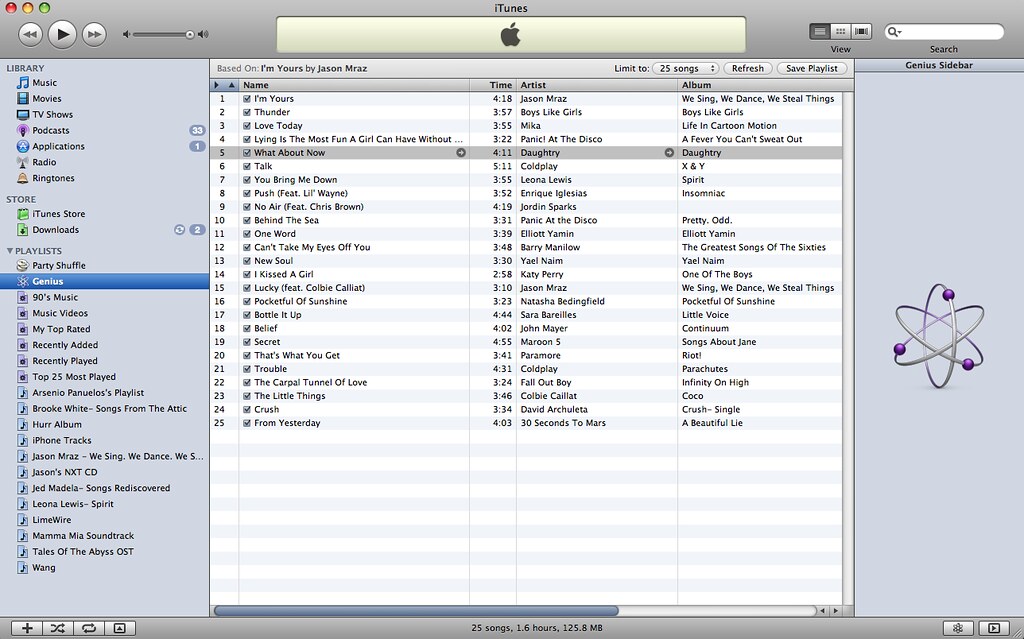 Panic! At The Disco? Daughtry? Fall Out Boy? Wait, I never knew they'd potentially sound good alongside something like "I'm Yours"!
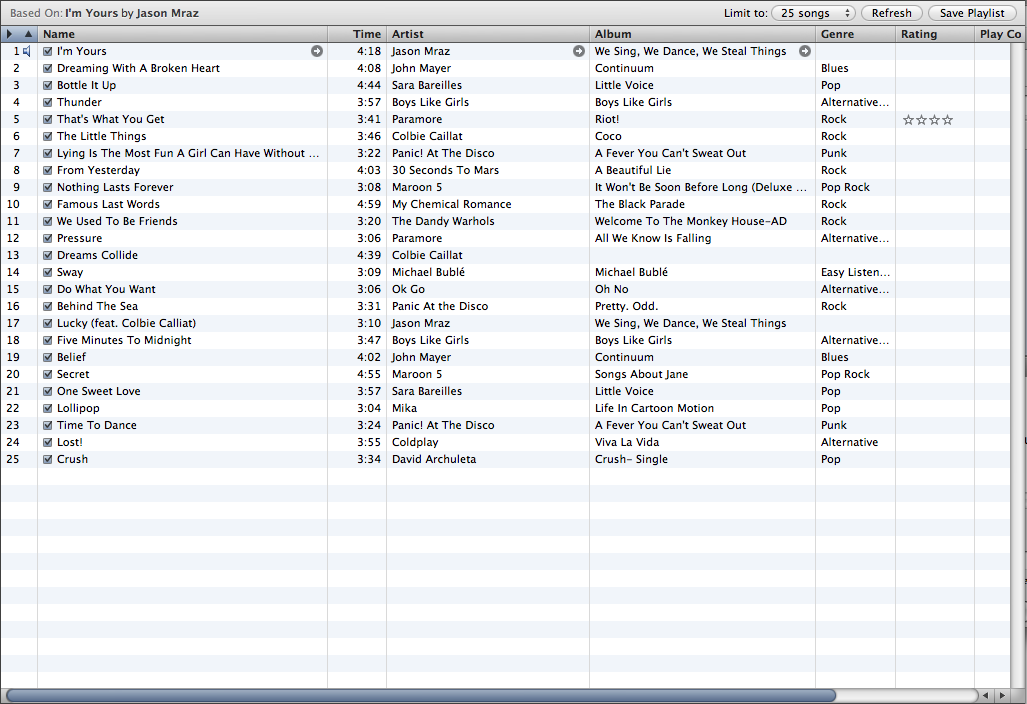 If you hate Genius though, I won't blame you. It's very much new, so if you give it enough time, and if a lot more people use it, the system will become smarter. It's still off to a great start regardless.
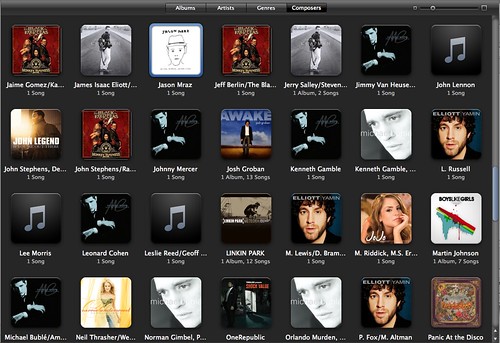 If you're a Mac user, you'll notice that the design is reminiscent to that of iPhoto. And if an artist has, say, 2 or 3 albums, you can look at them by pulling the mouse cursor up or down, left or right. To play the whole album or artist, you can just click the "Play Album" button that appears when you hover your mouse over it. You can resize the size of each album cover (and the captions underneath them) if you're blind, and you can sort them by Artist, Genres, Composers and Albums.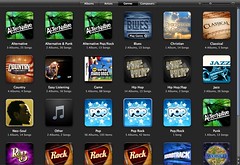
 But as I said: I don't think anyone would be using this very often. Especially since it's a...


 There's once again, the armband for fitness buffs, but what if they don't like a song and they want to click next? Do they have to stop their run just to press Next? Hell no! Well, Apple has introduced a new set of earbuds that has this sort of volume control thingy you'd typically find in phones. The plus button is of course, for volume increase, minus for volume decrease, and depending on the number of presses you do on the central button, you could either pause or play, go to the next song or go back to the previous song, and it even has a mic. This is gonna be convenient since you only have to hold your earbuds to do that, but they're not included with the nano nor any of the iPods for free unfortunately. They ship in October for 29 USD.
 games and apps onto your phone without having to pay extra! Plus, a few requests have been granted, such as the addition of more humane buttons for volume (Woot),
  Don't fret existing iPod touch owners, because all of this comes with the firmware upgrade! You get Genius, and most of the iPhone's features save for the crappy calling, but for a price: $9.99, if you're upgrading from version 1.x. The iPhone will also be affected by this update as it fixes security leaks and drops calls less (I have yet to see if this is correct). But this is what I like about Apple, there are new features in newer models, but they don't leave past models far behind at all. Watch out for it this Saturday.
 pesos approx) for the 8GB model, $299 (approx. 14,000) for the 16GB model and $399 (approx. 20000 pesos with tax) for the 32GB model. Ooooh....


 Posts
Posts


