Get your iPods and iPhones ready (lest you're on the 1st generation), Apple's almost dropping the next software update to your devices, and it's a big one.
iOS 4, the update that brings in multitasking, wallpapers and folders among others was announced a mere few weeks after the iPad was announced. It will ship with the new iPhone 4 this June 24, as well as the special 8GB iPhone 3GS's that are already shipping.
It's free for both iPhone and iPod touch from 2nd generation and up. Multitasking is only supported in the 3GS and iPod touch 3rd generation.
Just in case you bought an iPod shuffle lately, you may or may not have experienced some severe screw-ups with the only method of control you have: your earphones.
Today, Apple has launched a presumably worldwide replacement program that covers iPod shuffles with serial numbers xx909xxxxxx to xx952xxxxxx and xx001xxxxxx to xx004xxxxxx. If your headphones are an epic fail and they fall in line with those numbers, you're good to go as long as you get them replaced in an Apple Authorized Store, meaning it's likely that Power Mac Center, iStudio and Digital Walker are candidates for a visit.
If you want a complete list of Apple Authorized Stores, click this link. If you want to know where to find the serial number of the iPod shuffle, click this link.
EDIT: I forgot to mention that the program also covers iPods and iPhones that come with the Earphone + remote and mic, meaning that you can pretty much give out the serial numbers of those devices to the Apple Authorized Store and get those failed cans replaced.
Yes, it's that time again: another Apple music event. I've watched the on-demand stream once again and I invite you to read my not-live-live-blog where I just post my thoughts as the moments unfold. You won't care for a lot of things, which is why I'm going to post the major news stories separately as well, like last time in WWDC. -------------------------
Steve Jobs returns to the stage, and to uproarious applause. People actually half-expected Phil Schiller to speak once more, but THANK GOD a grateful Steve Jobs is back on the show floor once more. Citing the source of his new liver, he wants everyone to be organ donors. It's actually genuinely heartfelt... a rare look at Jobs' human side.
But enough about that, let's get into the music.
Oh wait, iPhone segueway first.
30 million of these things have been sold, and one of the reasons why is the app store. 1.8 billion downloads for 35,000 apps. He also introduces 3.1 for the iPhone and iPod touch which incorporates the Genius feature into the App Store, meaning that the App Store will recommend apps that you might like based on what you own. It's actually quite interesting to see how much coverage a few obscure apps can get. Less interesting are the ringtones incorporated into the iTunes Store. $1.29. Yawn.
Steve goes on to cover iTunes, citing that it is currently the #1 music retailer with 100 million accounts and 8.5 billion purchased songs. iTunes 9 gets introduced, per the rumors as it introduces a very good clean-up of the online iTunes Store.
New features of the new release include Genius Mixes which builds upon the Genius technology first introduced in iTunes 8. "Imagine a 'genius' DJ that plays endless mixes of songs from your library that go great together, like FM radio." A particularly pretty interface, but I still don't really get it.
It also includes "Improved Syncing", and it sounds quite promising, actually. More granular control of your playlists, as you can also sync not only one playlist, but also a particular artist or genre, which is nice. It also applies to Photos, Movies and, get ready: Apps. Now you can organize apps right from iTunes, which quite frankly is a life-saver.
Home Sharing must've been Apple's answer to Windows 7's similar feature. It lets you copy music, songs, TV shows, etc., throughout your house, but you can only authorize for up to 5 computers in the home network.
Cocktail, err, iTunes LP is now being introduced. "Some of us were actually old enough to be able to buy an LP. You got great photography, liner notes, essays... unfortunately, all that stuff left us when we went to CD's and digital music, but that shouldn't be the case." They actually look like DVD menu's of a concert CD, and I'll never really use them because there is no freaking iTunes Store for the Philippines!
Well, anyway, a demo of iTunes 9. Looks responsive and intuitive (and yes, you can select more than one at a time). Hopefully, the Windows version won't be very slow, but how about a way to actually create "Smart Pages" or something? You heard it here first, people, if this feature happens, I'll be getting my royalties.
Kidding aside, some guy also demonstrates the pretty simple Home Sharing feature. Again, you can only authorize up to five computers, and you need to input iTunes Store user information. You can also do a little "Sync" throughout computers, meaning that if new content is added in an iTunes library, sharing will instantly happen and the stuff will be shifted immediately.
The redesigned iTunes Store which surprisingly didn't leak out, is actually the redesign I've always imagined. I've always thought that the iTunes Store needed a revamp, and they pull it off. More convenient, more modern, but still quite familiar. You can even share music to Facebook and Twitter, so it confirms the rumor about a semblance of social networking. It's not full-on which may cause a few people to breathe easy, but it's actually quite refreshing to see Apple incorporate these services.
iTunes LP is also demonstrated, and it includes photos, videos, lyrics, etc.. Totally like a DVD menu, totally not exactly compelling. Still, if Harmonix does the iTunes LP for the Beatles remastered edition (which will eventually make its way to the iTunes Store), it would actually be so awesome. And yes, Apple is opening the gates for record labels to do their own iTunes LP's. Movies also have this as well, making it exactly like a DVD menu. Is buying a movie with an iTunes LP cheaper than a DVD? Well, a Blu-ray is surely much more grandiose since it's 1080p.
Anyway, iTunes 9, as always, is free and available for download through either the Apple site or Software Update.
OK, iPod refresh time.
Phil Schiller is called in, and they announce that 235 million iPods have been sold. Holy crap, iPod makes up 73.8% of the market share. They'll surely make a hit at Microsoft. Oh, there it is. 1.1% market share. Roll eyes. Let's see your Mac market share, Apple. Bashful?
Anyway, it's surprising that more than 50 percent of people are new to the iPod. WTF.
Now, Schiller says that 20 million iPod touches have been sold. Obviously, a new generation will be announced. Hopeful for a camera! A camera on the iPod touch would own the Zune HD terribly.
3.1 firmware introduces Genius Mixes to the iPod and iPhones, and now I figure out that it's actually simply a near endless Genius mix that randomly picks a song to base Genius on and just play.
Schiller says that consumers think that the iPod touch is a great internet device-- a statement I strongly agree upon. "It's a computer that fits on your pocket, unlike someone else's," and a Dell laptop being put in a pocket is displayed. LOL.
Of course, the marketing moniker for "funnest iPod ever" is not let go. "It's a great gaming experience," and for the first time ever, Schiller cites the "inconvenience" of the PSP and the DS, and yes they are mentioned by name. It's like an ad made up of Schiller's cracking voice. While I use my iPod touch more, the DS has better games.
A demo reel of great iPod games is shown. Reminds me of the Sony E3 conference, LOL. Obviously, some developers will be exhibiting hot new apps. New iPod touch later.
A Ubisoft rep is called to the stage to demonstrate, yes, Assassin's Creed II. With the success of the port of the DS Assassin's Creed, it's not much of a surprise. Still, it seems that it will be an Ezio-tic adventure built from the ground up. It looks much faster than the old one, thanks to the new OpenGL standard, but it's quite weird that the d-pad is not an actual d-pad, but an app that sort of scrolls left and right. Subtitled Discovery, Assassin's Creed 2 will be released on the same day as its big brothers-- a release window rarely seen even on the DS or the PSP.
Next is one of my favorite iPhone developers, Tapulous. They introduce a racing-rhtyhm hybrid called Riddim Ribbon. Despite the stupid name, it looks like a mix between Audiosurf and Amplitude. Boom Boom Pow is a featured track. Looks very good. The objective is to tilt the device and go through hoops to keep the music going. Otherwise... ouch. My ears. Comes out on October.
Gameloft is next. Wait, isn't Gameloft owned by Ubisoft? Well, anyway, a rep introduces an app called Nova-- a shooter that possesses some pretty nice graphics. Still, it features the same dual analog control in Brothers in Arms. The control method works, but not as good as, say, Wolfenstein 3D, which is ironic. It looks really Halo-ish.
A frequent visitor, EA, goes back on stage with a new game. Apparently, Madden. I personally do not have any interest in football, or for the politically correct name, rugby. A custom kick gameplay mechanic is present, and it features the titular announcer's voice. Strategizing the play is actually very easy, and it's actually pretty cool. You can manipulate the gameplay so that it even goes slow-mo. Crowds particularly like the intuitive strategy drawing thingy.
A whopping 20,000 game titles are present. But then again, 98% of this stuff is bad, lol.
Schiller references the iPod mini. When it was lowered down to $199, people were crazy about it. The 8GB iPod touch gets the same treatment. Yay!
32GB, you can for just $299, and SIXTY FOUR GIGABYTES for $399. Condition is that the 32 and 64 GB versions possess the same processor and Open GL/ES compatibility that the iPhone 3GS has. So is the iPod touch basically last year's model, with 3.1 and not even a slight cosmetic refresh like the second-gen?
A new ad is presented in the usual manner, and it actually demonstrates the multiplayer capabilities of the thing.
iPod classic. Meh, same $249, but with 160GB again.
iPod shuffle. Well, Apple acknowledges the outrage that came with the introduction of proprietary headphones, so Apple is working with more headphone makers to make it a bit more of a viable purchase. Seriously, the default earphones hurt my ears bad. Schiller also introduces 3 new colors aside from black and white, as well as a $59 price point for a 2GB model, the same $79 for the 4GB model. Apple will also release a special edition release in stainless steel which actually looks alluring.
One more thing...
A video camera.
That's right, a video camera to the iPod nano. Stupid, for me. Come on, it's not exactly an HD camera like the Flip, so you can't exactly cry "MORE VALUE!". True, it's still thin as ever, but how about that freaking video quality?
...Just barely decent.
At least there's a built-in external speaker and microphone for voice memos.
Oh wait a sec, more features?
Genius Mixes, FM Radio(!), a revamped Voice recorder, and yes, a Pedometer that syncs to Nike Plus. Obviously, the accelerometer enables the pedometer, duh.
It still looks pretty damn good though, I have to admit. Newer colors made of adonized aluminum are to be introduced as well. 8GB still for $150, and 16GB for just 20 dollars more. They're available today.
The ad's pretty nice too. People in different colors match the colors of the new iPod.
Again, the environmental checklist... OK, we know, check it all.
All of these iPods, despite rumors of production issues, are available today. Norah Jones takes the stage and brings the keynote to a close.
Oh, and the Grammy-winning singer has an iTunes LP, as well as a new album. And what's with all this talk about secret passages?
Closing Thoughts Now that Apple is willing to adopt much-requested features like FM radio, even if it's only on the iPod nano, it's not that big of a stretch if the Apple TV would get DVR capabilities, or maybe even compatibility to the iTunes LP's since they look like they're meant to be played on an HDTV more than anything.
Frankly, the iPod touch upgrade was just underwhelming despite the addition of a 64GB model and extremely irresistible prices (take that, Zune HD!), and the video camera on the new nano isn't a particularly big draw. The classic isn't particularly of much focus, so it's death may just be imminent in the next two years. Weirdly enough, even an announcement of the Beatles was non-existent, and it would've really been apt because of the event's name and date, but not everyone cares much about it since they can just buy the newly released remastered versions of Beatles songs through their music retailer and rip these higher-quality files onto iTunes.
iTunes LP isn't also terribly exciting, and Apple fans may have to wait another year for a 64-bit iTunes to arrive to match Quicktime X. Still, the novelty of seeing Steve Jobs on the stage again is a pretty good reason to watch, even if the products aren't all that compelling. Hell, I'm even more excited for the third-party apps they had on display!
In true Apple fashion, invites have finally been sent out to the tune of rock n' roll.
A little subtle spin on a Rolling Stones song, Apple has confirmed that the much-rumored September 9 event is truly happening. To be expected are refreshes throughout the entire iPod line, most likely with the addition of a camera.
Other rumors include Facebook integration and app organization with iTunes, a new album viewing experience codenamed "Cocktail", the release of iPhone and iPod touch 3.1 firmware, and the long-awaited addition of The Beatles to the iTunes Store catalogue. It is worth noting that the keynote happens the same time as The Beatles: Rock Band and the remastered Beatles collection are released.
Will Steve Jobs be presenting? Well, maybe if there's a tablet involved... which in my opinion may not be likely.
Despite the fact that a new Shuffle was just released, it seems that Apple already has another one in the works!
While details are vague, it may seem that the earphones to be used are the In-Ear Headphones with Remote and Mic, but now the Remote may just be the iPod itself. Potentially, VoiceOver could be used to help in navigating the songs, and Shuffle or Repeat modes might just be activated through several clicks of the Remote's central button.
The use of in-ear headphones may signal a change to the entire iPod line, or maybe it's just because of the huge backlash due to the default headphones that come with the current generation 4GB shuffle.
The questions remain: how much capacity will it accommodate, and how much battery life it will have? Is it real at all? Will the remote have a 3.5" headphone jack (because it doesn't from the looks of it)?
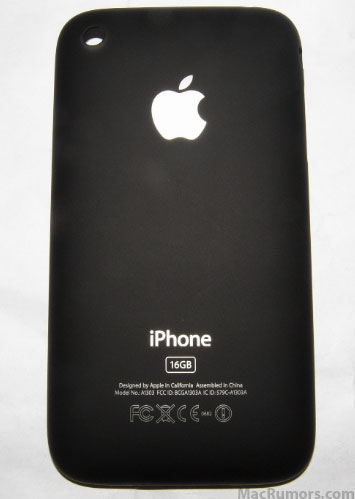
First it was an aluminum casing, then it was curved black plastic, and now... it's metal, maybe.
MacRumors.com has reported that the website iPodObserver has posted "leaked photos" of the upcoming iPhone. Obviously it won't be dubbed iPhone 3G so the picture gets a teeny bit of credibility, but aside from that, what seems to be a mock-up is pretty darn believable. Last year, the same website- iPodObserver- posted correct photo leaks of the iPhone 3G's backside, so there's quite a bit of reason to believe this rumor to be true.
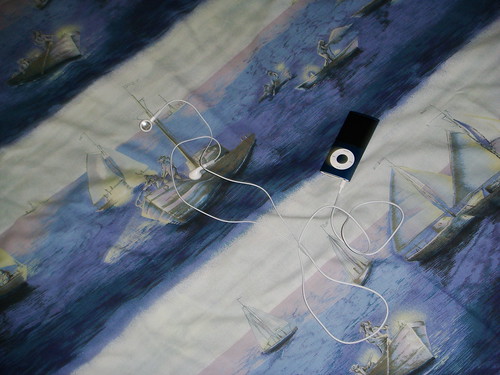
If you've been following my Twitter feed, then you'll know about the trevails of my brother's new blue engraved iPod nano we ordered online in the Philippine Online Apple Store. It's a bitch that we didn't get the T-shirt they promised, but what the heck, it's kinda ugly in the picture.
Anyway, everyone would know what I'm reviewing this thing for: to determine if it's worth the money. And you know what? It is. But before you go horsing around for the nearest mall to get the thing, let me expound on my review first.
iPod nano (4G) review
Cost: P 9500 (Apple Online Store Phils.)
Also available: anywhere
NOTE: If you don't want to read, scroll all the way down for a summary.
No other gadget has ever taken so much of my time, so much of my attention just to ogle at it more than the 4th generation nano. And while Apple products tend to make you do just that, this one is special. This is just how awesome the nano is to look at, and out-of-the-box is what I mean, because it looks better than the pictures in my opinion.
But what it delivers on style, it almost delivers on substance. It has the same features everyone knows and loves/hates on the regular iPods, and then some.
So to keep this review short (kind of), let's focus on the new stuff.
Genius
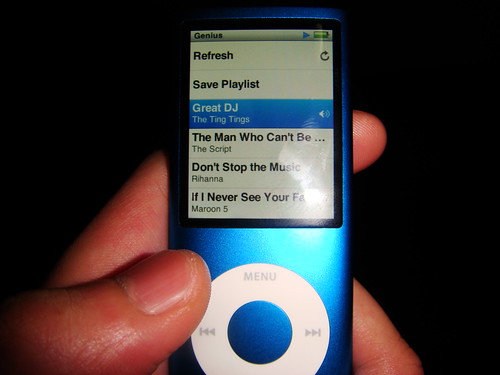
A new way to discover your old, buried music, Genius playlists try to locate 25 songs that have the same "mood" as the current song you're playing. You have to get your computer's iTunes Genius feature turned on, though.
Generally, it's the same on all iPods: it can work, but it can also pick a few sour pickles from the jar.
But for the sake of convenience, Apple decided to give you three ways to access Genius:
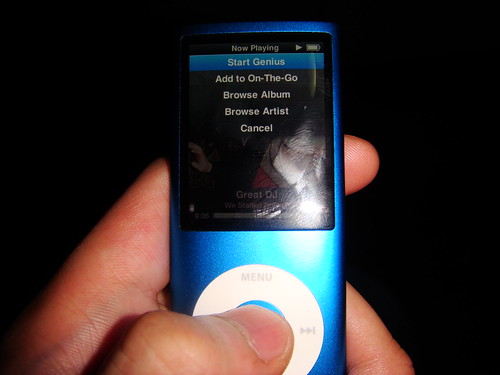
1) Hold the Center button for two seconds in the Now Playing screen, and a menu appears.
2) Push the Center button several times in the Now Playing screen until you see Genius with a sort of arrow beside it. Slide the Click Wheel to start Genius.
3) Access Genius from the Music menu while playing a song.
It's good to see Apple giving the newbies a great hand.
VoiceOver (Accessibility)
But it's even better to see Apple giving the blind a hand. New in the iPod line is the ability to be able to sync VoiceOver (Mac) or Narrator (Windows) onto your iPod so a blind person could be able to navigate the iPod nano. I didn't test this however, but it's still worth mentioning. To activate this feature, simply check a box in the iPod section of iTunes and press Sync (I forgot what was written on that checkbox).
Revamped aesthetics
If you saw the pictures, you'd know that the iPod nano has a more iPod touch-y look going on in the software, and a welcome change back to the old tall look.
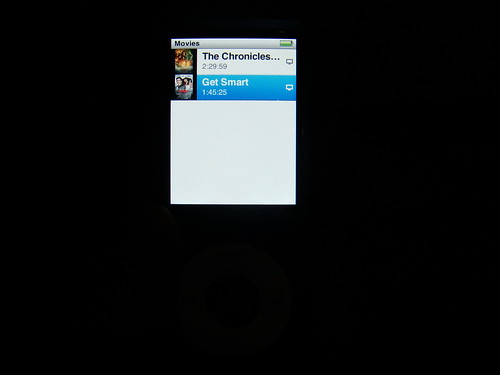
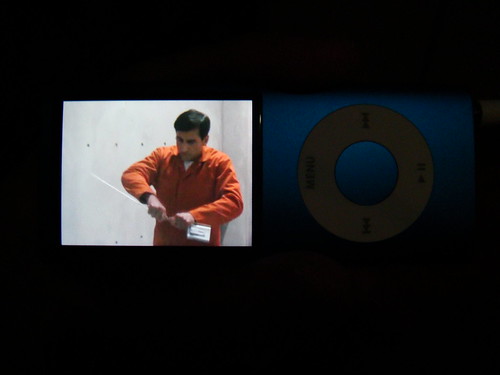
The hardware change makes room for a larger screen (which is most welcome) as well as a better grip. However, this will also make you have to hold the nano to its side if you were to watch a movie, which is very much more tolerable to watch in that way to be honest.
NOTE: Flash turned off intentionally to show off default brightness.
The Now Playing screen is most iPod touch like, and I love it. Plus, if you'd look at the uppermost picture of this post, you'd see that the Album Art montage of your Music, Videos, Photos, etc. have been placed at the bottom due to the return to (original) form and to make the menus more responsive as well.
Navigation is still largely the same despite the changes inside, but... is it my big finger or is the Click Wheel kind of cramped?
Plus, the screen is now made of glass- the same material used for iMac's and MacBook's. Not bad. Now if you place it on the iPod classic...
...but wait! The screen is curved, meaning that it will attract unwelcome light called glare. Put it under a bright light, and let your eyes burn!!!
Still, I also love how they scrapped the smudgy back with, well... a back that doesn't invite fingerprints!
CAPTION: The engravement is up there!
Accelerometer
Probably the most unexpected addition to the nano is the accelerometer. I mean, no one would know how Apple would use something like that on a device like this, but use it he did.
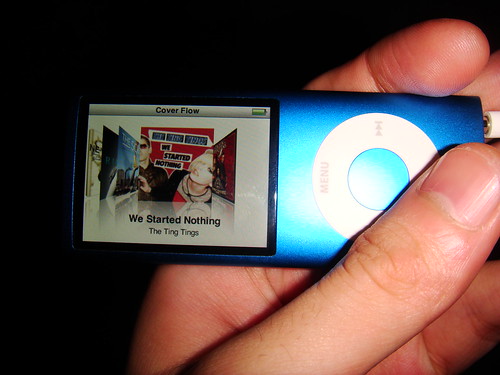
So what do you do with an "accelerometer" anyway? Well, it's a mechanism that detects how you move your nano whether it be in a landscape or portrait manner. So if you're watching a movie, and you want to flip the picture to the other side of the nano because it's more comfortable to hold, you can do so. Or if you want to use Cover Flow to show off or take the scenic route in navigating your music, you can do so by holding the nano to its side as well. Photo too small to view vertically? Fix that by viewing it sidewards.
Surprisingly, however, the controls of the Click Wheel don't rotate along with the screen. So if you thought that while watching a movie, the Next (or Previous, depending on what position you hold the nano while watching a movie) button is now the "Menu" button, forget it. Because the Menu button is still the Menu button in that mode. It will take a little getting used to, but you will instantly get used to it, really.
To save battery, however, I'd recommend turning off Cover Flow.
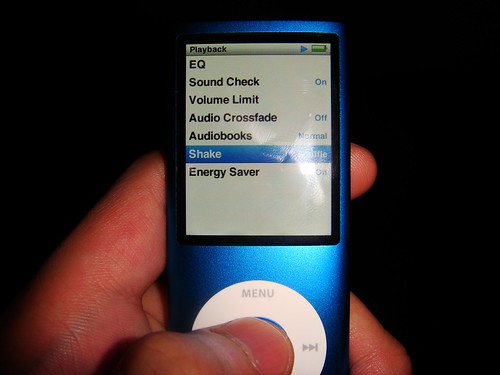
And of course, Shake-to-Shuffle. It's a pretty gimmicky feature, but if you hate it, you can turn it off. Surprisingly, it doesn't actually activate unless you shake it very vigorously, so it's actually not gonna affect your exercise routine. Still, if you're paranoid (or if it does affect your exercise routine), Apple did include features designed with you exercise buffs in mind: the ability to turn the feature off entirely or just being able to leave the nano be because Shake-to-Shuffle won't activate when the nano is locked (the Hold switch is turned on) or if the screen dims.
Other uses for it are in the future, when iPod games built for the nano come out. Unfortunately, these downloads are only available in the US.
Voice recording
Yep, you can now record your voice on it. But that is if you insert some compatible earphones. I don't know if it's only limited to the official iPod earphones with recorder (READ: the ones that don't come in the box) but I've heard of iPhone earphones working just fine. (I have yet to try this because my dad sent the iPhone 3G box back to Globe because it broke down.) So no comment on sound quality here.
Obviously, the bad thing about this is that you have to shell out money to get these earphones, and they probably don't even improve on the sound quality with the earphones that come in with the package. If sound quality is what you're looking for, look for the iPod earphones that come with the rubber buds, or better yet, other brands.
Other stuff
The most important thing to consider in a portable device is: does it last long? The answer is Yes unless you like watching movies. Regardless, you'd get a decent amount of battery life left after watching a regular movie anyway.
But there's another important thing to consider in a portable music device; two in fact: the sound quality and the capacity. To be honest, you'd be able to hear the slightly better sound quality if you actually get to compare the last generation nano side by side with it, but it's not that big a jump. The big jump however is in capacity. From just a teensy 1-2GB to 8GB and 16GB flavors, the nano will give you a great run for your money since it costs the same with the last generation's 1 and 2 GB models.
The iTunes factor
If you love iTunes, then you don't need to read this because syncing, management, etc. are all the same save for having to create an iTunes account to activate Genius. Otherwise, you'll have to stick to making your own On-The-Go playlists within the iPod because you'll never get Genius if you don't sync your nano to iTunes. It's silly really... I mean, can't Genius be standalone in the iPod?!
Some people hate iTunes and for good reason: it's a memory hog. And that's more especially obvious in Windows than in Mac. Plus, iTunes has been known to cause blue screens.
Here's some advice: give yourself a day or two before you start downloading the updates iTunes bugs you about.
Accessories, accessories, accessories
The nano has a gallery of accessories. So if you are looking for a case, don't worry, you're covered! There are a lot of accessories out there for you to hunt for. And I think that some older ones even fit (but not snugly) in the new nano... I'm not sure.
Klondike, Vortex and... wait a sec.
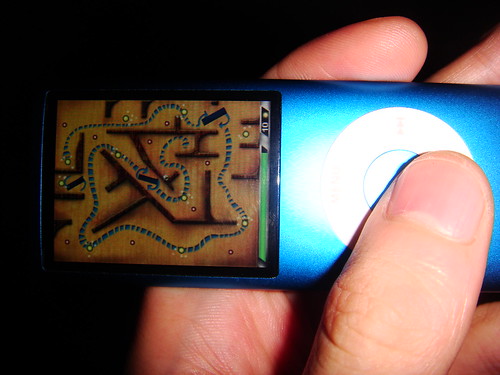
This isn't important, really. But I love iQuiz, LOL. However, it's replaced by an accelerometer-controlled game called Maze. It's decent enough to waste your time as it has a simple goal: collect the yellow shiny things... in a maze... but why omit iQuiz?
Factory defect
I'm not sure if all iPod nano's on sale right now have this, but if you plug the headphones in the jack, you get sound only from the left earphone with the right earphone's sound muffled karaoke-style. Plug it halfway and you only get sound from the left earphone exclusively, but there's a sweet spot 3/4's into the jack that works. It's shi*ty how the Chinese factory can screw something like a headphone jack up (that sounded wrong) because, well, it's probably the same factory that makes all the past generation iPods right?
Right?
Overall
This iPod is a great purchase, and the enhancements are worth it. But if you already have a 3G nano (the "fat" one), there's not much reason to justify the purchase unless you want a bigger screen to watch videos in but still retain that portability (and price, because the iPod touch provides all that too). To help you decide whether to purchase, maybe you can consult the laundry list below:
The Good:
+ Gorgeous aesthetics in and out plus nice build quality
+ Slightly better sound quality
+ Accelerometer
+ Battery life + Excellent screen
+ Now comes in 8 and 16GB flavors
+ Great bang for your buck
+ Still uber-portable
+ More responsive Cover Flow and navigation
+ More impressive looking than the pictures (no really)
+ Shake-to-shuffle isn't as annoying as you think
+ Accessibility features are a plus
+ Sh*tstorm of accessories
The Bad
- Headphone jack may have a defect (varies from model to model)
- Click wheel has little allowance
- Screen invites glare
- Shake-to-shuffle is a tiring gimmick
- Extra cash needed for headphones with recorder
- Landscape controls need a little getting used to
- iTunes is BS especially in Windows, but you need it to use Genius
- iQuiz is glaringly absent (but that's personal preference since you can download it anyway but not for free)
Rating: 9/10 (Congratulations if you don't have the headphone jack problem)
So today we went to Bonifacio High Street- always a pleasure to go to- and we went into iStudio where smack dab right in front of the doorway iPods both old and new were placed for mass fondling. Naturally, I went to the newer nano and tried it out, unfortunately I had to make do with my cellphone's video camera as its still camera is next to broken (it rarely works) but at least it's video!
You seriously have to hold it to see how amazingly thin this thing is. Still, I did not realize how sharp its base edges are. Sit down in a certain angle with that thing in your pocket and bam, potentially bruised leg! But I guess that's beauty for ya- like that pair of awesomely contoured but painful to wear shoes, you just have to make sacrifices for the sake of coolness.
That quirk aside, this iPod is unbelievably nearly as slim as a credit card which is no joke, yet like a shuffle is ultimately easy to lose because it can easily drop and the grip you have on this is thing is not exactly anything to write home about especially if you have sweaty hands like mine.
Features-wise, the new nano works excellently on most if not all accounts. Yeah Genius, although not turned on in that specific unit will depend on the kinds of varieties of music you have in your library. The accelerometer is surprisingly snappier and more responsive so you get to Cover Flow mode in your music or landscape mode in your photos faster if you rotate the position of the iPod... or maybe I got used to the angle you have to rotate the iPod in to do those things? Whatever the case, the nano does these things beautifully. Unfortunately, the controls don't rotate accordingly, thus even when you flip the nano 90 degrees, the Menu button does not become either the Next or Previous buttons in the click wheel, the function of the Menu button merely remains the same.
But another thing that's more responsive is the aforementioned Cover Flow. When it was first introduced in the fat nano and the then new classic, operation was rather slow unlike in the iPod touch where it was invaluable as a navigation tool. Now, well, the new nano doesn't exactly change everything, but it feels less slower and more responsive.
And when you fire it up, you'll notice some more practical aesthetic changes in the interface. You know that little preview screen that divided the real list into half and made navigation slower? It's been relegated to the lower part of the screen instead seeing that the screen's dimensions don't exactly fit a setup like last time's.
Another beautiful aesthetic change comes when you actually play something because it now looks like the iPod touch's Now Playing screen wherein the album art covers up most of the screen. And if you hold on to the center button long enough, you'll see a new context menu with options for browsing songs of the same artist or album, for adding a song to the On-The-Go playlist and for starting Genius which makes a playlist of songs that it thinks sounds great with the current song, which is a nice touch.
But if you don't seem to like a specific song, you can always give the nano a vigorous shake as if you're blaming the nano for making yourself know that you have a horrible taste in music, so it will switch tracks and activate Shuffle. If you're wondering whether this gimmick will ruin your mood because it'll repeatedly switch tracks while you're running or jogging, don't fret, because Apple worked hard to make sure that that will rarely happen, if not at all. Besides, if the thing is on Hold, shake-to-Shuffle is disabled anyway. If you're still paranoid about it, you could always disable it entirely.
As I mentioned in an earlier post, video and picture quality are superb, and the screen has become more tolerable for longer video viewing sessions, but I encountered plenty of glare. The video or picture you're viewing will rotate accordingly to the angle you're viewing unless it's portrait though.
I didn't get to try out the acceleremeter driven game Maze, nor was I able to gauge how clear the Voice Recording feature was, but it's still safe to say that the new nano is a more than welcome enhancement- and a must-buy especially with its competitive price in the 8000-10000 peso range for 8 and 16GB models.
On an unrelated side note, the Fully Booked Bonifacio High Street branch is just pure heaven for booklovers. So obviously today was also my first time going in there. I mean, what more can you ask for with a whole building devoted to books of all genres? Starbucks? It's got that too.
That particular man was the only thing between me and the attractive new iPod nano in our brief visit to the Power Mac Center- the only establishment that offers free trials of Apple stuff to the grubby hands of the masses, me included. And note the word brief. Which means no, I didn't have the chance to fiddle with it as the actual agenda of our visit to that store was to look for protective plastics for my brother's and sister's iPod classics.
But from what I saw, the screen real estate has been dramatically increased- or at least it seems to be the case- making for more than tolerable video viewing, and unlike the last generation nano, the Ken Burns montage of your album art has been relocated to the lower part of the menus for a better view of your song list.
I saw some video playback action going on, and as usual the screen looks stunning doing it- the only different thing is that you have to do this activity in landscape, not portrait.
And there ends the stuff I saw today as my father called for me to stop ogling at the impeccably gorgeous device as they could not find any plastic there. That's how brief that sighting turned out, although I did see a little girl trying out the new touch, which is not much when you've got a first generation iPod touch upgraded to the latest software (2.1) at your disposal. The only edge it has, however, is in the hardware. The design makes my first generation touch look like garbage, and the volume controls and built-in speaker sure help a hell of a lot even if in paper, these enhancements are seemingly petty.
The new classic makes an appearance, but I was like, "Meh... there's no reason to check the classic out... Next!".
The price of the new nano, however, I got to put in pictures when we went to Avant. Hmmm... makes me wonder how much it is in Greenhills? CAPTION: I thought the 8GB nano would sell in Avant/Abenson for like, 10000. I was wrong. (P8900 or something is the price for 8GB). LOL, multiple price tags.
Way back even before the September special event held by Apple to announce iTunes 8 and the new iPods, several rumors and leaks have already popped up about a sort of "Genius" feature included in the iTunes 8 upgrade. Like the popular websites Pandora and Last.fm, the feature tries to create a playlist that it thinks sound great together with this one song you yourself pick. Does it work? What about the other features in iTunes 8? Well let's see then...
Genius This is the most advertised feature but does it work?
Well, it actually depends on how many songs (or rather, song genres) you actually have in your library.
But it's not exactly activated at first launch, though. First, you'll have to send your entire library to Apple, so they can process it and determine which songs sound great with each other. Of course, you don't need to fill in some private information, but if hackers found a way to access your computer via this feature, (because Apple sends information back to you) I'll be damned. Anyway, once you activate Genius, you can plug in any upgraded iPhone 3G, upgraded first generation iPod touch, 2nd generation iPod touch, 4th generation Nano and 6th generation Classic to activate the feature in those machines. Besides that, you can now use that new atom button thingy below. You first play a song- any song- and click that button so you can let iTunes generate a "Genius playlist". I based my first ever Genius playlist on Jason Mraz's "I'm Yours", and the results are snappy but some of the choices made are pretty questionable. Panic! At The Disco? Daughtry? Fall Out Boy? Wait, I never knew they'd potentially sound good alongside something like "I'm Yours"!
Still, I have to give effort points to the system, and really, I don't blame it for the choices since I'm more of a rock/alt fan than pop. Still, if you're unsatisfied with the results, you can always Refresh it. And when iTunes gives you that perfect combination, you can Save that playlist (although you can still Refresh it anyway) and sync it to your iPod.
So I tried putting more varieties of songs into the library, then updating Genius, and what do you know? It became smarter. The questionable choices were less, and the playlist was a lot better. If you hate Genius though, I won't blame you. It's very much new, so if you give it enough time, and if a lot more people use it, the system will become smarter. It's still off to a great start regardless.
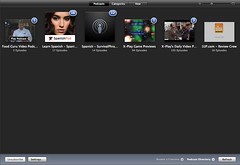
New Browsing mode Back then, it was just that "spreadsheet" style of music browsing. It was pretty boring, even with Cover Flow. Now, Apple gives the browsing style an overhaul. The spreadsheet style is still there for those who opt for it, but for those who want a new way to browse their music, they can use the revamped Grid view. If you're a Mac user, you'll notice that the design is reminiscent to that of iPhoto. And if an artist has, say, 2 or 3 albums, you can look at them by pulling the mouse cursor up or down, left or right. To play the whole album or artist, you can just click the "Play Album" button that appears when you hover your mouse over it. You can resize the size of each album cover (and the captions underneath them) if you're blind, and you can sort them by Artist, Genres, Composers and Albums. (AT TOP: You can view albums by Genre or; BELOW: ...get this view in the Podcasts, TV Shows and Movies menus. Noticeable in the Podcast menu are blue numbered circles marking the number of unwatched/unheard podcasts.)
New Visualizer I don't know if you still use a visualizer in this day and age (I sure don't), except for Windows Media Player fans (they have no choice), but if you like them, you will like the new Visualizer Apple put in the new version. It's actually very pretty if you ask me. But as I said: I don't think anyone would be using this very often. Especially since it's a...
Memory Hog iTunes has a reputation of being a big memory hog. Unless you're running a Mac, not all processes run silky smooth in iTunes 8. It's slow, it's unresponsive, and damn, it just brings CPU usage up the roof. Heck, it causes the Blue Screen of Death in Vista! That can't be good. Of course, Apple has re-uploaded a fixed version of the Windows iTunes, but this just makes me ask whether Apple even tests its software before releasing it to the public? Surely, you should like any normal company? Or maybe your Windows developers just got lazy or something?
A hassle to download It's like really HUGE! It's ginormous! It's a music and video player for God's sakes! Even VLC is only like 4-5MB's or something! I'd accept 20MB, but 60MB is like... a real hassle to download even on a broadband network. Apple needs to reduce the file size for this thing, damn it.
Overall Genius needs a bit of time to mature, but it's off to a good start. The new view is welcome, and the visualizer is really beautiful, but kind of pointless. I'm not sure why Apple still hasn't fixed the memory leaks and all, and they sure haven't reduced the file size of this beast, but other than that, this upgrade is pretty nice- especially if you want to buy a new iPod (or upgrade your iPod touch or iPhones), but for other people who still don't plan to buy a new iPod or upgrade their existing iPod touch or iPhones can stick to iTunes 7 if they so choose to. Genius isn't really that much of a reason to download in the first place, but it's still a really fun feature to toy with.
Of course, you have the standard music and (limited) video playing options, and they work as they should. Aforementioned hogging may cause a broken listening and viewing experience at times, though.












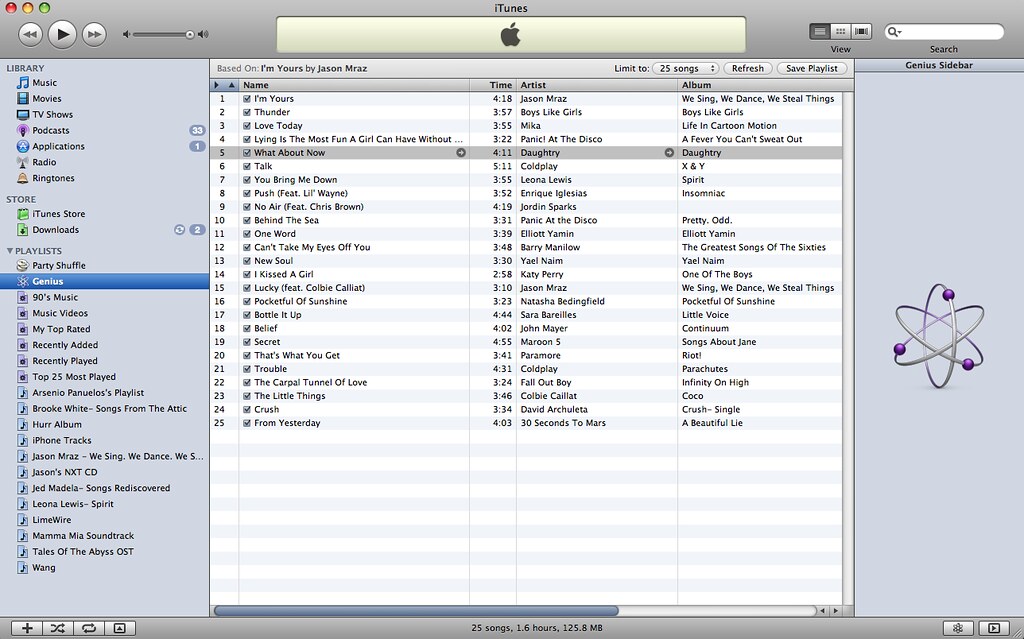 Panic! At The Disco? Daughtry? Fall Out Boy? Wait, I never knew they'd potentially sound good alongside something like "I'm Yours"!
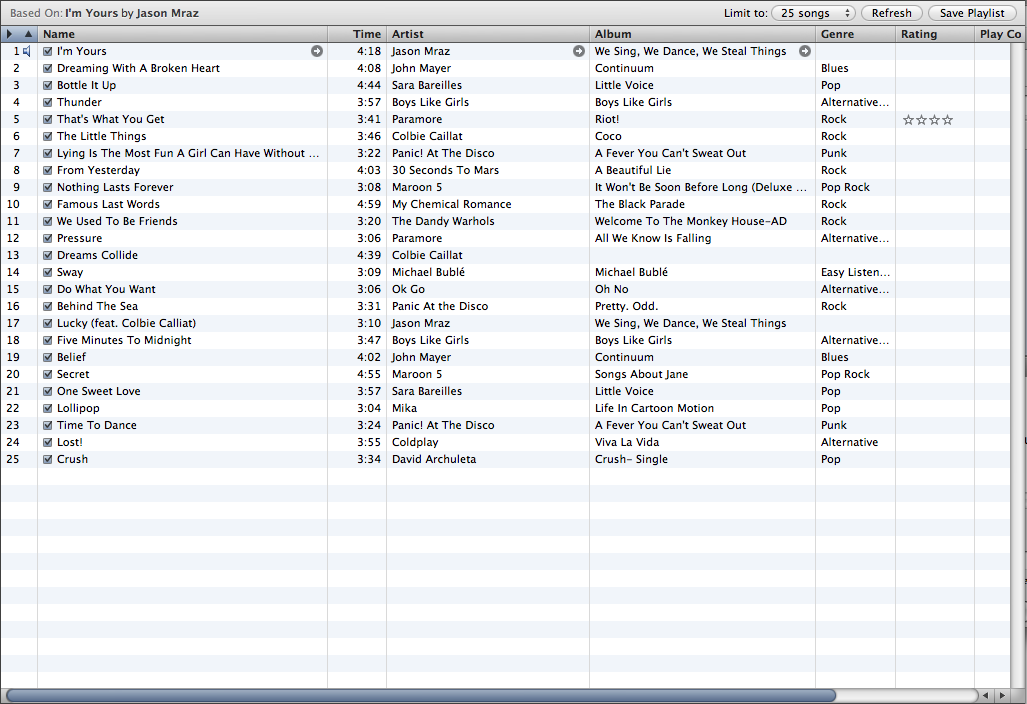 If you hate Genius though, I won't blame you. It's very much new, so if you give it enough time, and if a lot more people use it, the system will become smarter. It's still off to a great start regardless.
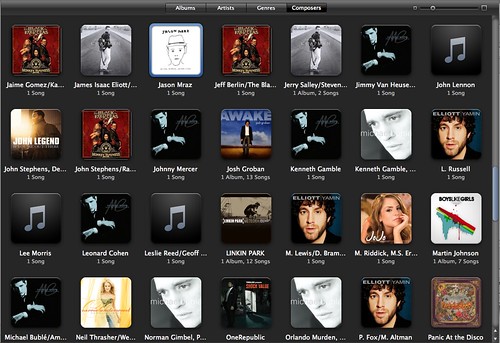 If you're a Mac user, you'll notice that the design is reminiscent to that of iPhoto. And if an artist has, say, 2 or 3 albums, you can look at them by pulling the mouse cursor up or down, left or right. To play the whole album or artist, you can just click the "Play Album" button that appears when you hover your mouse over it. You can resize the size of each album cover (and the captions underneath them) if you're blind, and you can sort them by Artist, Genres, Composers and Albums.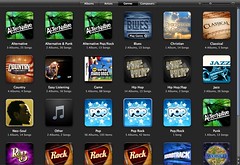
 But as I said: I don't think anyone would be using this very often. Especially since it's a...
 Posts
Posts


